Is there a way to change the responder or select another text view by pressing tab on the keyboard, in Swift?

Notes: It's for a fill in the blank type application.
My VC creates a list of Words [Word], and each of those words has its own WordView - word.wordView. The WordView is what is displayed. WordView is a child of NSTextView.
I tried to override keydown but it doesn't allow me to type anything in the text view.
2 Answers
Answers 1
You have to connect your textField nextKeyView to the next textField through the IB or programmatically:
textField1.nextKeyView = textField2 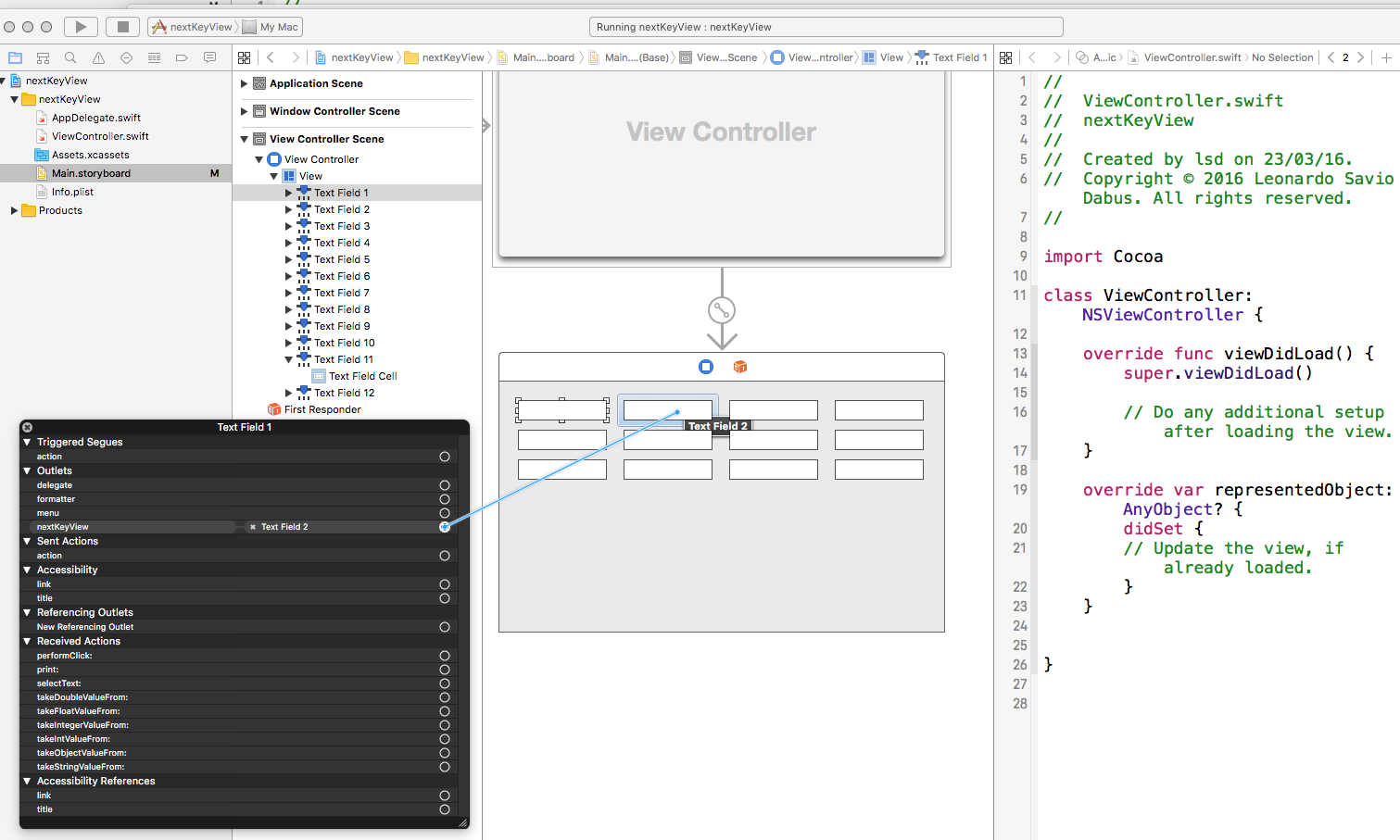
Answers 2
Assuming you want to go from textView1 to textView2. First set the delegate:
self.textView1.delegate = self Then implement the delegate method:
func textView(textView: NSTextView, doCommandBySelector commandSelector: Selector) -> Bool { if commandSelector == "insertTab:" && textView == self.textView1 { self.window.makeFirstResponder(self.textView2) return true } return false } 
0 comments:
Post a Comment