Showing posts with label adfs. Show all posts

Monday, January 8, 2018

ASP.net using OWIN for Azure Active Directory Federation Services Single Sign On

Leave a Comment

I am working on a project, based on this solution: https://github.com/Azure-Samples/active-directory-dotnet-webapp-wsfederation

Currently, the way I have the user authenticate is by default. When the page loads, I call my login script:

Public Sub SignIn()         If (Not Request.IsAuthenticated) Then             Try                 Dim newAuth As AuthenticationProperties = New AuthenticationProperties()                 newAuth.RedirectUri = "/"                  HttpContext.Current.GetOwinContext().Authentication.Challenge(newAuth, WsFederationAuthenticationDefaults.AuthenticationType)             Catch ex As Exception              End Try          End If     End Sub 

EDIT To add more context, here is my code for APP_START/Startup.Auth.vb:

Partial Public Class Startup          Private realm As String = ConfigurationManager.AppSettings("ida:RPIdentifier")         Private aadInstance As String = ConfigurationManager.AppSettings("ida:AADInstance")         Private tenant As String = ConfigurationManager.AppSettings("ida:Tenant")         Private metadata As String = String.Format("{0}/FederationMetadata/2007-06/FederationMetadata.xml", aadInstance)         Private authority As String = String.Format(CultureInfo.InvariantCulture, aadInstance, tenant)              Public Sub ConfigureAuth(app As IAppBuilder)             Try                 app.SetDefaultSignInAsAuthenticationType(CookieAuthenticationDefaults.AuthenticationType)                 app.UseCookieAuthentication(New CookieAuthenticationOptions())                 Dim authOption As WsFederationAuthenticationOptions = New WsFederationAuthenticationOptions()                  app.UseWsFederationAuthentication(New WsFederationAuthenticationOptions() With {                      .Wtrealm = realm,                      .MetadataAddress = metadata,                                              .Notifications = New WsFederationAuthenticationNotifications() With {                      .AuthenticationFailed = Function(context)                                                  context.HandleResponse()                                                  context.Response.Redirect("Home/Error?message=" + context.Exception.Message)                                                  Return Task.FromResult(0)                                              End Function                                         }                         })             Catch ex As Exception                 Throw ex             End Try           End Sub       End Class 

What I want to avoid, though, is if someone from outside our network views the site, I don't want them to be redirected to the Azure Single Sign On login page. I just want them to proceed to the website, where my code will handle what they can see and do. I will, eventually, add a login button that will take them to the login page, in the event they are just off site. But, for now, how do I skip the login page?

Second, I want to handle the possibility that Azure ADFS is down. In this case, I just want the user to be redirected to the website, as un-authenticated users. I test this by disconnecting from the Internets and running my app. I've tried using Try blocks, but I still get these errors:

The remote name could not be resolved: 'adfs.myCompany.com'

IOException: Unable to get document from: https://adfs.myCompany.com/FederationMetadata/2007-06/FederationMetadata.xml

[InvalidOperationException: IDX10803: Unable to create to obtain configuration from: 'https://adfs.myCompany.com/FederationMetadata/2007-06/FederationMetadata.xml'.]

Are these settings in Azure I should be making or in my code? Any help, with either of these issues, would be great. I needed, I can also add my Start.Auth.vb code, as well.

thanks

1 Answers

Answers 1

Unfortunately, using the samples Microsoft provides will enforce auto-sign on. That being said, there are two options:

  1. Choose a different authentication scheme
  2. Use a an Azure application with an oAuth code flow to sign in when a user clicks the login in link, then read the user's profile and determine their authorization rights.

If I misunderstood, please let me know. Hope this helps!
Read More

Tuesday, June 27, 2017

IdentityServer and ADFS

Leave a Comment

I'm trying to setup IdentityServer to use ADFS for authentication. The flow will be:

User -> Custom app -> IS -> ADFS

I've setup almost everything, but I'm stuck at the communication between IS and ADFS. The user seems to login successfully in ADFS, but I get an error:

ID4037: The key needed to verify the signature could not be resolved from the following security key identifier 'SecurityKeyIdentifier

when I get back to IS.

It's obvious that there's an issue with the token signing certificates in one side or the other. I've tried unsuccessfully to find some documentation explaining the relation between different certificates.

Right now I have a self signed certificate in IS that is signing tokens (set up using SigningCertificate property of IdentityServerOptions) and I have a AD certificate configured in ADFS to sign tokens.

Is there any guide or recommendation on how to properly do it? Should it be the same in both or should I configure something else to make it work?

EDIT With Fiddler I can see that everything inside ADFS runs fine and the error is when the results are posted to IdentityServer. The XML posted in wresult param is:

<t:RequestSecurityTokenResponse xmlns:t="http://schemas.xmlsoap.org/ws/2005/02/trust">   <t:Lifetime>     <wsu:Created xmlns:wsu="http://docs.oasis-open.org/wss/2004/01/oasis-200401-wss-wssecurity-utility-1.0.xsd">2017-06-20T12:25:31.148Z</wsu:Created>     <wsu:Expires xmlns:wsu="http://docs.oasis-open.org/wss/2004/01/oasis-200401-wss-wssecurity-utility-1.0.xsd">2017-06-20T13:25:31.148Z</wsu:Expires>   </t:Lifetime>   <wsp:AppliesTo xmlns:wsp="http://schemas.xmlsoap.org/ws/2004/09/policy">     <wsa:EndpointReference xmlns:wsa="http://www.w3.org/2005/08/addressing">       <wsa:Address>urn:identityServer</wsa:Address>     </wsa:EndpointReference>   </wsp:AppliesTo>   <t:RequestedSecurityToken>     <saml:Assertion MajorVersion="1" MinorVersion="1" AssertionID="_fd1a14cd-4d18-407b-97d4-9f9dfcacd29a" Issuer="http://ssosrv.mydomain.com/adfs/services/trust" IssueInstant="2017-06-20T12:25:31.148Z" xmlns:saml="urn:oasis:names:tc:SAML:1.0:assertion">       <saml:Conditions NotBefore="2017-06-20T12:25:31.148Z" NotOnOrAfter="2017-06-20T13:25:31.148Z">         <saml:AudienceRestrictionCondition>           <saml:Audience>urn:identityServer</saml:Audience>         </saml:AudienceRestrictionCondition>       </saml:Conditions>       <saml:AttributeStatement>         <saml:Subject>           <saml:NameIdentifier>user@mydomain.com</saml:NameIdentifier>           <saml:SubjectConfirmation>             <saml:ConfirmationMethod>urn:oasis:names:tc:SAML:1.0:cm:bearer</saml:ConfirmationMethod>           </saml:SubjectConfirmation>         </saml:Subject>         <saml:Attribute AttributeName="emailaddress" AttributeNamespace="http://schemas.xmlsoap.org/ws/2005/05/identity/claims">           <saml:AttributeValue>name.surname@mydomain.tv</saml:AttributeValue>         </saml:Attribute>         <saml:Attribute AttributeName="name" AttributeNamespace="http://schemas.xmlsoap.org/ws/2005/05/identity/claims">           <saml:AttributeValue>Name Surname</saml:AttributeValue>         </saml:Attribute>         <saml:Attribute AttributeName="upn" AttributeNamespace="http://schemas.xmlsoap.org/ws/2005/05/identity/claims">           <saml:AttributeValue>user@mydomain.com</saml:AttributeValue>         </saml:Attribute>       </saml:AttributeStatement>       <saml:AuthenticationStatement AuthenticationMethod="urn:oasis:names:tc:SAML:2.0:ac:classes:PasswordProtectedTransport" AuthenticationInstant="2017-06-20T12:25:31.039Z">         <saml:Subject>           <saml:NameIdentifier>user@mydomain.com</saml:NameIdentifier>           <saml:SubjectConfirmation>             <saml:ConfirmationMethod>urn:oasis:names:tc:SAML:1.0:cm:bearer</saml:ConfirmationMethod>           </saml:SubjectConfirmation>         </saml:Subject>       </saml:AuthenticationStatement>       <ds:Signature xmlns:ds="http://www.w3.org/2000/09/xmldsig#">         <ds:SignedInfo>           <ds:CanonicalizationMethod Algorithm="http://www.w3.org/2001/10/xml-exc-c14n#" />           <ds:SignatureMethod Algorithm="http://www.w3.org/2001/04/xmldsig-more#rsa-sha256" />           <ds:Reference URI="#_fd1a14cd-4d18-407b-97d4-9f9dfcacd29a">             <ds:Transforms>               <ds:Transform Algorithm="http://www.w3.org/2000/09/xmldsig#enveloped-signature" />               <ds:Transform Algorithm="http://www.w3.org/2001/10/xml-exc-c14n#" />             </ds:Transforms>             <ds:DigestMethod Algorithm="http://www.w3.org/2001/04/xmlenc#sha256" />             <ds:DigestValue>6CeXXXXXXXXXXXXXXXXXXXX=</ds:DigestValue>           </ds:Reference>         </ds:SignedInfo>         <ds:SignatureValue>q9hJBFFFFFFFFFFFFFFFFFFFF==</ds:SignatureValue>         <KeyInfo xmlns="http://www.w3.org/2000/09/xmldsig#">           <X509Data>             <X509Certificate>MIIFnzXXXXXXXXXXXXXXXXXXXX</X509Certificate>           </X509Data>         </KeyInfo>       </ds:Signature>     </saml:Assertion>   </t:RequestedSecurityToken>   <t:TokenType>urn:oasis:names:tc:SAML:1.0:assertion</t:TokenType>   <t:RequestType>http://schemas.xmlsoap.org/ws/2005/02/trust/Issue</t:RequestType>   <t:KeyType>http://schemas.xmlsoap.org/ws/2005/05/identity/NoProofKey</t:KeyType> </t:RequestSecurityTokenResponse> 

Thank you, Albert

2 Answers

Answers 1

Solved it. It was not related with ADFS integration, but how I had setup federation authentication in Identity Server. I was using two federation authentication identity providers: this one with ADFS and another using WinAuth. Without a callback the response from ADFS was being handled by WinAuth, so I configured different callbacks for each of them and it's working.

Answers 2

From memory:

  • You need to convert the IS certificate to .cer format.
  • In mmc, right click on the certificate and “All Tasks” / “Export”.
  • Click through Export Wizard selecting: “No, do not export the private key”. “DER encoded binary X.509 (.CER)”.
  • Select file name to export to and “Save”.
  • Review options and “Finish”.
  • In the ADFS wizard, import the .cer file into the Certificates tab.
Read More

Friday, August 12, 2016

WebApi and ADFS integration

Leave a Comment

I've created a "test" project where I'm using a .Net 4.6 WebApi that I want to integrate authentication using ADFS - similar to this post. I'm calling the api from an angular project and using the following code I'm able to get the Authorization Header:

     string authority = ConfigurationManager.AppSettings["adfsEndpoint"].ToString();      string resourceURI = "https://localhost:44388/";      string clientID = "someguid";      string clientReturnURI = "http://localhost:55695/";       var ac = new AuthenticationContext(authority, false);      //This seems to be working as I am getting a token back after successful authentication      var ar = await ac.AcquireTokenAsync(resourceURI, clientID, new Uri(clientReturnURI), new PlatformParameters(PromptBehavior.Auto));      string authHeader = ar.CreateAuthorizationHeader();      //this fails with a 401      var client = new HttpClient();      var request = new HttpRequestMessage(HttpMethod.Get, "http://localhost:64038/api/Values");      request.Headers.TryAddWithoutValidation("Authorization", authHeader);      var response = await client.SendAsync(request);       return response ; 

However, on a subsequent call to my ValuesController that is using the Authorize attribute, I always receive a 401 Unathorized response (even though I'm passing the Authorization header). I'm not sure what I'm missing.

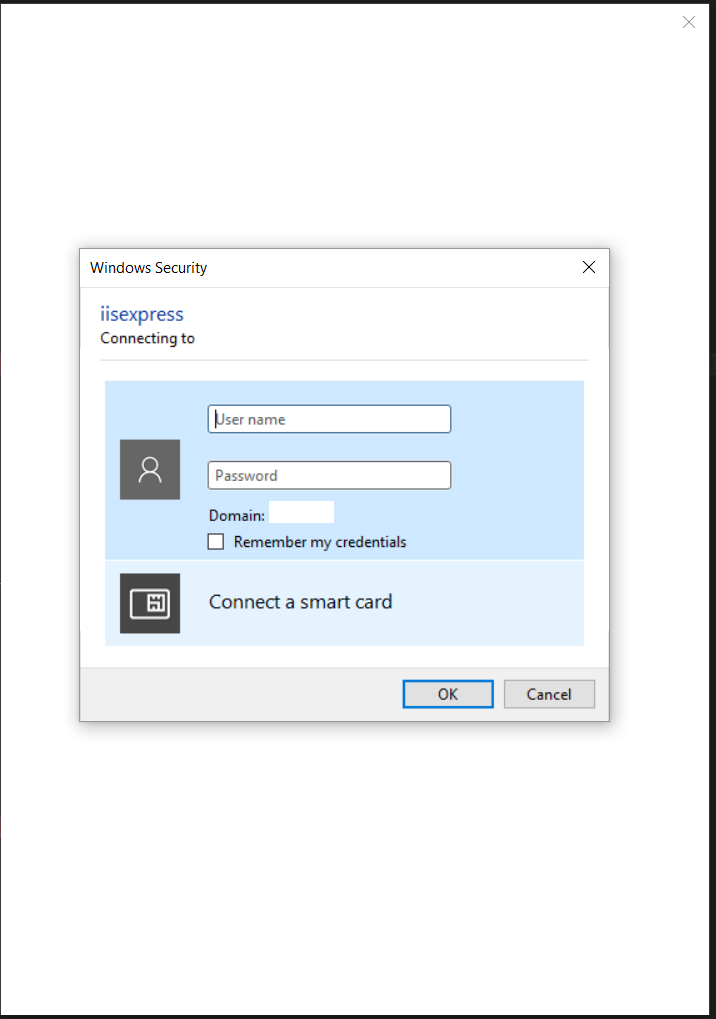
One other thing to note: when I'm prompted for my credentials, I get the dialog below and not the typical ADFS login page I get with my normal MVC apps that authenticate using ADFS (I'm not sure why this happens either). enter image description here

1 Answers

Answers 1

Ugh! Turns out I missed this piece of code that was needed in the ConfigureAuth method:

app.UseActiveDirectoryFederationServicesBearerAuthentication( new ActiveDirectoryFederationServicesBearerAuthenticationOptions {     Audience = ConfigurationManager.AppSettings["ida:Audience"],     MetadataEndpoint = ConfigurationManager.AppSettings["ida:MetadataEndpoint"] }); 

Once I added this and made the necessary configurations in the web.config file (and correcting the resourceUri variable passed into the AcquireTokenAsync method), I was able to make an http call from my api controller to the values controller that was decorated with the Authorize attribute using this code from the tutorial:

 var client = new HttpClient();  var request = new HttpRequestMessage(HttpMethod.Get, "http://localhost:64038/api/Values");  request.Headers.TryAddWithoutValidation("Authorization", authHeader);  var response = await client.SendAsync(request);  string responseString = await response.Content.ReadAsStringAsync();  return responseString; 

This still won't work for an AngularJS client (which I now understand), so I'll look to implement the ADAL JS library for that.

Edit

As it turns out, based on this answer, it appears I will not be able to do what I was hoping to do (AngularJS app using WebApi backend using On-Premise ADFS). I've decided to use an MVC-AngularJS approach instead.

Read More

Sunday, April 10, 2016

CAS attributes in wsfederation not being forwarded to CAS client

Leave a Comment

I am implementing an authentication system for a Tomcat web application that gets authenticated against ADFS using CAS. I am using unicon's CAS server with ADFS integration.

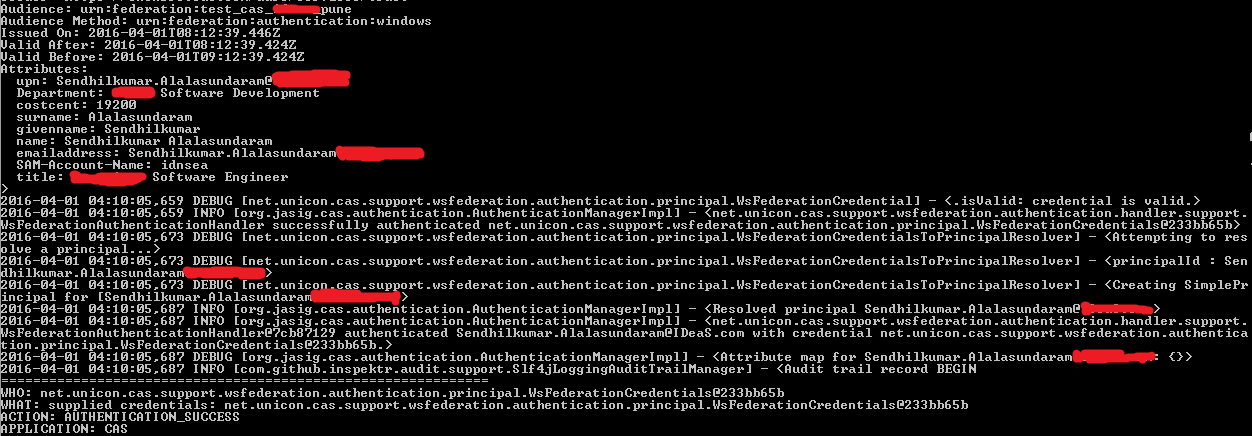
I have reached to the state where I can see that the required attributes reach the CAS server. But these attributes are not getting forwarded to the client. check the figure below: enter image description here

In the above image, the attribute map is empty after authentication. Also, when the client application validates the ticket, the attribute map is empty. Ref picture below:

enter image description here

After getting authenticated, the attributes are visible in the logs, but they are not being loaded into attribute Map.

The deployerConfigContext.xml is as follows. The attributeRepository bean and allowed attributes property in serviceRegistryDao bean are the probably the main focus areas.

<?xml version="1.0" encoding="UTF-8"?>   <beans xmlns="http://www.springframework.org/schema/beans"        xmlns:xsi="http://www.w3.org/2001/XMLSchema-instance"        xmlns:p="http://www.springframework.org/schema/p"        xmlns:tx="http://www.springframework.org/schema/tx"        xmlns:sec="http://www.springframework.org/schema/security"        xsi:schemaLocation="http://www.springframework.org/schema/beans http://www.springframework.org/schema/beans/spring-beans-3.1.xsd        http://www.springframework.org/schema/tx http://www.springframework.org/schema/tx/spring-tx-3.1.xsd        http://www.springframework.org/schema/security http://www.springframework.org/schema/security/spring-security-3.1.xsd">      <bean id="authenticationManager"         class="org.jasig.cas.authentication.AuthenticationManagerImpl">          <property name="authenticationMetaDataPopulators">            <list>               <bean class="net.unicon.cas.support.wsfederation.authentication.WsFederationAuthenticationMetaDataPopulator" />            </list>         </property>         <property name="credentialsToPrincipalResolvers">             <list>             <bean class="net.unicon.cas.support.wsfederation.authentication.principal.WsFederationCredentialsToPrincipalResolver">                 <property name="configuration" ref="wsFedConfig" />             </bean>             <bean class="org.jasig.cas.authentication.principal.UsernamePasswordCredentialsToPrincipalResolver" >                 <property name="attributeRepository" ref="attributeRepository" />             </bean>             <bean       class="org.jasig.cas.authentication.principal.HttpBasedServiceCredentialsToPrincipalResolver" />             </list>                  </property>          <property name="authenticationHandlers">             <list>             <bean class="net.unicon.cas.support.wsfederation.authentication.handler.support.WsFederationAuthenticationHandler" />             <bean class="org.jasig.cas.authentication.handler.support.HttpBasedServiceCredentialsAuthenticationHandler"                 p:httpClient-ref="httpClient" />             </list>         </property>     </bean>      <sec:user-service id="userDetailsService">         <sec:user name="@@THIS SHOULD BE REPLACED@@" password="notused" authorities="ROLE_ADMIN" />     </sec:user-service>      <bean id="attributeRepository"         class="org.jasig.services.persondir.support.StubPersonAttributeDao">         <property name="backingMap">             <map>                 <entry key="emailaddress" value="upn" />                 <!--<entry key="FirstName" value="username" />-->                 <entry key="name" value="LastName" />                 <entry key="costcent" value="costcent" />                 <entry key="title" value="FirstName" />             </map>         </property>     </bean>      <bean         id="serviceRegistryDao"         class="org.jasig.cas.services.InMemoryServiceRegistryDaoImpl">             <property name="registeredServices">                 <list>                     <bean class="org.jasig.cas.services.RegexRegisteredService">                         <property name="id" value="0" />                         <property name="name" value="HTTP and IMAP" />                         <property name="description" value="Allows HTTP(S) and IMAP(S) protocols" />                         <property name="serviceId" value="^(https?|imaps?)://.*" />                         <property name="evaluationOrder" value="10000001" />                         <property name="allowedAttributes">                         <list>             <value>upn</value>             <value>Department</value>             <value>costcent</value>             <value>LastName</value>             <value>FirstName</value>             <value>name</value>             <value>emailaddress</value>             <value>title</value>             <value>SAM-Account-Name</value>                          </list>                     </property>                     </bean>                  </list>             </property>         </bean>    <bean id="auditTrailManager" class="com.github.inspektr.audit.support.Slf4jLoggingAuditTrailManager" />    <bean id="healthCheckMonitor" class="org.jasig.cas.monitor.HealthCheckMonitor">     <property name="monitors">       <list>         <bean class="org.jasig.cas.monitor.MemoryMonitor"             p:freeMemoryWarnThreshold="10" />         <bean class="org.jasig.cas.monitor.SessionMonitor"             p:ticketRegistry-ref="ticketRegistry"             p:serviceTicketCountWarnThreshold="5000"             p:sessionCountWarnThreshold="100000" />       </list>     </property>   </bean> </beans> 

The rest of the at CAS server is same as in the sample implementation of unicon's CAS-server implementation here

I've tried a lot of combinations in the mentioned beans. Being new to Spring I could not understand how to load the credentials in the attributeMap. Kindly guide me in forwarding the attributes sent by CAS server during authentication to the client application.

1 Answers

Answers 1

It looks like the WsFederationCredentialsToPrincipalResolver only extracts the principal id from the collection of attributes received, and ignores other attributes. So you only get the identity attribute defined in your configuration. You could for the time being, connect that resolver to your attribute repository and have it consume and retrieve attributes from there.

Note that CAS 4.2 supports and fixes this behavior and has built-in support for the ADFS integration. Your other option would be to extend WsFederationCredentialsToPrincipalResolver and have it process attributes and stuff them into the final principal created there by overriding the appropriate method.

Read More

Sunday, March 20, 2016

ADFS authentication and impersonation from a Java (Spring MVC under Jetty) application

Leave a Comment

I have a Java web app which provides a search service, and in some cases needs to check security for results. If it matters, it's implemented in Spring MVC and running under jetty.

I have a customer who would like the web app's authentication to:

  • Be done via Active Directory Federation Services (ADFS) instead of the existing build-in mechanism (to avoid a seperate login).
  • Be able to impersonate the remote user on the search server, such that security checks can be performed by a executing a seperate application on the search server (which doesn't itself know anything about ADFS, but is able to perform the relevant checks when run as the user in question).

It this possible, and if so, how?

(Apologies if the Windows world terminology is a bit off - it's not something I know much about, but hopefully at least the intention is clear)


A few notes on pieces of the puzzle I've already looked at:

  1. Impersonating a user from a Java Servlet, is a question I had a number of years ago covering roughly the same ground, but without the ADFS requirement - I'm not sure how ADFS impacts things, but Waffle (the solution for that question) doesn't seem to provide any support for it.
  2. I've seen Java application with SSO (SAML) and ADFS and How do I talk to ADFS from Java?, which seem to provide a way forward for the ADFS authentication, but I'm unsure if that is compatible with subsequent impersonation.
  3. I've seen http://blogs.objectsharp.com/post/2010/09/10/Converting-Claims-to-Windows-Tokens-and-User-Impersonation.aspx and https://msdn.microsoft.com/en-au/library/ee517278.aspx but I'm unsure:

    1. If I'll have access to the necessary claims to do this if I follow the SAML or OAuth path above
    2. Whether it's possible to implement that from within Java
  4. I think the second (impersonation) part is roughly the same as Impersonating ASP.NET claims identity to windows identity, except that I want to do it from within Java rather than .Net.

2 Answers

Answers 1

You don't mention the ADFS version?

You have three choices:

  • WS-Fed
  • SAML
  • OAuth2

In the Java world, SAML is normally used. Which implies a SAML stack.

The SO link above has an answer from me with links to a list of SAML stacks.

Since you are already using Spring, Spring Security seems a good fit.

Spring Security SAML Extension

ADFS currently does not support OpenID Connect which rules OAuth out.

Yes - Spring Security provides you with a list of the claims generated by ADFS.

ADFS does provide impersonation via Identity Delegation.

Unfortunately, this is typically done via WCF and WIF (both .NET constructs).

Answers 2

I have a similar application- mine is a Swing client rather than web application, but the process should be similar. It needs to submit queries under an assumed role using an AWS API after first authenticating with an on-premise ADFS server. In our environment, ADFS has been configured to give out SAML assertions and AWS has been configured to recognise these. So, this is what I do:

  1. When required, the application prompts the user for their usual network credentials and these are used to request a SAML assertion from ADFS. I use Apache HttpClient to make the call:

    private String getAdfsResponse(String username, String password) throws Exception {  log.debug("Trying to log onto ADFS server for {}", username);  // Lax redirect policy is needed so that all HTTP 302 redirects are followed after hitting the initial ADFS URL. try (CloseableHttpClient httpClient = HttpClientBuilder.create().setRedirectStrategy(new LaxRedirectStrategy()).build()) {      HttpUriRequest login = RequestBuilder.post()             .setUri(new URI(ADFS_URL))             .addParameter("UserName", username)             .addParameter("Password", password)             .build();      CloseableHttpResponse response = httpClient.execute(login);      if (response.getStatusLine().getStatusCode() == HttpStatus.SC_OK) {          HttpEntity responseEntity = response.getEntity();         String adfsResponse = EntityUtils.toString(responseEntity, "UTF-8");         log.debug("ADFS server responded with {}", adfsResponse);         return adfsResponse;      } else {          throw new Exception("ADFS server responded with " + response.getStatusLine());      } } } 
  2. If the credentials are validated, ADFS returns a SAML response that looks like an HTML form but contains a input element with a SAMLResponse name/value pair.

  3. When the SAMLResponse value attribute is base64-decoded it will contain the SAML assertion. For AWS, I need to extract some role information and I use this, along with the full SAMLResponse, to call the AWS STS (security token service). If all is OK with AWS, I receive a set of temporary security credentials that I can use for the queries I really want to make. The whole round trip is described in http://docs.aws.amazon.com/IAM/latest/UserGuide/id_roles_providers_saml.html

All this depends on ADFS and the other party being SAML-configured, and for the other party to provide a suitable API that lets you assume a particular role on their side. Is this the sort of thing you're facing?

Read More