Showing posts with label high-availability. Show all posts

Thursday, July 7, 2016

Detecting and recovering failed H2 cluster nodes

Leave a Comment

After going through H2 developer guide I still don't understand how can I find out what cluster node(s) was/were failing and which database needs to be recovered in the event of temporary network failure.

Let's consider the following scenario:

  • H2 cluster started with N active nodes (is actually it true that H2 can support N>2, i.e. more than 2 cluster nodes?)
  • (lots DB updates, reads...)
  • Network connection with one (or several) cluster nodes gets down and node becomes invisible to the rest of the cluster
  • (lots of DB updates, reads...)
  • Network link with previously disconnected node(s) restored
  • It is discovered that cluster node was probably missing (as far as I can see SELECT VALUE FROM INFORMATION_SCHEMA.SETTINGS WHERE NAME='CLUSTER' starts responding with empty string if one node in cluster fails)

After this point it is unclear how to find out what nodes were failing? Obviously, I can do some basic check like comparing DB size, but it is unreliable.

  1. What is the recommended procedure to find out what node was missing in the cluster, esp. if query above responds with empty string?

  2. Another question - why urlTarget doesn't support multiple parameters? How I am supposed to use CreateCluster tool if multiple nodes in the cluster failed and I want to recover more than one?

  3. Also I don't understand how CreateCluster works if I had to stop the cluster and I don't want to actually recover any nodes? What's not clear to me is what I need to pass to CreateCluster tool if I don't actually need to copy database.

1 Answers

Answers 1

That is partially right SELECT VALUE FROM INFORMATION_SCHEMA.SETTINGS WHERE NAME='CLUSTER', will return an empty string when queried in standard mode.

However, you can get the list of servers by using Connection.getClientInfo() as well, but it is a two-step process. Paraphrased from h2database.com:

The list of properties returned by getClientInfo() includes a numServers property that returns the number of servers that are in the connection list. getClientInfo() also has properties server0..serverN, where N is the number of servers - 1. So to get the 2nd server from the list you use getClientInfo('server1').

Note: The serverX property only returns IP addresses and ports and not hostnames.

And before you say simple replication, yes that is default operation, but you can do more advanced things that are outside the scope of your question in clustered H2.

Here's the quote for what you're talking about:

Clustering can only be used in the server mode (the embedded mode does not support clustering). The cluster can be re-created using the CreateCluster tool without stopping the remaining server. Applications that are still connected are automatically disconnected, however when appending ;AUTO_RECONNECT=TRUE, they will recover from that.

So yes if the cluster stops, auto_reconnect is not enabled, and you stick with the basic query, you are stuck and it is difficult to find information. While most people will tell you to look through the API and or manual, they haven't had to look through this one so, my sympathies.

I find it way more useful to track through the error codes, because you get a real good idea of what you can do when you see how the failure is planned for ... here you go.
Read More

Wednesday, April 27, 2016

EC2 Amazon High Availability Always On

Leave a Comment

I am using a Web & DB Instances in AWS EC2 and I want to make them high available, so that if one server fails (primary server), then another one is turned on (secondary server).

I have found lots of information for RDS high availability but not for EC2 instances that are not RDS.

  1. Could you please provide me some links for a good guide of how doing it?
  2. Could you please tell me in some words what is the process I should do in order to achive the high availability?

Thanks.

3 Answers

Answers 1

there are several possibilities to achieve HA with EC2:

  • create an autoscaling group with min capacity=1 and max capacity=1. So whenever your instance fails, the autoscaling group will create a new one. The autoscaling group comes for free, so this is not a bad solution depending on your SLA.
  • use ec2 auto-recovery feature by creating a cloudwatch alarm that would replace your instance if failed.
  • create two EC2 instances and use Route 53 DNS failover to resolve to an healthy instance
  • Last but not least: the best solution is definitely to create several instances across several availability zones and to use an elastic load balancer to distribute the traffic. This way, even if an instance fails, you already have other ones available. AWS recommends this solution as they have an SLA of 99.95% for their instance in an AZ. By putting in several AZs you can have 100% availability

EDIT: adding information why there is no such native feature for EC2.

there is no native HA feature in EC2 compared to RDS, because EC2 is pure IaaS when RDS is more PaaS. So for RDS when you select HA, behind the scene it actually spawns a slave database in another availabilty zone and replicates your master. Whenever the master fails, you have an automatic DNS failover to the slave database, which is elected master, and a new slave database is getting created.

Answers 2

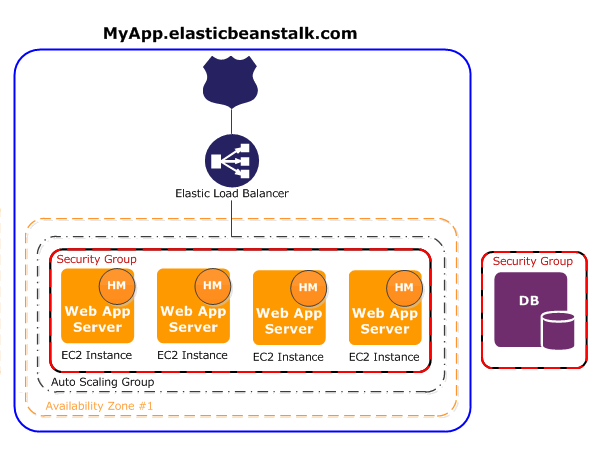
How about using Elastic Beanstalk (for official documentation see here)?

Essentially it making use of many AWS services in the using the configuration detailed here.

Its main purpose is to make it easier to create several sets of environments for running your apps, while monitoring the health and load of your application and bringing up instances to distribute the load.

It is however possible to use configure your environment as a single instance (see the main documentation under the section Environment Types). That means that you can take advantage of the health monitoring and AWS will take care of the availability.

More specifically to answer your questions: 1) Official AWS Documentation is quite detailed and should get you started. There are several video resources explaining the basic setup

2) You could combine several EBS instances in different regions to keep your servers close to your traffic.

Answers 3

The question you should ask is - how do I make my application HA on AWS, not how do I make EC2 HA. And the short answer is that you must tell AWS how you define and deploy your application first.

In the case of RDS, it is abundantly clear what the application is - it is the database server of your choice. At the most basic, AWS can setup an HA instance of RDS with default settings without much input from you.

However, in the case of your application, you need to give AWS more details. There are several ways to do this:

  • create an ELB with a bunch of EC2 instances in different availability zones
  • create an ELB with an auto-scaling group which will lead you down the path of creating an AMI and a launch configuration; in this mode, you can even tell ASG to use the ELB health check to determine when an EC2 instance is no longer healthy
  • you didn't mention what your application is, but you might want to get CodeDeploy involved to tell AWS how to deploy latest code to a newly spun up EC2 instance; CodeDeploy works well in tandem with ELB and ASG
  • instead of defining the above components individually, you could define them together in an Elastic Beanstalk; this is the determination you'll have to make on your own - do you want more flexibility by defining individual components on your own, should you simplify things and use EB?
  • lastly, if you use Docker and you can dockerize your applications or different components of the same application, AWS supports EB with multi-container docker

Whichever route you decide, AWS CloudFormation templates are a good way to tie everything together and define your stack. One advantage of this is whenever you need to make a change in your stack, you'll change your CloudFormation template, apply the change and let AWS figure out what the dependencies are, what order to update them and how.

Read More