Showing posts with label post. Show all posts

Thursday, September 6, 2018

Can't post comment on reddit using Postman: USER_REQUIRED error

1 comment

I'm trying to post a comment using Postman. I'm sending the following information:

Headers:

Authorization: "Bearer access_token"  Content-Type: " application/x-www-form-urlencoded"  User-Agent: "some u/user" 

Body:

api_type: "json"  thing_id: "t3_9bmzy6"  text: "some comment" 

I'm sending this POST request to https://oauth.reddit.com/api/comment.

In return I get a USER_REQUIRED error:

{     "json": {         "errors": [             [                 "USER_REQUIRED",                 "Please log in to do that.",                 null             ]         ]     } } 

Why is that? I've passed an access_token and it was accepted as right (otherwise if I knowingly pass the wrong token I would get a 401 Unauthorized error).

What I have of the passwords:

My usual username:password pair

My script's app_id:app_secret pair

My access_token I was given in exchange for my app_id:app_secret pair.

I also tried to do this in Java, using HttpURLConnection class:

import org.apache.tomcat.util.codec.binary.Base64; import org.json.JSONArray; import org.json.JSONObject;  import java.io.InputStream; import java.io.OutputStream; import java.net.HttpURLConnection; import java.net.URL; import java.util.ArrayList; import java.util.Scanner;  public class RedditParser {         public static void main(String[] args)  {             RedditParser redditParser = new RedditParser();             redditParser.postAComment("sds", "fdfdf");         }           public  void postAComment(String postID, String commentBody)  {                try  {                   String postLink = "https://oauth.reddit.com/api/comment";                     URL loginURL = new URL(postLink);                    HttpURLConnection connection = (HttpURLConnection) loginURL.openConnection();                   JSONObject requestJSON = new JSONObject();                   requestJSON.put("api_type", "json");                   requestJSON.put("thing_id", "t3_9bmzy6");                   requestJSON.put("text", "a test comment");                    connection.setDoOutput(true);                    connection.setRequestProperty("Authorization", "Bearer " +getAccessToken());  //getAccessToken returns correct(!) token; it's not the cause of the error                   connection.setRequestProperty("User-Agent", "script by /u/someuser");                   connection.setRequestProperty("Content-Type", "application/json");                    OutputStream os = connection.getOutputStream();                   os.write(requestJSON.toString().getBytes("UTF-8"));                   os.close();                    connection.connect();                    System.out.println("Done comment");                    InputStream input = connection.getInputStream();                   String inputString = new Scanner(input, "UTF-8").useDelimiter("\\Z").next();                   JSONObject jsonObject = new JSONObject(inputString);                   System.out.println(inputString);             }              catch (Exception e)  {                   System.out.println(e);             }         } } ​ 

But I still get the error output:

Done comment {"jquery": [[0, 1, "refresh", []], [0, 2, "attr", "find"], [2, 3, "call", [".error.USER_REQUIRED"]], [3, 4, "attr", "show"], [4, 5, "call", []], [5, 6, "attr", "text"], [6, 7, "call", ["Please log in to do that."]], [7, 8, "attr", "end"], [8, 9, "call", []]], "success": false} 

What else do I need to add to the request to get rid of the error?

1 Answers

Answers 1

From the information available I'd guess that you didn't provide user credentials in the access token request but that you requested an Application Only Token. This type of token can probably not be used to post comments on reddit for obvious reasons.

To perform actions for a certain user you will need to request an access token like this:

reddit@reddit-VirtualBox:~$ curl -X POST -d 'grant_type=password&username=reddit_bot&password=snoo' --user 'p-jcoLKBynTLew:gko_LXELoV07ZBNUXrvWZfzE3aI' https://www.reddit.com/api/v1/access_token {     "access_token": "J1qK1c18UUGJFAzz9xnH56584l4",      "expires_in": 3600,      "scope": "*",      "token_type": "bearer" } 

That is provide user credentials as form data and use the app credentials for Basic authentication.

Read More

Tuesday, July 17, 2018

Request time out error 1001 using alamofire in ios swift?

Leave a Comment

Here i am sending parameter value like username, user toke, post id, etc to backend using alamofire. if status success then, notification will will send from backend. Inside postnotification function i have tried post method code using alamofire and datatask method but it does not work. In console i am getting request time out or nothing.

Here is my code :

   func postNotification(postItem: String, post: Post) {    //                declare parameter as a dictionary which contains string as key and value combination. considering inputs are valid        print("Get token from post:::",post.token)     print(postItem)     let token = UserDefaults.standard.string(forKey: "token")             //create the url with URL       var parameters       = [String:Any]()      parameters["count"]  = post.likeCount!     parameters["likedby"]  = currentName     parameters["postId"] = postItem     parameters["token"] = post.token!      let Url = String(format: "http://highavenue.co:9000/likesnotification")     guard let serviceUrl = URL(string: Url) else { return }     //        let loginParams = String(format: LOGIN_PARAMETERS1, "test", "Hi World")     let parameterDictionary = ["username" : "Test", "password" : "123456"]     var request = URLRequest(url: serviceUrl)     request.httpMethod = "POST"     request.setValue("Application/json", forHTTPHeaderField: "Content-Type")     guard let httpBody = try? JSONSerialization.data(withJSONObject: parameters, options: []) else {         return     }     request.httpBody = httpBody      let session = URLSession.shared     session.dataTask(with: request) { (data, response, error) in         if let response = response {             print(response)         }         if let data = data {             do {                 let json = try JSONSerialization.jsonObject(with: data, options: [])                 print(json)             }catch {                 print(error)             }         }         }.resume()     //        let headers: HTTPHeaders = ["Content-Type" :"application/x-www-form-urlencoded"]   //   //        Alamofire.request("http://highavenue.co:9000/likesnotification", method: .post, parameters: parameters, encoding: JSONEncoding.default, headers: headers).responseJSON { (response) in  //                    //             original URL request  //                        print("Request is :",response.request!)  //  //                        // HTTP URL response --> header and status code  //                        print("Response received is :",response.response)  //  //                        // server data : example 267 bytes    //                        print("Response data is :",response.data)   //     //                        // result of response serialization : SUCCESS / FAILURE    //                        print("Response result is :",response.result)    //    //                        debugPrint("Debug Print :", response)   //    //    //        }     //        Alamofire.request("http://highavenue.co:9000/likesnotification", method: HTTPMethod.post, parameters: json, encoding: JSONEncoding.default, headers: headers).responseJSON { response in    //     //            // original URL request    //            print("Request is :",response.request!)    //   //            // HTTP URL response --> header and status code     //            print("Response received is :",response.response)    //   //            // server data : example 267 bytes    //            print("Response data is :",response.data)    //    //            // result of response serialization : SUCCESS / FAILURE   //            print("Response result is :",response.result)   //   //            debugPrint("Debug Print :", response)   //        }      } 

Any help much appreciated pls..

1 Answers

Answers 1

Yaah solved it. There was a negligence mistake. I used an additional slash in the URL. I changed the web API to a different folder and I made this mistake while changing it in the iOS code. and Also Set your timeout interval here.

let RequestData = NSMutableURLRequest(URL: NSURL.init(string: "Your URL Hear")!) RequestData.HTTPMethod = "POST" RequestData.timeoutInterval = 250 // Time interval here.  Alamofire.request(RequestData).responseJSON { (responseData) -> Void in     if((responseData.result.value) != nil) { // response         print(responseData.result.value!)     } }     

Hope this Help You..

Read More

Tuesday, June 12, 2018

Make Postman test - Grails

Leave a Comment

I have the following test of a grails integration:

def http = new HTTPBuilder(loginUrl) http.request( POST, TEXT ) {     headers.'User-Agent' = 'Mozilla/5.0 Ubuntu/8.10 Firefox/3.0.4'     send URLENC, [j_username: username, j_password: password]      response.success = { resp, reader ->         loggedIn = ! reader.text.contains("j_username")     } } 

I'm trying to mount the test in Postman, but I'm not sure if I'm doing it correctly because of this send URLENC, [j_username: username, j_password: password]

I put the POST type route, and put something like:

{     j_username: username,     j_password: password } 

And the headers parameters:

'User-Agent' = 'Mozilla/5.0 Ubuntu/8.10 Firefox/3.0.4' 'Content-type' = 'Application/json' 

But it is always returning my login form in the body, does anyone know how to mount this test?

UPDATE

Actually in other projects I follow the reference and it works well. However I have developed the grails response part, did not leave an api/login route, and I believe that the login is done by the same web route /login/auth, but I can not validate the test by postman, but on the web logo perfectly.

UPDATE 2

I believe that in the project that receives my login request, to try to facilitate, they have made access to the api by the same web, and this request that is mounted in the integration, do not make a json type request, because of "send URLENC", Can someone please explain to me how to put this call in postman?

1 Answers

Answers 1

If you have the default Spring Security and Spring Security REST config, here how I do it :

Body of the Postman call

Header of the Postman call

Read More

Monday, January 15, 2018

Volley using StringRequest not calling getParams for sending POST Request Parameters after 1st time

Leave a Comment

I am facing a problem where my POST request parameters are not going to server after 1st time. I know Volley is using cache mechanism for responses, but in my case my request parameter values can be changed at runtime as i am using pagination in Recyclerview.

So my questions is how can i send Post request parameter every time and wont loose cache mechanism of volley.

I have tried using below ones and get my things done (calling getParams() every-time).. but it loses caches response and i don't want that.

requestQueue.getCache().clear();

stringRequest.setShouldCache(false);

Also have Searched Google and below links but cant find any proper solution. below are the SO links

Below is my code:

        StringRequest stringRequest = new StringRequest(Request.Method.POST, url, new Response.Listener<String>() {             @Override             public void onResponse(String response) {                  Log.e("RES", response);                   GsonBuilder gsonBuilder = new GsonBuilder();                 gsonBuilder.setDateFormat("M/d/yy hh:mm a"); //Format of our JSON dates                 Gson gson = gsonBuilder.create();                  NewsFeedPOJO resultObj = (NewsFeedPOJO) gson.fromJson(response, (Class) NewsFeedPOJO.class);                  inCurrPage = Integer.parseInt(resultObj.getPagination().getCurrent_page());                 inTotalPage = Integer.parseInt(resultObj.getPagination().getTotal_pages());                 inCurrPage++;                  arrayList.addAll(resultObj.getNewsFeedList());                 if (isFtym) {                     isFtym = false;                     layoutManager = new LinearLayoutManager(MainActivity.this);                     rcNewsFeed.setLayoutManager(layoutManager);                     adapter = new NewsFeedAdapter(MainActivity.this, arrayList);                     rcNewsFeed.setAdapter(adapter);                 } else {                     adapter.notifyItemInserted(arrayList.size());                     adapter.notifyDataSetChanged();                 }              }          }, new Response.ErrorListener() {             @Override             public void onErrorResponse(VolleyError error) {              }         }) {             @Override             protected Map<String, String> getParams() throws AuthFailureError {                 Map<String, String> map = new HashMap<>();                 map.put("user_id", "188");                  if (inCurrPage == 0)                     map.put("page", "1");                 else {                     map.put("page", "" + inCurrPage);                 }                  Log.e("RES", inCurrPage + "  PARA");                 return map;             }         };         //RequestQueue requestQueue = Volley.newRequestQueue(MainActivity.this);         //requestQueue.add(stringRequest);         //requestQueue.getCache().clear();          //AppController.getInstance().addToRequestQueue(stringRequest);        // stringRequest.setShouldCache(false);         VolleySingleton.getInstance(this).addToRequestQueue(stringRequest); 

using below Volley Dependency.

compile 'com.android.volley:volley:1.1.0' 

If need more information please do let me know. Thanks in advance. Your efforts will be appreciated.

1 Answers

Answers 1

Did you checked your Volley Singleton is correct or not ?

import android.content.Context; import android.graphics.Bitmap; import android.util.LruCache;  import com.android.volley.Request; import com.android.volley.RequestQueue; import com.android.volley.toolbox.ImageLoader; import com.android.volley.toolbox.Volley;  public class VolleySingleton { private static AppSingleton mAppSingletonInstance; private RequestQueue mRequestQueue; private ImageLoader mImageLoader; private static Context mContext;  private AppSingleton(Context context) {     mContext = context;     mRequestQueue = getRequestQueue();      mImageLoader = new ImageLoader(mRequestQueue,             new ImageLoader.ImageCache() {                 private final LruCache<String, Bitmap>                         cache = new LruCache<String, Bitmap>(20);                  @Override                 public Bitmap getBitmap(String url) {                     return cache.get(url);                 }                  @Override                 public void putBitmap(String url, Bitmap bitmap) {                     cache.put(url, bitmap);                 }             }); }  public static synchronized AppSingleton getInstance(Context context) {     if (mAppSingletonInstance == null) {         mAppSingletonInstance = new AppSingleton(context);     }     return mAppSingletonInstance; }  public RequestQueue getRequestQueue() {     if (mRequestQueue == null) {         // getApplicationContext() is key, it keeps you from leaking the         // Activity or BroadcastReceiver if someone passes one in.         mRequestQueue = Volley.newRequestQueue(mContext.getApplicationContext());     }     return mRequestQueue; }  public <T> void addToRequestQueue(Request<T> req,String tag) {     req.setTag(tag);     getRequestQueue().add(req); }  public ImageLoader getImageLoader() {     return mImageLoader; }  public void cancelPendingRequests(Object tag) {     if (mRequestQueue != null) {         mRequestQueue.cancelAll(tag);     } } } 

Or maybe there is other in your code.

Read More

Thursday, January 4, 2018

Getting the body of POST request(Amazon SNS ) in Nodejs

Leave a Comment

I am trying to get the body of an Amazon SNS request but it is returned as an object. I can get the headers from the request without any problems. (req.header('x-amz-sns-message-type'))

var msgBody = req.body.Message;  

The msgBody variable is returned as an object where I expect to get the string value from the request.

I am using express and body-parser with the following options:

app.use(bodyParser.json()); app.use(bodyParser.urlencoded({ extended: true })); 

The request format is as follows (shortened for easy reading):

POST /createLog/slackLogSNS/ HTTP/1.1 x-amz-sns-message-type: Notification x-amz-sns-message-id: 3f71e0db-a9b1-5092-96f4-b26015676ba0  {   "Type" : "Notification",   "MessageId" : "3f71e0db-a9b1-5092-96f4-b26015676ba0",   "TopicArn" : "arn:aws:sns:us-east-2:043886476179:testslackSNS",   "Subject" : "hghghgfhgfhg",   "Message" : "{\n  \"Type\" : \"Notification\",\n  \"MessageId\" : \"22b80b92-fdea-4c2c-8f9d-bdfb0c7bf324\",\n  \"TopicArn\" : \"arn:aws:sns:us-west-2:123456789012:MyTopic\",\n  \"Subject\" : \"My First Message\",\n  \"Message\" : \"Hello world!\",\n  \"Timestamp\" : \"2012-05-02T00:54:06.655Z\",\n  \"SignatureVersion\" : \"1\",\n  \"Signature\" : \"EXAMPLEw6JRNwm1LFQL4ICB0bnXrdB8ClRMTQFGBqwLpGbM78tJ4etTwC5zU7O3tS6tGpey3ejedNdOJ+1fkIp9F2/LmNVKb5aFlYq+9rk9ZiPph5YlLmWsDcyC5T+Sy9/umic5S0UQc2PEtgdpVBahwNOdMW4JPwk0kAJJztnc=\",\n  \"SigningCertURL\" : \"https://sns.us-west-2.amazonaws.com/SimpleNotificationService-f3ecfb7224c7233fe7bb5f59f96de52f.pem\",\n  \"UnsubscribeURL\" : \"https://sns.us-west-2.amazonaws.com/?Action=Unsubscribe&SubscriptionArn=arn:aws:sns:us-west-2:123456789012:MyTopic:c9135db0-26c4-47ec-8998-413945fb5a96\"\n}",    } } 

2 Answers

Answers 1

console.log("stringified json") will parse the JSON string before printing it to the console. However if you check the typeof req.body.Message you'll see it as string type as expected.

console.log(typeof req.body.Message)

It's the console.log() method doing the conversion behind the seen.

if you need you could use JSON.stringify({your json object}) to get a stringified version of the objects.

Below is the code(index.js) to simulate your case with the provided request payload in the question.

const express = require('express') const bodyParser = require('body-parser') const app = express() app.use(bodyParser.json()); // for parsing application/json app.use(bodyParser.urlencoded({ extended: true })); // for parsing  app.post('/',  function(req, res) {   // get posts   console.log(req.body);   var x = req.body.Message;   console.log(typeof req.body.Message) // string   console.log(x.Type) // undefined   res.json({"a" : "test response"}) });  app.listen(3000, () => console.log('Example app listening on port 3000!')) 

Answers 2

The "Message" that you are looking for is part of the stringified JSON in your request.

You should be able to access it using...

const msgBody = JSON.parse(req.body.Message).Message;  
Read More

Friday, July 14, 2017

How to put Cookie session id into volley request?

Leave a Comment

So, i have this code to make a POST request with volley:

public class MainActivity extends AppCompatActivity {   Button btnSearch;  ProgressDialog loadingDialog;  ListView lvResult;  String session_id;  RequestQueue queue;  MyCookieManager myCookieManager;   @Override  protected void onCreate(Bundle savedInstanceState) {   super.onCreate(savedInstanceState);   setContentView(R.layout.activity_main);    btnSearch = (Button) findViewById(R.id.btnSearch);   lvResult = (ListView) findViewById(R.id.lvResult);   loadingDialog = new ProgressDialog(MainActivity.this);   loadingDialog.setMessage("Wait.\nLoading...");   loadingDialog.setCancelable(false);   myCookieManager = new MyCookieManager();    requestCookie(); //FIRST CALL TO GET SESSION ID    btnSearch.setOnClickListener(new View.OnClickListener() {    @Override    public void onClick(View view) {     showLoading();     requestWithSomeHttpHeaders(); //CALL TO MAKE THE REQUEST WITH VALID SESSION ID    }   });   }   public void requestCookie() {   queue = Volley.newRequestQueue(this);   String url = "http://bid.cbf.com.br/a/bid/carregar/json/";    StringRequest postRequest = new StringRequest(Request.Method.POST, url,    new Response.Listener < String > () {     @Override     public void onResponse(String response) {      //      String x = myCookieManager.getCookieValue();     }    },    new Response.ErrorListener() {     @Override     public void onErrorResponse(VolleyError error) {      Log.d("ERRO", "Erro => " + error.toString());      hideLoading();     }    }   ) {    @Override    public byte[] getBody() throws AuthFailureError {     String httpPostBody = "uf=PE&dt_pesquisa=23/05/2017&tp_contrato=TODOS&n_atleta=&codigo_clube=&exercicio=";     return httpPostBody.getBytes();    }     @Override    public Map < String, String > getHeaders() throws AuthFailureError {     Map < String, String > params = new HashMap < String, String > ();     params.put("User-Agent", "Mozilla/5.0");     params.put("Accept", "application/json, text/javascript, */*; q=0.01");     params.put("Content-Type", "application/x-www-form-urlencoded; charset=UTF-8");     //params.put("Set-Cookie", session_id);// + " _ga=GA1.3.1300076726.1496455105; _gid=GA1.3.1624400465.1496455105; _gat=1; _gali=AguardeButton");     //"PHPSESSID=ra0nbm0l22gsnl6s4jo0qkqci1");     return params;    }     protected Response < String > parseNetworkResponse(NetworkResponse response) {     try {      String jsonString = new String(response.data, HttpHeaderParser.parseCharset(response.headers));      String header_response = String.valueOf(response.headers.values());      int index1 = header_response.indexOf("PHPSESSID=");      int index2 = header_response.indexOf("; path");      //Log.e(Utils.tag, "error is : " + index1 + "::" + index2);      session_id = header_response.substring(index1, index2);       return Response.success(jsonString, HttpHeaderParser.parseCacheHeaders(response));     } catch (UnsupportedEncodingException e) {      return Response.error(new ParseError(e));     }    }   };    queue.add(postRequest);  }   public void requestWithSomeHttpHeaders() {   queue = Volley.newRequestQueue(this);   String url = "http://bid.cbf.com.br/a/bid/carregar/json/";    StringRequest postRequest = new StringRequest(Request.Method.POST, url,    new Response.Listener < String > () {     @Override     public void onResponse(String response) {      Log.d("Response", response);      String x = myCookieManager.getCookieValue();      String status = "";       try {       JSONObject resultObject = new JSONObject(response);       Log.d("JSON RESULT =>", resultObject.toString());      } catch (JSONException e) {       Toast.makeText(MainActivity.this, "Request Error", Toast.LENGTH_SHORT).show();       e.printStackTrace();      }       hideLoading();     }    },    new Response.ErrorListener() {     @Override     public void onErrorResponse(VolleyError error) {      Log.d("ERROR", "Error => " + error.toString());      hideLoading();     }    }   ) {    @Override    public byte[] getBody() throws AuthFailureError {     String httpPostBody = "uf=PE&dt_pesquisa=23/05/2017&tp_contrato=TODOS&n_atleta=&codigo_clube=&exercicio=";     return httpPostBody.getBytes();    }     @Override    public Map < String, String > getHeaders() throws AuthFailureError {     Map < String, String > params = new HashMap < String, String > ();     params.put("User-Agent", "Mozilla/5.0");     params.put("Accept", "application/json, text/javascript, */*; q=0.01");     params.put("Content-Type", "application/x-www-form-urlencoded; charset=UTF-8");     params.put("Cookie", /*myCookieManager.getCookieValue()*/ session_id + "; _ga=GA1.3.1300076726.1496455105; _gid=GA1.3.1624400465.1496455105; _gat=1; _gali=AguardeButton");     return params;    }   };    queue.add(postRequest);  }   private void showLoading() {   runOnUiThread(new Runnable() {    @Override    public void run() {     if (!loadingDialog.isShowing())      loadingDialog.show();    }   });  }   private void hideLoading() {   runOnUiThread(new Runnable() {    @Override    public void run() {     if (loadingDialog.isShowing())      loadingDialog.dismiss();    }   });  } } 

If I send a valid cookie ID this return a valid JSON object else a empty object.

I tried (unsuccessfully) to set default cookie handles like

CookieManager manager = new CookieManager(); CookieHandler.setDefault(manager);

but I get a empty object.

How to put a valid cookie session ID to post request?

3 Answers

Answers 1

So the problem was getting a valid cookie. My mistake was to get it from the POST request itself. I kept the same working principle, getting the cookie when I started the application but using GET instead of POST and calling the root of the URL instead of the address where I get the JSON. My solution looked like this:

public void requestCookie() {   queue = Volley.newRequestQueue(this);   String url = "http://bid.cbf.com.br/";    StringRequest getRequest = new StringRequest(Request.Method.GET, url,    new Response.Listener < String > () {     @Override     public void onResponse(String response) {      String x = myCookieManager.getCookieValue();     }    },    new Response.ErrorListener() {     @Override     public void onErrorResponse(VolleyError error) {      Log.d("ERROR", "Error => " + error.toString());      hideLoading();     }    }   ) {       protected Response < String > parseNetworkResponse(NetworkResponse response) {     try {      String jsonString = new String(response.data, HttpHeaderParser.parseCharset(response.headers));      String header_response = String.valueOf(response.headers.values());      int index1 = header_response.indexOf("PHPSESSID=");      int index2 = header_response.indexOf("; path");      //Log.e(Utils.tag, "error is : " + index1 + "::" + index2);      session_id = header_response.substring(index1, index2);       return Response.success(jsonString, HttpHeaderParser.parseCacheHeaders(response));     } catch (UnsupportedEncodingException e) {      return Response.error(new ParseError(e));     }    }   };    queue.add(getRequest);  } 

Answers 2

You getting cookie (Session id) in Login response, Save cookie in sharedpreference or other db, and use that to send in request.

for getting cookie from login request

 CustomStringRequest stringRequest = new CustomStringRequest(Request.Method.POST, SIGN_IN_URL,                     new Response.Listener<CustomStringRequest.ResponseM>() {                         @Override                         public void onResponse(CustomStringRequest.ResponseM result) {                              CookieManager cookieManage = new CookieManager();                             CookieHandler.setDefault(cookieManage);                              progressDialog.hide();                             try {                                 //From here you will get headers                                 String sessionId = result.headers.get("Set-Cookie");                                 String responseString = result.response;                                  Log.e("session", sessionId);                                 Log.e("responseString", responseString);                                  JSONObject object = new JSONObject(responseString); 

CustomStringRequest class

public class CustomStringRequest extends Request<CustomStringRequest.ResponseM> {       private Response.Listener<CustomStringRequest.ResponseM> mListener;      public CustomStringRequest(int method, String url, Response.Listener<CustomStringRequest.ResponseM> responseListener, Response.ErrorListener listener) {         super(method, url, listener);         this.mListener = responseListener;     }       @Override     protected void deliverResponse(ResponseM response) {         this.mListener.onResponse(response);     }      @Override     protected Response<ResponseM> parseNetworkResponse(NetworkResponse response) {         String parsed;         try {             parsed = new String(response.data, HttpHeaderParser.parseCharset(response.headers));         } catch (UnsupportedEncodingException e) {             parsed = new String(response.data);         }          ResponseM responseM = new ResponseM();         responseM.headers = response.headers;         responseM.response = parsed;          return Response.success(responseM, HttpHeaderParser.parseCacheHeaders(response));     }       public static class ResponseM {         public Map<String, String> headers;         public String response;     }  } 

set cookie when add request to server..

                @Override                 public Map<String, String> getHeaders() throws AuthFailureError {                     Map<String, String> headers = new HashMap<String, String>();                      String session=sharedPreferences.getString("sessionId","");                     headers.put("Cookie",session);                     return headers;                 } 

Answers 3

Using cookies with Android volley library

Request class:

public class StringRequest extends com.android.volley.toolbox.StringRequest {      private final Map<String, String> _params;      /**      * @param method      * @param url      * @param params      *            A {@link HashMap} to post with the request. Null is allowed      *            and indicates no parameters will be posted along with request.      * @param listener      * @param errorListener      */     public StringRequest(int method, String url, Map<String, String> params, Listener<String> listener,             ErrorListener errorListener) {         super(method, url, listener, errorListener);          _params = params;     }      @Override     protected Map<String, String> getParams() {         return _params;     }      /* (non-Javadoc)      * @see com.android.volley.toolbox.StringRequest#parseNetworkResponse(com.android.volley.NetworkResponse)      */     @Override     protected Response<String> parseNetworkResponse(NetworkResponse response) {         // since we don't know which of the two underlying network vehicles         // will Volley use, we have to handle and store session cookies manually         MyApp.get().checkSessionCookie(response.headers);          return super.parseNetworkResponse(response);     }      /* (non-Javadoc)      * @see com.android.volley.Request#getHeaders()      */     @Override     public Map<String, String> getHeaders() throws AuthFailureError {         Map<String, String> headers = super.getHeaders();          if (headers == null                 || headers.equals(Collections.emptyMap())) {             headers = new HashMap<String, String>();         }          MyApp.get().addSessionCookie(headers);          return headers;     } } 

MyApp:

public class MyApp extends Application {     private static final String SET_COOKIE_KEY = "Set-Cookie";     private static final String COOKIE_KEY = "Cookie";     private static final String SESSION_COOKIE = "sessionid";      private static MyApp _instance;   private RequestQueue _requestQueue;   private SharedPreferences _preferences;      public static MyApp get() {         return _instance;     }      @Override     public void onCreate() {         super.onCreate();         _instance = this;             _preferences = PreferenceManager.getDefaultSharedPreferences(this);         _requestQueue = Volley.newRequestQueue(this);     }      public RequestQueue getRequestQueue() {         return _requestQueue;     }       /**      * Checks the response headers for session cookie and saves it      * if it finds it.      * @param headers Response Headers.      */     public final void checkSessionCookie(Map<String, String> headers) {         if (headers.containsKey(SET_COOKIE_KEY)                 && headers.get(SET_COOKIE_KEY).startsWith(SESSION_COOKIE)) {                 String cookie = headers.get(SET_COOKIE_KEY);                 if (cookie.length() > 0) {                     String[] splitCookie = cookie.split(";");                     String[] splitSessionId = splitCookie[0].split("=");                     cookie = splitSessionId[1];                     Editor prefEditor = _preferences.edit();                     prefEditor.putString(SESSION_COOKIE, cookie);                     prefEditor.commit();                 }             }     }      /**      * Adds session cookie to headers if exists.      * @param headers      */     public final void addSessionCookie(Map<String, String> headers) {         String sessionId = _preferences.getString(SESSION_COOKIE, "");         if (sessionId.length() > 0) {             StringBuilder builder = new StringBuilder();             builder.append(SESSION_COOKIE);             builder.append("=");             builder.append(sessionId);             if (headers.containsKey(COOKIE_KEY)) {                 builder.append("; ");                 builder.append(headers.get(COOKIE_KEY));             }             headers.put(COOKIE_KEY, builder.toString());         }     }  } 
Read More

Thursday, June 8, 2017

How to put Cookie session id into volley request?

Leave a Comment

So, i have this code to make a POST request with volley:

public void myRequest() {  RequestQueue queue = Volley.newRequestQueue(this);  String url = "http://bid.cbf.com.br/a/bid/carregar/json/";  StringRequest postRequest = new StringRequest(Request.Method.POST, url,   new Response.Listener <String> () {    @Override    public void onResponse(String response) {     Log.d("Response", response);    }   },   new Response.ErrorListener() {    @Override    public void onErrorResponse(VolleyError error) {     Log.d("ERROR", "Error => " + error.toString());    }   }  ) {   @Override   public byte[] getBody() throws AuthFailureError {    String httpPostBody = "uf=PE&dt_pesquisa=23%2F05%2F2017&tp_contrato=TODOS&n_atleta=&codigo_clube=&exercicio=";    return httpPostBody.getBytes();   }    @Override   public Map <String, String> getHeaders() throws AuthFailureError {    Map <String, String> params = new HashMap <String, String> ();    params.put("User-Agent", "Mozilla/5.0");    params.put("Accept", "application/json, text/javascript, */*; q=0.01");    params.put("Content-Type", "application/x-www-form-urlencoded; charset=UTF-8");    //params.put("Cookie", "PHPSESSID=ra0nbm0l22gsnl6s4jo0qkqci1"); PROBLEM HERE    return params;   }  };   queue.add(postRequest); } 

If I send a valid cookie ID this return a valid JSON object else a empty object.

I tried (unsuccessfully) to set default cookie handles like

CookieManager manager = new CookieManager(); CookieHandler.setDefault(manager);

but I get a empty object.

How to put a valid cookie session ID to post request?

0 Answers

Read More

Sunday, April 30, 2017

Relative form action removes 4th grade subdomain

Leave a Comment

I have issue with HTML form which is pointing its action to: /index.php?something=x

So its looks like

<form action="/index.php?something=x" method="POST"> 

I have production of application running on subdomain xx.example.com

When i submit form, everything works well, request is going to:

xx.example.com/index.php?something=x

But on development environment i have 4th grade url. Example: yy.xx.example.com

When i submit form on dev environment request is not going to https://yy.xx.example.com/index.php?something=x

but url is without yy => https://xx.example.com/index.php?something=x and it is wrong.

Any suggestions?

2 Answers

Answers 1

It's not problem in URL, you can have domain or sub domain as you like.
it can be, as you said 4th grade URL or longer "https://zz.yy.xx.example.com/".
Tested in my localhost xampp and on real server with some test sub domain.

Try to fix your code, you have two action fields

action="POST" 

Replace second "action" with "method". It should be like this:

<form action="/index.php?something=x" method="POST"> 

Answers 2

To check, what is happening with your site, I have created two subdomains on the domain http://techdeft.com namely http://xx.techdeft.com and http://yy.xx.techdeft.com.

Now when I created a simple form on these sub-domains and actions set to, what you have mentioned in the question, I found that everything works fine with these sub-domains. You can check here http://xx.techdeft.com and http://yy.xx.techdeft.com.

here, is the possible solution to your problem-

<form action="http://<?php echo $_SERVER['SERVER_NAME'];?>/index.php?something=x" method="POST"> 

Using this your problem must be solved. Do let me know, have it worked for you? Thanks

Read More

Sunday, April 9, 2017

Expected response code 220 but got code “” with message “”

Leave a Comment

Every time I submit the contact form on my Laravel application I receive the error message in the title. I've followed the recommendation in this discussion, but it has had no effect even after php artisan cache:clear and php artisan config:cache. Here's the relevant code:

.env

MAIL_DRIVER=smtp MAIL_HOST=smtp.gmail.com MAIL_PORT=587 MAIL_USERNAME=username@gmail.com MAIL_PASSWORD=password MAIL_ENCRYPTION=ssl 

config/mail.php

<?php  return [     'driver' => env('MAIL_DRIVER', 'smtp'),     'host' => env('MAIL_HOST', 'smtp.gmail.org'),     'port' => env('MAIL_PORT', 587),     'from' => [         'address' => env('MAIL_FROM_ADDRESS', 'hello@example.com'),         'name' => env('MAIL_FROM_NAME', 'Example'),     ],     'encryption' => env('MAIL_ENCRYPTION', 'tls'),         'username' => env('MAIL_USERNAME'),     'password' => env('MAIL_PASSWORD'),     'sendmail' => '/usr/sbin/sendmail -bs',     'markdown' => [         'theme' => 'default',          'paths' => [             resource_path('views/vendor/mail'),         ],     ],  ]; 

I was under the impression from the documentation that the global 'from' wouldn't fire unless no other from address was provided, but in my controller for the mail, I specified the address supplied to the contact form as the 'from,' is that a conflict point somehow? It doesn't seem to be from the error message details.

Because the contact form is not a distinct view but the bottom of the mainpage view, the Controller function lives in PageController

public function postContact(Request $request) {     $this->validate($request, [        'email' => 'required|email',       'subject' => 'required|min:3',       'message' => 'required|min:10'     ]);      $data = array(       'email' => $request->email,       'subject' => $request->subject,       'mailbody' => $request->message     );      Mail::send('emails.contact', $data, function($message) use ($data) {       $message->from($data['email']);       $message->to('username@gmail.com');       $message->subject($data['subject']);     });   } 

2 Answers

Answers 1

I think you should define mail sender (MAIL_FROM_ADDRESS) as your gmail which you want to use send emails with.

for example, if your MAIL_USERNAME at .env is example@gmail.com you should define your MAIL_FROM_ADDRESS (or of course $mail->from()) as example@gmail.com.

I don't think gmail allows you send emails as another user (another address).

Answers 2

Similar problem 587 port

MAIL_DRIVER=smtp MAIL_HOST=smtp.gmail.com MAIL_PORT=587 MAIL_USERNAME=username@gmail.com MAIL_PASSWORD=mypassword 
Read More

Sunday, May 8, 2016

How to retrieve an image sent from a desktop app to a Rails API

Leave a Comment

I'm building a desktop app using Electron, which is basically JavaScript.

In it, I'm sending an image to my Rails API like this:

var myHeaders = new Headers(); myHeaders.append('Authorization', 'Token token=redacted'); myHeaders.append('Content-Type', 'application/json'); myHeaders.append('Accept', 'application/json');  ...  var formData = new FormData(); formData.append("img", base64EncodedImage); var myPost = {method: 'POST', headers: myHeaders, body: formData} fetch("url", myPost) 

(simplified)

In my Rails console, I see:

{"REMOTE_ADDR"=>"127.0.0.1", "REQUEST_METHOD"=>"POST", "REQUEST_PATH"=>"/task/screenshot", "PATH_INFO"=>"/task/screenshot", "REQUEST_URI"=>"/task/screenshot", "SERVER_PROTOCOL"=>"HTTP/1.1", "HTTP_VERSION"=>"HTTP/1.1", "HTTP_HOST"=>"localhost:3000", "HTTP_CONNECTION"=>"keep-alive", "CONTENT_LENGTH"=>"454856", "HTTP_ACCEPT"=>"application/json", "HTTP_ORIGIN"=>"null", "HTTP_USER_AGENT"=>"Mozilla/5.0 (Macintosh; Intel Mac OS X 10_11_4) AppleWebKit/537.36 (KHTML, like Gecko) testivate-research-gigs/1.0.0 Chrome/49.0.2623.75 Electron/0.37.5 Safari/537.36", "HTTP_AUTHORIZATION"=>"Token token=redacted", "CONTENT_TYPE"=>"application/json", "HTTP_ACCEPT_ENCODING"=>"gzip, deflate", "HTTP_ACCEPT_LANGUAGE"=>"en-US", "rack.url_scheme"=>"http", "SERVER_NAME"=>"localhost", "SERVER_PORT"=>"3000", "QUERY_STRING"=>"", "rack.tempfiles"=>[#<Unicorn::TmpIO:/var/folders/k9/vnpft_6d7qs6xmdb9_4svvmw0000gn/T/0.19309304750270062>], "rack.input"=>#<Rack::Lint::InputWrapper:0x007fe1de317000 @input=#<Unicorn::TeeInput:0x007fe1de31d950 @len=454856, @chunked=false, @socket=#<Kgio::Socket:fd 7>, @parser=#<Unicorn::HttpParser:0x007fe1db08ce00>, @buf="", @rbuf="------WebKitFormBoundaryxkkhvE17qoI5ozlK\r\nContent-Disposition: form-data; name=\"img\"\r\n\r\ndata:image/jpeg;base64,iVBORw0KGgoAAAANSUhEU...

But I can't get to the image. This is what I see when I drop into the controller using Pry:

> request.body.read > request.body.rewind > request.body.read > request.env 

That is, I receive empty responses to most of the commands, and then it just hangs there indefinitely after I type request.env, without returning to the prompt.

How do I get to the image?

Thanks.

BTW, other actions that are receiving POSTs but not with embedded images are working perfectly. Previously, this action was working perfectly too when I was using XMLHttpRequest() not fetch(), but I've had to make the switch to turn my Google Chrome Extension into an Electron app.

UPDATE

I solved this problem for myself by uploading my images directly to S3 rather than to S3-via-Rails. It not only works but is faster than going via the app, which I now only have to tell where to look to find the image. But seeing as my original issue was not addressed, I'm leaving this question and the bounty open. Perhaps someone will solve it, claim the bounty, and write up an answer that someone else will find useful down the track.

2 Answers

Answers 1

If you are sending the image properly with POST and have it on the permitted params it should be available through regular parameters collection, then you can read your base64 encoded image and write it out:

File.open('some/path/to/image.jpg', 'wb') do|f|   f.write(Base64.decode64(base_64_encoded_data)) end 

Why are you reading from request.body directly anyway? params in your controller should have a hash of values from the form data.

Answers 2

I would test by sending a request from the desktop app to a locally served version of the API (i.e. run rails server from the terminal) and watch the rails console to see what is received. You should see a list of params. If the img param is included in the request then you are probably blacklisting via strong params in your rails controller

If you don't see the img param then you need to tweak the desktop app to send the form data correctly

Also, I suspect you should be using a post not a fetch from the desktop app

Read More

Sunday, March 27, 2016

codeigniter form POST Empty in Controller from View

Leave a Comment

I'm working with Codeigniter. I have created an HTML form which post data to the Controller.

This Form was working perfectly but it suddenly stopped posting data.

HTML:

<form name="frm_search" id="frm_search" method="post" action="http://ip/free/index.php/taskdetails/tabOne/1/ShibNo/asc/"> <input  id="order1" name="order1" value="26" type="text" > <input  id="item1" name="item1" value="" type="text" > </form> 
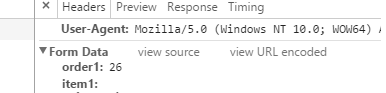
  1. I tried to check the data post in Browser and it shows the data that I input in the input box.

enter image description here

  1. In My index.php I placed the following code to see if it is posted:
echo "CONTENT_TYPE: " . $_SERVER['CONTENT_TYPE'] . ""; $data = file_get_contents('php://input'); echo "DATA: <pre>"; var_dump($data); var_dump($_POST); echo "</pre>";  exit;  

RESULT:

CONTENT_TYPE: application/x-www-form-urlencoded

string 'order1=26&item1='

array (size=23)
'order1' => string '26' (length=2)
'item1' => string '' (length=0)

But when I print $_POST in controller I get the following:

Array (     [order1] =>      [item1] => ) 
  1. My .htaccess code as follows:

    RewriteEngine on  RewriteCond $1 !^(index\\.php|resources|robots\\.txt)  RewriteCond %{REQUEST_FILENAME} !-f  RewriteCond %{REQUEST_FILENAME} !-d  RewriteRule ^(.*)$ index.php/$1 [L,QSA] 

Can someone tell me what's the issue? I'm not able to find out why is it when the data passes to controller it becomes null. The application was running successfully for more than a year but I got this issue suddenly.

Thank you in advance. Kindly let me know if you need any more to help me.

Note: I figured out Once page loaded, If i edit the name of the input time to some other name then the data is post successfully.

i.e: instead of order1, If I change the name my editing using inspect element in chrome to "neworder" Then if I submit, the data submits with value to controller. Dont know why?

Update: I found some this strange. In the set-cookie of the browser. Its like a full page of junk.

each time when the page is called i start a new session but i wont kill the existing session. Is that a problem?

Even If i destory the old session and start new one i get eh set-cookies in browser. It has to me one.. but in my case i get more then 6 set cookies in the browser.

1 Answers

Answers 1

It could be a .htaccess issue with RewriteRule, according to this CI github post issue https://github.com/bcit-ci/CodeIgniter/issues/242:

if Apache server is used then mod rewrite should be enabled, otherwise redirection will be proper but with empty $_POST.

&

if you don't have a trailing slash on your URL the server will send a 301 redirect which will interfere with POST data.

Your problem could be with

RewriteRule ^(.*)$ index.php/$1 [L,QSA] 

Try changing to:

RewriteRule ^(.*)$ index.php/$1 [PT,L] 

(from: not able get post form submit values in codeigniter) or try to set:

sudo a2enmod rewrite 

Hope it helps!

Read More