Showing posts with label scrapy. Show all posts

Sunday, July 8, 2018

Using scrapy-splash clicking a button

Leave a Comment

I am trying to use Scrapy-splash to click a button on a page that I'm being redirected to.

I have tested manually clicking on the page, and I am redirected to the correct page after I have clicked the button that gives my consent. I have written a small script to click the button when I am redirected to the page, but this is not working.

I have included a snippet of my spider below - am I missing something in my code?:

script=""" function main(splash)     splash:go(splash.args.yahoo_url)     splash:wait(1)     splash:runjs('document.querySelector("input.btn.btn-primary.agree").click()')     splash:wait(1)     return {         html = splash:html(),     } end """   class FoobarSpider(scrapy.Spider):     name = "foobar"                def start_requests(self):         urls = ['https://finance.yahoo.com/quote/IBM/']          for url in urls:             yield SplashRequest(url=url, callback=self.parse,                     endpoint='render.html',                     args={'wait': 3},                     meta = {'yahoo_url': url }                 )        def parse(self, response):         url = response.url          if 'guce.oath.com/collectConsent' in url:             print('About to attempt to authenticate ...')             yield SplashRequest(                                     url,                                      callback = self.get_price,                                      endpoint = 'execute',                                     args = {'lua_source': script, 'yahoo_url': response.meta.get('yahoo_url'), 'timeout': 3600},                                     meta = response.meta                                  )          else:             self.get_price(response)         def get_price(self, response):             yahoo_price = None                    try:             # Get Price ...             temp1 = response.css('div.D\(ib\).Mend\(20px\)')             if temp1 and len(temp1) > 1:                 temp2 = temp1[1].css('span')                 if len(temp2) > 0:                     yahoo_price = convert_to_float(temp2[0].xpath('.//text()').extract_first().replace(',','') )              if not yahoo_price:                 val = response.css('span.Trsdu\(0\.3s\).Trsdu\(0\.3s\).Fw\(b\).Fz\(36px\).Mb\(-4px\).D\(b\)').xpath('.//text()').extract_first().replace(',','')                 yahoo_price = convert_to_float(val)           except Exception as err:             pass                   def handle_error(self, failure):         pass 

How do I fix this so that I can correctly give consent, so I'm directed to the page I want?

1 Answers

Answers 1

Rather than clicking the button, try submitting the form:

document.querySelector("form.consent-form").submit() 

I tried running the JavaScript command input.btn.btn-primary.agree").click() in my console and would get an error message "Oops, Something went Wrong" but the page loads when using the above code to submit the form.

Because I'm not in Europe I can't fully recreate your setup but I believe that should get you past the issue. My guess is that this script is interfering with the other method.

Read More

Tuesday, June 19, 2018

Trouble running a parser created using scrapy with selenium

Leave a Comment

I've written a scraper in Python scrapy in combination with selenium to scrape some titles from a website. The css selectors defined within my scraper is flawless. I wish my scraper to keep on clicking on the next page and parse the information embedded in each page. It is doing fine for the first page but when it comes to play the role for selenium part the scraper keeps clicking on the same link over and over again.

As this is my first time to work with selenium along with scrapy, I don't have any idea to move on successfully. Any fix will be highly appreciated.

If I try like this then it works smoothly (there is nothing wrong with selectors):

class IncomeTaxSpider(scrapy.Spider):     name = "taxspider"      start_urls = [         'https://www.incometaxindia.gov.in/Pages/utilities/exempted-institutions.aspx',     ]      def __init__(self):         self.driver = webdriver.Chrome()         self.wait = WebDriverWait(self.driver, 10)      def parse(self,response):         self.driver.get(response.url)          while True:             for elem in self.wait.until(EC.presence_of_all_elements_located((By.CSS_SELECTOR,"h1.faqsno-heading"))):                 name = elem.find_element_by_css_selector("div[id^='arrowex']").text                 print(name)              try:                 self.wait.until(EC.visibility_of_element_located((By.CSS_SELECTOR, "input[id$='_imgbtnNext']"))).click()                 self.wait.until(EC.staleness_of(elem))             except TimeoutException:break 

But my intention is to make my script run this way:

import scrapy from selenium import webdriver from selenium.webdriver.common.by import By from selenium.webdriver.support.ui import WebDriverWait from selenium.webdriver.support import expected_conditions as EC from selenium.common.exceptions import TimeoutException  class IncomeTaxSpider(scrapy.Spider):     name = "taxspider"      start_urls = [         'https://www.incometaxindia.gov.in/Pages/utilities/exempted-institutions.aspx',     ]      def __init__(self):         self.driver = webdriver.Chrome()         self.wait = WebDriverWait(self.driver, 10)      def click_nextpage(self,link):         self.driver.get(link)         elem = self.wait.until(EC.visibility_of_element_located((By.CSS_SELECTOR, "div[id^='arrowex']")))          #It keeeps clicking on the same link over and over again          self.wait.until(EC.visibility_of_element_located((By.CSS_SELECTOR, "input[id$='_imgbtnNext']"))).click()           self.wait.until(EC.staleness_of(elem))       def parse(self,response):         while True:             for item in response.css("h1.faqsno-heading"):                 name = item.css("div[id^='arrowex']::text").extract_first()                 yield {"Name": name}              try:                 self.click_nextpage(response.url) #initiate the method to do the clicking             except TimeoutException:break 

These are the titles visible on that landing page (to let you know what I'm after):

INDIA INCLUSION FOUNDATION INDIAN WILDLIFE CONSERVATION TRUST VATSALYA URBAN AND RURAL DEVELOPMENT TRUST 

I'm not willing to get the data from that site so any alternative approach other than what I've tried above is useless to me. My only intention is to have any solution related to the way I tried in my second approach.

2 Answers

Answers 1

In case you need pure Selenium solution:

driver.get("https://www.incometaxindia.gov.in/Pages/utilities/exempted-institutions.aspx")  while True:     for item in wait(driver, 10).until(EC.presence_of_all_elements_located((By.CSS_SELECTOR, "div[id^='arrowex']"))):         print(item.text)     try:         driver.find_element_by_xpath("//input[@text='Next' and not(contains(@class, 'disabledImageButton'))]").click()     except NoSuchElementException:         break 

Answers 2

Whenever the page gets loaded using the 'Next Page' arrow (using Selenium) it gets reset back to Page '1'. Not sure about the reason for this (may be the java script) Hence changed the approach to use the input field to enter the page number needed and hitting ENTER key to navigate.

Here is the modified code. Hope this may be useful for you.

import scrapy from selenium import webdriver from selenium.webdriver.common.by import By from selenium.webdriver.support.ui import WebDriverWait from selenium.webdriver.support import expected_conditions as EC from selenium.common.exceptions import TimeoutException from selenium.webdriver.common.keys import Keys  class IncomeTaxSpider(scrapy.Spider):     name = "taxspider"     start_urls = [         'https://www.incometaxindia.gov.in/Pages/utilities/exempted-institutions.aspx',     ]     def __init__(self):         self.driver = webdriver.Firefox()         self.wait = WebDriverWait(self.driver, 10)      def click_nextpage(self,link, number):         self.driver.get(link)         elem = self.wait.until(EC.visibility_of_element_located((By.CSS_SELECTOR, "div[id^='arrowex']")))          #It keeeps clicking on the same link over and over again      inputElement = self.driver.find_element_by_xpath("//input[@id='ctl00_SPWebPartManager1_g_d6877ff2_42a8_4804_8802_6d49230dae8a_ctl00_txtPageNumber']")     inputElement.clear()     inputElement.send_keys(number)     inputElement.send_keys(Keys.ENTER)         self.wait.until(EC.staleness_of(elem))       def parse(self,response):         number = 1         while number < 10412: #Website shows it has 10411 pages.             for item in response.css("h1.faqsno-heading"):                 name = item.css("div[id^='arrowex']::text").extract_first()                 yield {"Name": name}                 print (name)              try:                 number += 1                 self.click_nextpage(response.url, number) #initiate the method to do the clicking             except TimeoutException:break 
Read More

Monday, March 19, 2018

Proxy Pooling System for Scrapy to temporarily stop using slow/timing out proxies

Leave a Comment

I've been looking around trying to find a decent pooling system for Scrapy but I can't find anything that has everything I need/want.

I'm looking for a solution to:

Rotate proxies

  • I'd like them randomly switch between proxies but never selecting the same proxy twice in a row. (Scrapoxy has this)

Impersonate Known Browsers

  • Impersonate Chrome, Firefox, Internet Explorer, Edge, Safari... etc (Scrapoxy has this)

Blacklist Slow Proxies

  • If the proxy times out or is slow it should be blacklisted through a series of rules... (Scrapoxy only has blacklisting for number of instances / startups)

  • If a proxy is slow (takes over x time) it should be marked as Slow and a timestamp should be taken and a counter should be increased.

  • If a proxy timeout's it should be marked as Fail and a timestamp should be taken and a counter should be increased.
  • If a proxy has no slows for 15 minutes after receiving its last slow then the counter & timestamp should be zeroed and the proxy gets returns back to a fresh state.
  • If a proxy has no fails for 30 minutes after receiving its last fail then the counter & timestamp should be zeroed and the proxy gets returns back to a fresh state.
  • If a proxy is slow 5 times in 1 hour then it should be removed from the pool for 1 hour.
  • If a proxy timeout's 5 times in 1 hour then it should be blacklisted for 1 hour
  • If a proxy get's blocked twice in 3 hours it should be blacklisted for 12 hours and marked as bad
  • If a proxy gets marked as bad twice in 48 hours then it should notify me (email, push bullet... anything)

Anyone know of any such solution (the main feature being the blacklisting of slow/timed out proxies...

1 Answers

Answers 1

As your polling rules are very specifics, you may code your own, please see the code bellow which implement some part of your rules (you have to implement some other):

#!/usr/bin/env python # -*- coding: UTF-8 -*-  import pexpect,time from random import shuffle  #this func is use to test a single proxy def test_proxy(ip,port,max_timeout=1):     child = pexpect.spawn("telnet " + ip + " " +str(port))     time_send_request=time.time()     try:         i=child.expect(["Connected to","Connection refused"], timeout=max_timeout) #max timeout in seconds     except pexpect.TIMEOUT:         i=-1     if i==0:         time_request_ok=time.time()         return {"status":True,"tim#!/usr/bin/env python # -*- coding: UTF-8 -*-e_to_answer":time_request_ok-time_send_request}     else:         return {"status":False,"time_to_answer":max_timeout}   #this func is use to test all the current proxy and update status and apply your custom rules def update_proxy_list_status(proxy_list):     for i in range(0,len(proxy_list)):         print ("testing proxy "+str(i)+" "+proxy_list[i]["ip"]+":"+str(proxy_list[i]["port"]))         proxy_status = test_proxy(proxy_list[i]["ip"],proxy_list[i]["port"])         proxy_list[i]["status_ok"]= proxy_status["status"]           print proxy_status          #here it is time to treat your own rule to update respective proxy dict          #~ If a proxy is slow (takes over x time) it should be marked as Slow and a timestamp should be taken and a counter should be increased.         #~ If a proxy timeout's it should be marked as Fail and a timestamp should be taken and a counter should be increased.         #~ If a proxy has no slows for 15 minutes after receiving its last slow then the counter & timestamp should be zeroed and the proxy gets returns back to a fresh state.         #~ If a proxy has no fails for 30 minutes after receiving its last fail then the counter & timestamp should be zeroed and the proxy gets returns back to a fresh state.         #~ If a proxy is slow 5 times in 1 hour then it should be removed from the pool for 1 hour.         #~ If a proxy timeout's 5 times in 1 hour then it should be blacklisted for 1 hour         #~ If a proxy get's blocked twice in 3 hours it should be blacklisted for 12 hours and marked as bad         #~ If a proxy gets marked as bad twice in 48 hours then it should notify me (email, push bullet... anything)                  if proxy_status["status"]==True:             #modify proxy dict with your own rules (adding timestamp, last check time, last down, last up eFIRSTtc...)             #...             pass         else:             #modify proxy dict with your own rules (adding timestamp, last check time, last down, last up etc...)             #...             pass              return proxy_list   #this func select a good proxy and do the job def main():      #first populate a proxy list | I get those example proxies list from http://free-proxy.cz/en/     proxy_list=[         {"ip":"167.99.2.12","port":8080}, #bad proxy         {"ip":"167.99.2.17","port":8080},         {"ip":"66.70.160.171","port":1080},         {"ip":"192.99.220.151","port":8080},         {"ip":"142.44.137.222","port":80}         # [...]     ]        #this variable is use to keep track of last used proxy (to avoid to use the same one two consecutive time)     previous_proxy_ip=""      the_job=True     while the_job:          #here we update each proxy status         proxy_list = update_proxy_list_status(proxy_list)          #we keep only proxy considered as ok         good_proxy_list = [d for d in proxy_list if d['status_ok']==True]          #here you can shuffle the list         shuffle(good_proxy_list)          #select a proxy (not same last previous one)         current_proxy={}         for i in range(0,len(good_proxy_list)):             if good_proxy_list[i]["ip"]!=previous_proxy_ip:                 previous_proxy_ip=good_proxy_list[i]["ip"]                 current_proxy=good_proxy_list[i]                 break          #use this selected proxy to do the job         print ("the current proxy is: "+str(current_proxy))          #UPDATE SCRAPY PROXY          #DO THE SCRAPY JOB         print "DO MY SCRAPY JOB with the current proxy settings"          #wait some seconds         time.sleep(5)  main() 
Read More

Saturday, February 10, 2018

Generate a correct scrapy hidden input form values for asp doPostBack() function

Leave a Comment

tldr; My attempts to overwritte the hidden field needed by server to return me a new page of geocaches failed (__EVENTTARGET attributes) , so server return me an empty page.

Ps : My original post was closed du to vote abandon, so i repost here after a the massive edit i produce on the first post.


I try to scrap some webpages which contain cache on a famous geocaching site using Scrapy 1.5.0.

Because you need an account if you want to run this code, i create a new temporary and free account on the website to make some test : dumbuser with password stackoverflow


A) The actual working part of the process :

  • First, i enter the website by login page (needed to search page) : https://www.geocaching.com/account/login
  • After successful login, i search item (geocaches) in some geographic places (for exemple France, Haute-Normandie).

This first search works without problem, and i have no difficulties to parse the first geocaches.

B) The problem part of the process : requesting next pages

When i try to simulate a click to go to the next page of geocaches. For example going to page 1 to page 2.

enter image description here

The website use ASP with synchronised state between client and server, so we need to go to page1 then page2 then page3 then etc. during the scrap in order to maintain the __VIEWSTATE variable (an hidden input) generated by server between each FORM query.

The link of each number (see the image) call a link with javascript function javascript:__doPostBack(...), which inject content into already existing hidden field before submitting the entire form.

As you can see in the __doPostBack function :

<script type="text/javascript"> //<![CDATA[ var theForm = document.forms['aspnetForm']; if (!theForm) {     theForm = document.aspnetForm; } function __doPostBack(eventTarget, eventArgument) {     if (!theForm.onsubmit || (theForm.onsubmit() != false)) {         theForm.__EVENTTARGET.value = eventTarget;         theForm.__EVENTARGUMENT.value = eventArgument;         theForm.submit();     } } //]]> </script> 

Exemple : So when you click on page 2 link, javascript run is javascript:__doPostBack('ctl00$ContentBody$pgrTop$lbGoToPage_2',''). The form is submitted with

  • __EVENTTARGET = ctl00$ContentBody$pgrTop$lbGoToPage_2
  • __EVENTARGUMENT = ''

C) First try to imitate this behavior :

In order to scrap many pages (limited here to five first pages) i try here to yield five formRequest.from_response query which simply overwrite manually this __EVENTTARGET __EVENTARGUMENT attribute :

def parse_pages(self,response):      self.parse_cachesList(response)      ## EXTRACT NUMBER OF PAGES     links = response.xpath('//td[@class="PageBuilderWidget"]/span/b[3]')     print(links.extract_first())      ## Try to extract page 1 to 5 for exemple     for page in range(1,5):         yield scrapy.FormRequest.from_response(             response,             formxpath="//form[@id='aspnetForm']",             formdata= {'__EVENTTARGET':'ctl00$ContentBody$pgrTop$lbGoToPage_'+str(page), '__EVENTARGUMENT': '',                       '__LASTFOCUS': ''},             dont_click=True,             callback=self.parse_cachesList,             dont_filter=True         ) 

D) Consequence :

The page returned by server is empty, so there is something wrong in my strategy.

When i look at the generated html code returned by server after form post, the __EVENTTARGET is never overwritten by scrapy :

<input id="__EVENTTARGET" name="__EVENTTARGET" type="hidden" value=""/> <input id="__EVENTARGUMENT" name="__EVENTARGUMENT" type="hidden" value=""/> 

E) Question :

Could you help me to understand why scrapy don't replace/overwrite the __EVENTTARGET value here ? Where is the problem in my strategy to simulate users who click to follow each new pages ?

Complete code is downloadable here : code


UPDATE 1 :

Using fiddler, i finally found that the problem is linked to an input : ctl00$ContentBody$chkAll=Check All This input is automatically copied by scrapy.FormRequest.from_response method. If i remove this attribute from POST request, it works. So, how can i remove this field, i try empty without result :

result = scrapy.FormRequest.from_response(             response,             formname="aspnetForm",             formxpath="//form[@id='aspnetForm']",             formdata={'ctl00$ContentBody$chkAll':'',                       '__EVENTTARGET':'ctl00$ContentBody$pgrTop$lbGoToPage_2',},             dont_click=True,             callback=self.parse_cachesList,             dont_filter=True,             meta={'proxy': 'http://localhost:8888'}             ) 

1 Answers

Answers 1

Solved using lot of patience, and fiddler tool to debug and resend the POST query to the server !

Like update 1 say in my original question, the problem comes from the input ctl00$ContentBody$chkAll in the form.

The way to remove an input into the POST form sent by FormRequest is simple, i found it in the commit here. Set the attribute to None in the formdata dictionnary.

    result = scrapy.FormRequest.from_response(         response,         formname="aspnetForm",         formxpath="//form[@id='aspnetForm']",         formdata={'ctl00$ContentBody$chkAll':None,         '__EVENTTARGET':'ctl00$ContentBody$pgrTop$lbGoToPage_2',},         dont_click=True,         callback=self.parse_cachesList,         dont_filter=True         ) 
Read More

Monday, February 5, 2018

Run Scrapy from Flask

Leave a Comment

I have this folder structure:

app.py # flask app app/    datafoo/           scrapy.cfg           crawler.py           blogs/                 pipelines.py                  settings.py                 middlewares.py                 items.py                 spiders/                                             allmusic_feed.py                         allmusic_data/                                       delicate_tracks.jl 

scrapy.cfg:

[settings] default = blogs.settings 

allmusic_feed.py:

   class AllMusicDelicateTracks(scrapy.Spider): # one amongst many spiders         name = "allmusic_delicate_tracks"         allowed_domains = ["allmusic.com"]         start_urls = ["http://web.archive.org/web/20160813101056/http://www.allmusic.com/mood/delicate-xa0000000972/songs",                      ]         def parse(self, response):              for sel in response.xpath('//tr'):                 item = AllMusicItem()                 item['artist'] = sel.xpath('.//td[@class="performer"]/a/text()').extract_first()                  item['track'] = sel.xpath('.//td[@class="title"]/a/text()').extract_first()                 yield item 

crawler.py:

from twisted.internet import reactor from scrapy.crawler import CrawlerProcess from scrapy.utils.project import get_project_settings    def blog_crawler(self, mood):          item, jl = mood  # ITEM = SPIDER         process = CrawlerProcess(get_project_settings())         process.crawl(item, domain='allmusic.com')         process.start()          allmusic = []         allmusic_tracks = []         allmusic_artists = []         try:             # jl is file where crawled data is stored             with open(jl, 'r+') as t:                 for line in t:                     allmusic.append(json.loads(line))         except Exception as e:             print (e, 'try another mood')          for item in allmusic:             allmusic_artists.append(item['artist'])             allmusic_tracks.append(item['track'])         return zip(allmusic_tracks, allmusic_artists) 

app.py :

@app.route('/tracks', methods=['GET','POST']) def tracks(name):     from app.datafoo import crawler      c = crawler()     mood = ['allmusic_delicate_tracks', 'blogs/spiders/allmusic_data/delicate_tracks.jl']     results = c.blog_crawler(mood)     return results 

if simply run the app with python app.py, I get the following error:

ValueError: signal only works in main thread 

when I run the app with gunicorn -c gconfig.py app:app --log-level=debug --threads 2, it just hangs there:

127.0.0.1 - - [29/Jan/2018:03:40:36 -0200] "GET /tracks HTTP/1.1" 500 291 "http://127.0.0.1:8080/menu" "Mozilla/5.0 (Macintosh; Intel Mac OS X 10_12_6) AppleWebKit/537.36 (KHTML, like Gecko) Chrome/63.0.3239.132 Safari/537.36" 

lastly, running with gunicorn -c gconfig.py app:app --log-level=debug --threads 2 --error-logfile server.log, I get:

server.log

[2018-01-30 13:41:39 -0200] [4580] [DEBUG] Current configuration:   proxy_protocol: False   worker_connections: 1000   statsd_host: None   max_requests_jitter: 0   post_fork: <function post_fork at 0x1027da848>   errorlog: server.log   enable_stdio_inheritance: False   worker_class: sync   ssl_version: 2   suppress_ragged_eofs: True   syslog: False   syslog_facility: user   when_ready: <function when_ready at 0x1027da9b0>   pre_fork: <function pre_fork at 0x1027da938>   cert_reqs: 0   preload_app: False   keepalive: 5   accesslog: -   group: 20   graceful_timeout: 30   do_handshake_on_connect: False   spew: False   workers: 16   proc_name: None   sendfile: None   pidfile: None   umask: 0   on_reload: <function on_reload at 0x10285c2a8>   pre_exec: <function pre_exec at 0x1027da8c0>   worker_tmp_dir: None   limit_request_fields: 100   pythonpath: None   on_exit: <function on_exit at 0x102861500>   config: gconfig.py   logconfig: None   check_config: False   statsd_prefix:    secure_scheme_headers: {'X-FORWARDED-PROTOCOL': 'ssl', 'X-FORWARDED-PROTO': 'https', 'X-FORWARDED-SSL': 'on'}   reload_engine: auto   proxy_allow_ips: ['127.0.0.1']   pre_request: <function pre_request at 0x10285cde8>   post_request: <function post_request at 0x10285ced8>   forwarded_allow_ips: ['127.0.0.1']   worker_int: <function worker_int at 0x1027daa28>   raw_paste_global_conf: []   threads: 2   max_requests: 0   chdir: /Users/me/Documents/Code/Apps/app   daemon: False   user: 501   limit_request_line: 4094   access_log_format: %(h)s %(l)s %(u)s %(t)s "%(r)s" %(s)s %(b)s "%(f)s" "%(a)s"   certfile: None   on_starting: <function on_starting at 0x10285c140>   post_worker_init: <function post_worker_init at 0x10285c848>   child_exit: <function child_exit at 0x1028610c8>   worker_exit: <function worker_exit at 0x102861230>   paste: None   default_proc_name: app:app   syslog_addr: unix:///var/run/syslog   syslog_prefix: None   ciphers: TLSv1   worker_abort: <function worker_abort at 0x1027daaa0>   loglevel: debug   bind: ['127.0.0.1:8080']   raw_env: []   initgroups: False   capture_output: False   reload: False   limit_request_field_size: 8190   nworkers_changed: <function nworkers_changed at 0x102861398>   timeout: 120   keyfile: None   ca_certs: None   tmp_upload_dir: None   backlog: 2048   logger_class: gunicorn.glogging.Logger [2018-01-30 13:41:39 -0200] [4580] [INFO] Starting gunicorn 19.7.1 [2018-01-30 13:41:39 -0200] [4580] [DEBUG] Arbiter booted [2018-01-30 13:41:39 -0200] [4580] [INFO] Listening at: http://127.0.0.1:8080 (4580) [2018-01-30 13:41:39 -0200] [4580] [INFO] Using worker: threads [2018-01-30 13:41:39 -0200] [4580] [INFO] Server is ready. Spawning workers [2018-01-30 13:41:39 -0200] [4583] [INFO] Booting worker with pid: 4583 [2018-01-30 13:41:39 -0200] [4583] [INFO] Worker spawned (pid: 4583) [2018-01-30 13:41:39 -0200] [4584] [INFO] Booting worker with pid: 4584 [2018-01-30 13:41:39 -0200] [4584] [INFO] Worker spawned (pid: 4584) [2018-01-30 13:41:39 -0200] [4585] [INFO] Booting worker with pid: 4585 [2018-01-30 13:41:39 -0200] [4585] [INFO] Worker spawned (pid: 4585) [2018-01-30 13:41:40 -0200] [4586] [INFO] Booting worker with pid: 4586 [2018-01-30 13:41:40 -0200] [4586] [INFO] Worker spawned (pid: 4586) [2018-01-30 13:41:40 -0200] [4587] [INFO] Booting worker with pid: 4587 [2018-01-30 13:41:40 -0200] [4587] [INFO] Worker spawned (pid: 4587) [2018-01-30 13:41:40 -0200] [4588] [INFO] Booting worker with pid: 4588 [2018-01-30 13:41:40 -0200] [4588] [INFO] Worker spawned (pid: 4588) [2018-01-30 13:41:40 -0200] [4589] [INFO] Booting worker with pid: 4589 [2018-01-30 13:41:40 -0200] [4589] [INFO] Worker spawned (pid: 4589) [2018-01-30 13:41:40 -0200] [4590] [INFO] Booting worker with pid: 4590 [2018-01-30 13:41:40 -0200] [4590] [INFO] Worker spawned (pid: 4590) [2018-01-30 13:41:40 -0200] [4591] [INFO] Booting worker with pid: 4591 [2018-01-30 13:41:40 -0200] [4591] [INFO] Worker spawned (pid: 4591) [2018-01-30 13:41:40 -0200] [4592] [INFO] Booting worker with pid: 4592 [2018-01-30 13:41:40 -0200] [4592] [INFO] Worker spawned (pid: 4592) [2018-01-30 13:41:40 -0200] [4595] [INFO] Booting worker with pid: 4595 [2018-01-30 13:41:40 -0200] [4595] [INFO] Worker spawned (pid: 4595) [2018-01-30 13:41:40 -0200] [4596] [INFO] Booting worker with pid: 4596 [2018-01-30 13:41:40 -0200] [4596] [INFO] Worker spawned (pid: 4596) [2018-01-30 13:41:40 -0200] [4597] [INFO] Booting worker with pid: 4597 [2018-01-30 13:41:40 -0200] [4597] [INFO] Worker spawned (pid: 4597) [2018-01-30 13:41:40 -0200] [4598] [INFO] Booting worker with pid: 4598 [2018-01-30 13:41:40 -0200] [4598] [INFO] Worker spawned (pid: 4598) [2018-01-30 13:41:40 -0200] [4599] [INFO] Booting worker with pid: 4599 [2018-01-30 13:41:40 -0200] [4599] [INFO] Worker spawned (pid: 4599) [2018-01-30 13:41:40 -0200] [4600] [INFO] Booting worker with pid: 4600 [2018-01-30 13:41:40 -0200] [4600] [INFO] Worker spawned (pid: 4600) [2018-01-30 13:41:40 -0200] [4580] [DEBUG] 16 workers [2018-01-30 13:41:47 -0200] [4583] [DEBUG] GET /menu [2018-01-30 13:41:54 -0200] [4584] [DEBUG] GET /tracks 

NOTE:

in this SO answer I've learned that in order to integrate Flask and Scrapy you can either use:

1. Python subprocess

2. Twisted-Klein + Scrapy

3. ScrapyRT

but I haven't had any luck adapting my specific code to these solutions.

I reckon a subprocess would be simpler and suffice, because user experience rarely requires a scraping thread, but am not sure.

could anyone please point me in the right direction here?

1 Answers

Answers 1

Here's a minimal example how you can do it with ScrapyRT.

This is the project structure:

project/ ├── scraping │   ├── example │   │   ├── __init__.py │   │   ├── items.py │   │   ├── middlewares.py │   │   ├── pipelines.py │   │   ├── settings.py │   │   └── spiders │   │       ├── __init__.py │   │       └── quotes.py │   └── scrapy.cfg └── webapp     └── example.py 

scraping directory contains the Scrapy project. This project contains one spider quotes.py to scrape some quotes from quotes.toscrape.com:

# -*- coding: utf-8 -*- from __future__ import unicode_literals  import scrapy   class QuotesSpider(scrapy.Spider):     name = 'quotes'     start_urls = ['http://quotes.toscrape.com/']      def parse(self, response):         for quote in response.xpath('//div[@class="quote"]'):             yield {                 'author': quote.xpath('.//small[@class="author"]/text()').extract_first(),                 'text': quote.xpath('normalize-space(./span[@class="text"])').extract_first()             } 

In order to start ScrapyRT and listen to requests for scraping, go to the Scrapy project's directory scraping and issue scrapyrt command:

$ cd ./project/scraping $ scrapyrt 

ScrapyRT will now listen on localhost:9080.

webapp directory contains simple Flask app that scrapes quotes on demand (using the spider above) and simply displays them to user:

from __future__ import unicode_literals  import json import requests  from flask import Flask  app = Flask(__name__)  @app.route('/') def show_quotes():     params = {         'spider_name': 'quotes',         'start_requests': True     }     response = requests.get('http://localhost:9080/crawl.json', params)     data = json.loads(response.text)     result = '\n'.join('<p><b>{}</b> - {}</p>'.format(item['author'], item['text'])                        for item in data['items'])     return result 

To start the app:

$ cd ./project/webapp $ FLASK_APP=example.py flask run 

Now when you point the browser on localhost:5000, you'll the list of quotes freshly scraped from quotes.toscrape.com.

Read More

Monday, January 1, 2018

Scrapy Very Basic Example

Leave a Comment

Hi I have Python Scrapy installed on my mac and I was trying to follow the very first example on their web.

They were trying to run the command:

scrapy crawl mininova.org -o scraped_data.json -t json 

I don't quite understand what does this mean? looks like scrapy turns out to be a separate program. And I don't think they have a command called crawl. In the example, they have a paragraph of code, which is the definition of the class MininovaSpider and the TorrentItem. I don't know where these two classes should go to, go to the same file and what is the name of this python file?

2 Answers

Answers 1

You may have better luck looking through the tutorial first, as opposed to the "Scrapy at a glance" webpage.

The tutorial implies that Scrapy is, in fact, a separate program.

Running the command scrapy startproject tutorial will create a folder called tutorial several files already set up for you.

For example, in my case, the modules/packages items, pipelines, settings and spiders have been added to the root package tutorial .

tutorial/     scrapy.cfg     tutorial/         __init__.py         items.py         pipelines.py         settings.py         spiders/             __init__.py             ... 

The TorrentItem class would be placed inside items.py, and the MininovaSpider class would go inside the spiders folder.

Once the project is set up, the command-line parameters for Scrapy appear to be fairly straightforward. They take the form:

scrapy crawl <website-name> -o <output-file> -t <output-type> 

Alternatively, if you want to run scrapy without the overhead of creating a project directory, you can use the runspider command:

scrapy runspider my_spider.py 

Answers 2

TL;DR: see Self-contained minimum example script to run scrapy.

First of all, having a normal Scrapy project with a separate .cfg, settings.py, pipelines.py, items.py, spiders package etc is a recommended way to keep and handle your web-scraping logic. It provides a modularity, separation of concerns that keeps things organized, clear and testable.

If you are following the official Scrapy tutorial to create a project, you are running web-scraping via a special scrapy command-line tool:

scrapy crawl myspider 

But, Scrapy also provides an API to run crawling from a script.

There are several key concepts that should be mentioned:

  • Settings class - basically a key-value "container" which is initialized with default built-in values
  • Crawler class - the main class that acts like a glue for all the different components involved in web-scraping with Scrapy
  • Twisted reactor - since Scrapy is built-in on top of twisted asynchronous networking library - to start a crawler, we need to put it inside the Twisted Reactor, which is in simple words, an event loop:

The reactor is the core of the event loop within Twisted – the loop which drives applications using Twisted. The event loop is a programming construct that waits for and dispatches events or messages in a program. It works by calling some internal or external “event provider”, which generally blocks until an event has arrived, and then calls the relevant event handler (“dispatches the event”). The reactor provides basic interfaces to a number of services, including network communications, threading, and event dispatching.

Here is a basic and simplified process of running Scrapy from script:

  • create a Settings instance (or use get_project_settings() to use existing settings):

    settings = Settings()  # or settings = get_project_settings() 
  • instantiate Crawler with settings instance passed in:

    crawler = Crawler(settings) 
  • instantiate a spider (this is what it is all about eventually, right?):

    spider = MySpider() 
  • configure signals. This is an important step if you want to have a post-processing logic, collect stats or, at least, to ever finish crawling since the twisted reactor needs to be stopped manually. Scrapy docs suggest to stop the reactor in the spider_closed signal handler:

Note that you will also have to shutdown the Twisted reactor yourself after the spider is finished. This can be achieved by connecting a handler to the signals.spider_closed signal.

def callback(spider, reason):     stats = spider.crawler.stats.get_stats()     # stats here is a dictionary of crawling stats that you usually see on the console              # here we need to stop the reactor     reactor.stop()  crawler.signals.connect(callback, signal=signals.spider_closed) 
  • configure and start crawler instance with a spider passed in:

    crawler.configure() crawler.crawl(spider) crawler.start() 
  • optionally start logging:

    log.start() 
  • start the reactor - this would block the script execution:

    reactor.run() 

Here is an example self-contained script that is using DmozSpider spider and involves item loaders with input and output processors and item pipelines:

import json  from scrapy.crawler import Crawler from scrapy.contrib.loader import ItemLoader from scrapy.contrib.loader.processor import Join, MapCompose, TakeFirst from scrapy import log, signals, Spider, Item, Field from scrapy.settings import Settings from twisted.internet import reactor   # define an item class class DmozItem(Item):     title = Field()     link = Field()     desc = Field()   # define an item loader with input and output processors class DmozItemLoader(ItemLoader):     default_input_processor = MapCompose(unicode.strip)     default_output_processor = TakeFirst()      desc_out = Join()   # define a pipeline class JsonWriterPipeline(object):     def __init__(self):         self.file = open('items.jl', 'wb')      def process_item(self, item, spider):         line = json.dumps(dict(item)) + "\n"         self.file.write(line)         return item   # define a spider class DmozSpider(Spider):     name = "dmoz"     allowed_domains = ["dmoz.org"]     start_urls = [         "http://www.dmoz.org/Computers/Programming/Languages/Python/Books/",         "http://www.dmoz.org/Computers/Programming/Languages/Python/Resources/"     ]      def parse(self, response):         for sel in response.xpath('//ul/li'):             loader = DmozItemLoader(DmozItem(), selector=sel, response=response)             loader.add_xpath('title', 'a/text()')             loader.add_xpath('link', 'a/@href')             loader.add_xpath('desc', 'text()')             yield loader.load_item()   # callback fired when the spider is closed def callback(spider, reason):     stats = spider.crawler.stats.get_stats()  # collect/log stats?      # stop the reactor     reactor.stop()   # instantiate settings and provide a custom configuration settings = Settings() settings.set('ITEM_PIPELINES', {     '__main__.JsonWriterPipeline': 100 })  # instantiate a crawler passing in settings crawler = Crawler(settings)  # instantiate a spider spider = DmozSpider()  # configure signals crawler.signals.connect(callback, signal=signals.spider_closed)  # configure and start the crawler crawler.configure() crawler.crawl(spider) crawler.start()  # start logging log.start()  # start the reactor (blocks execution) reactor.run() 

Run it in a usual way:

python runner.py 

and observe items exported to items.jl with the help of the pipeline:

{"desc": "", "link": "/", "title": "Top"} {"link": "/Computers/", "title": "Computers"} {"link": "/Computers/Programming/", "title": "Programming"} {"link": "/Computers/Programming/Languages/", "title": "Languages"} {"link": "/Computers/Programming/Languages/Python/", "title": "Python"} ... 

Gist is available here (feel free to improve):


Notes:

If you define settings by instantiating a Settings() object - you'll get all the defaults Scrapy settings. But, if you want to, for example, configure an existing pipeline, or configure a DEPTH_LIMIT or tweak any other setting, you need to either set it in the script via settings.set() (as demonstrated in the example):

pipelines = {     'mypackage.pipelines.FilterPipeline': 100,     'mypackage.pipelines.MySQLPipeline': 200 } settings.set('ITEM_PIPELINES', pipelines, priority='cmdline') 

or, use an existing settings.py with all the custom settings preconfigured:

from scrapy.utils.project import get_project_settings  settings = get_project_settings() 

Other useful links on the subject:

Read More

Sunday, March 13, 2016

Multi POST query (session mode)

Leave a Comment

I am trying to interrogate this site to get the list of offers. The problem is that we need to fill 2 forms (2 POST queries) before having the final result.

This what I have did so far:

First I am sending the firt POST after setting the cookies:

library(httr) set_cookies(.cookies = c(a = "1", b = "2")) first_url <- "https://compare.switchon.vic.gov.au/submit" body <- list(energy_category="electricity",              location="home",              "location-home"="shift",              "retailer-company"="",              postcode="3000",              distributor=7,              zone=1,              energy_concession=0,              "file-provider"="",              solar=0,              solar_feedin_tariff="",              disclaimer_chkbox="disclaimer_selected") qr<- POST(first_url,           encode="form",           body=body) 

Then trying to retrieve the offers using the second post query :

gov_url <- "https://compare.switchon.vic.gov.au/energy_questionnaire/submit" qr1<- POST(gov_url,           encode="form",           body=list(`person-count`=1,                     `room-count`=1,                     `refrigerator-count`=1,                     `gas-type`=4,                     `pool-heating`=0,                     spaceheating="none",                     spacecooling="none",                     `cloth-dryer`=0,                     waterheating="other"),           set_cookies(a = 1, b = 2)) ) library(XML) dc <- htmlParse(qr1) 

But unfortunately I get a message indicating the end of session. Many thanks for any help to resolve this.

update add cookies:

I added the cookies and the intermediate GET , but I still don't have the any results.

library(httr) first_url <- "https://compare.switchon.vic.gov.au/submit" body <- list(energy_category="electricity",              location="home",              "location-home"="shift",              "retailer-company"="",              postcode=3000,              distributor=7,              zone=1,              energy_concession=0,              "file-provider"="",              solar=0,              solar_feedin_tariff="",              disclaimer_chkbox="disclaimer_selected") qr<- POST(first_url,           encode="form",           body=body,           config=set_cookies(a = 1, b = 2))  xx <- GET("https://compare.switchon.vic.gov.au/energy_questionnaire",config=set_cookies(a = 1, b = 2))  gov_url <- "https://compare.switchon.vic.gov.au/energy_questionnaire/submit" qr1<- POST(gov_url,            encode="form",            body=list(              `person-count`=1,              `room-count`=1,              `refrigerator-count`=1,              `gas-type`=4,              `pool-heating`=0,              spaceheating="none",              spacecooling="none",              `cloth-dryer`=0,              waterheating="other"),            config=set_cookies(a = 1, b = 2))  library(XML) dc <- htmlParse(qr1) 

1 Answers

Answers 1

using a python requests.Session object with the following data gets to the results page:

form1 = {"energy_category": "electricity",          "location": "home",          "location-home": "shift",          "distributor": "7",          "postcode": "3000",          "energy_concession": "0",          "solar": "0",          "disclaimer_chkbox": "disclaimer_selected",          }   form2 = {"person-count":"1", "room-count":"4", "refrigerator-count":"0", "gas-type":"3", "pool-heating":"0", "spaceheating[]":"none", "spacecooling[]":"none", "cloth-dryer":"0", "waterheating[]":"other"}  sub_url = "https://compare.switchon.vic.gov.au/submit"  with requests.Session() as s:     s.post(sub_url, data=form1)     r = (s.get("https://compare.switchon.vic.gov.au/energy_questionnaire"))     s.post("https://compare.switchon.vic.gov.au/energy_questionnaire/submit",            data=form2)     r = s.get("https://compare.switchon.vic.gov.au/offers")     print(r.content) 

You should see the matching h1 in the returned html that you see on the page:

          <h1>Your electricity offers</h1> 

Or using scrapy form requests:

import scrapy  class Spider(scrapy.Spider):     name = 'comp'     start_urls = ['https://compare.switchon.vic.gov.au/energy_questionnaire/submit']      form1 = {"energy_category": "electricity",              "location": "home",              "location-home": "shift",              "distributor": "7",              "postcode": "3000",              "energy_concession": "0",              "solar": "0",              "disclaimer_chkbox": "disclaimer_selected",              }      sub_url = "https://compare.switchon.vic.gov.au/submit"     form2 = {"person-count":"1",     "room-count":"4",     "refrigerator-count":"0",     "gas-type":"3",     "pool-heating":"0",     "spaceheating[]":"none",     "spacecooling[]":"none",     "cloth-dryer":"0",     "waterheating[]":"other"}      def start_requests(self):         return [scrapy.FormRequest(             self.sub_url,             formdata=form1,             callback=self.parse         )]      def parse(self, response):         return scrapy.FormRequest.from_response(             response,             formdata=form2,             callback=self.after         )      def after(self, response):         print("<h1>Your electricity offers</h1>" in response.body) 

Which we can verify has the "<h1>Your electricity offers</h1>":

2016-03-07 12:27:31 [scrapy] DEBUG: Crawled (200) <GET https://compare.switchon.vic.gov.au/offers#list/electricity> (referer: https://compare.switchon.vic.gov.au/energy_questionnaire) True 2016-03-07 12:27:31 [scrapy] INFO: Closing spider (finished) 

The next problem is the actual data is dynamically rendered which you can verify if you look at the source of the results page, you can actually get all the provider in json format:

with requests.Session() as s:     s.post(sub_url, data=form1)     r = (s.get("https://compare.switchon.vic.gov.au/energy_questionnaire"))     s.post("https://compare.switchon.vic.gov.au/energy_questionnaire/submit",            data=form2)     r = s.get("https://compare.switchon.vic.gov.au/service/offers")     print(r.json()) 

A snippet of which is:

{u'pageMetaData': {u'showDual': False, u'isGas': False, u'showTouToggle': True, u'isElectricityInitial': True, u'showLoopback': False, u'isElectricity': True}, u'offersList': [{u'offerDetails': [{u'coolingOffPeriod': 0, u'retailerUrl': u'www.peopleenergy.com.au', u'offerId': u'PEO33707SR', u'contractLengthCount': 1, u'exitFee': [0], u'hasIncentive': False, u'tariffDetails': {}, u'greenpowerAmount': 0, u'isDirectDebitOnly': False, u'basePrice': 1410, u'offerType': u'Standing offer', u'offerName': u'Residential 5-Day Time of Use', u'conditionalPrice': 1410, u'fullDiscountedPrice': 1390, u'greenPower': 0, u'retailerName': u'People Energy', u'intrinsicGreenpowerPercentage': u'0.0000', u'contractLength': [u'None'], u'hasPayOnTimeDiscount': False, u'greenpowerChargeType': None, u'tariffType': u'Time of use', u'retailerPhone': u'1300 788 970', u'isPartDual': False, u'retailerId': u'7322', u'isTouOffer': True, u'solarType': None, u'estimatedSolarCredit': 0, u'offerKey': u'1645', u'exitFeeCount': 0, u'timeDefinition': u'Local time', u'retailerImageUrl': u'img/retailers/big/peopleenergy.png'}], u'isClosed': False, u'isChecked': False, u'offerFuelType': 0}, {u'offerDetails': [{u'coolingOffPeriod': 0, u'retailerUrl': u'www.peopleenergy.com.au', u'offerId': u'PEO33773SR', u'contractLengthCount': 1, u'exitFee': [0], u'hasIncentive': False, u'tariffDetails': {}, u'greenpowerAmount': 0, u'isDirectDebitOnly': False, u'basePrice': 1500, u'offerType': u'Standing offer', u'offerName': u'Residential Peak Anytime', u'conditionalPrice': 1500, u'fullDiscountedPrice': 1480, u'greenPower': 0, u'retailerName': u'People Energy', u'intrinsicGreenpowerPercentage': u'0.0000', u'contractLength': [u'None'], u'hasPayOnTimeDiscount': False, u'greenpowerChargeType': None, u'tariffType': u'Single rate', u'retailerPhone': u'1300 788 970', u'isPartDual': False, u'retailerId': u'7322', u'isTouOffer': False, u'solarType': None, u'estimatedSolarCredit': 0, u'offerKey': u'1649', u'exitFeeCount': 0, u'timeDefinition': u'AEST only', u'retailerImageUrl': u'img/retailers/big/peopleenergy.png'}], u'isClosed': False, u'isChecked': False, u'offerFuelType': 0}, {u'offerDetails': [{u'coolingOffPeriod': 0, u'retailerUrl': u'www.energythatcould.com.au', u'offerId': u'PAC33683SR', u'contractLengthCount': 1, u'exitFee': [0], u'hasIncentive': False, u'tariffDetails': {}, u'greenpowerAmount': 0, u'isDirectDebitOnly': False, u'basePrice': 1400, u'offerType': u'Standing offer', u'offerName': u'Vic Home Flex', u'conditionalPrice': 1400, u'fullDiscountedPrice': 1400, u'greenPower': 0, u'retailerName': u'Pacific Hydro Retail Pty Ltd', u'intrinsicGreenpowerPercentage': u'0.0000', u'contractLength': [u'None'], u'hasPayOnTimeDiscount': False, u'greenpowerChargeType': None, u'tariffType': u'Flexible Pricing', u'retailerPhone': u'1800 010 648', u'isPartDual': False, u'retailerId': u'15902', u'isTouOffer': False, u'solarType': None, u'estimatedSolarCredit': 0, u'offerKey': u'1666', u'exitFeeCount': 0, u'timeDefinition': u'Local time', u'retailerImageUrl': u'img/retailers/big/pachydro.jpg'}], u'isClosed': False, u'isChecked': False, u'offerFuelType': 0}, {u'offerDetails': [{u'coolingOffPeriod': 0, u'retailerUrl': u'www.energythatcould.com.au', u'offerId': u'PAC33679SR', u'contractLengthCount': 1, u'exitFee': [0], u'hasIncentive': False, u'tariffDetails': {}, u'greenpowerAmount': 0, u'isDirectDebitOnly': False, u'basePrice': 1340, u'offerType': u'Standing offer', u'offerName': u'Vic Home Flex', u'conditionalPrice': 1340, u'fullDiscountedPrice': 1340, u'greenPower': 0, u'retailerName': u'Pacific Hydro Retail Pty Ltd', u'intrinsicGreenpowerPercentage': u'0.0000', u'contractLength': [u'None'], u'hasPayOnTimeDiscount': False, u'greenpowerChargeType': None, u'tariffType': u'Single rate', u'retailerPhone': u'1800 010 648', u'isPartDual': False, u'retailerId': u'15902', u'isTouOffer': False, u'solarType': None, u'estimatedSolarCredit': 0, u'offerKey': u'1680', u'exitFeeCount': 0, u'timeDefinition': u'Local time', u'retailerImageUrl': u'img/retailers/big/pachydro.jpg'}], u'isClosed': False, u'isChecked': False, u'offerFuelType': 0}, {u'offerDetails': [{u'coolingOffPeriod': 10, u'retailerUrl': u'www.commander.com', u'offerId': u'M2E30367MR', u'contractLengthCount': 1, u'exitFee': [0], u'hasIncentive': True, u'tariffDetails': {}, u'greenpowerAmount': 0, u'isDirectDebitOnly': False, u'basePrice': 1370, u'offerType': u'Market offer', u'offerName': u'Citipower Commander Residential Market Offer (CE3CPR-MAT1 + PF1/TF1/GF1)', u'conditionalPrice': 1370, u'fullDiscountedPrice': 1160, u'greenPower': 0, u'retailerName': u'Commander Power & Gas', u'intrinsicGreenpowerPercentage': u'0.0000', u'contractLength': [u'None'], u'hasPayOnTimeDiscount': True, u'greenpowerChargeType': None, u'tariffType': u'Single rate', u'retailerPhone': u'13 39 14', u'isPartDual': False, u'retailerId': u'13667', u'isTouOffer': False, u'solarType': None, u'estimatedSolarCredit': 0, u'offerKey': u'2384', u'exitFeeCount': 0, u'timeDefinition': u'AEST only', u'retailerImageUrl': u'img/retailers/big/commanderpowergas.png'}], u'isClosed': False, u'isChecked': False, u'offerFuelType': 0}, {u'offerDetails': [{u'coolingOffPeriod': 10, u'retailerUrl': u'www.commander.com', u'offerId': u'M2E30359MR', u'contractLengthCount': 1, u'exitFee': [0], u'hasIncentive': True, u'tariffDetails': {}, u'greenpowerAmount': 0, u'isDirectDebitOnly': False, u'basePrice': 1330, u'offerType': u'Market offer', u'offerName': u'Citipower Commander Residential Market Offer (Flexible Pricing (Peak, Shoulder and Off Peak) (CE3CPR-MCFP1 + PF1/TF1/GF1)', u'conditionalPrice': 1330, u'fullDiscountedPrice': 1140, u'greenPower': 0, u'retailerName': u'Commander Power & Gas', u'intrinsicGreenpowerPercentage': u'0.0000', u'contractLength': [u'None'], u'hasPayOnTimeDiscount': True, u'greenpowerChargeType': None, u'tariffType': u'Time of use', u'retailerPhone': u'13 39 14', u'isPartDual': False, u'retailerId': u'13667', u'isTouOffer': True, u'solarType': None, u'estimatedSolarCredit': 0, u'offerKey': u'2386', u'exitFeeCount': 0, u'timeDefinition': u'AEST only', u'retailerImageUrl': u'img/retailers/big/commanderpowergas.png'}], u'isClosed': False, u'isChecked': False, u'offerFuelType': 0}, {u'offerDetails': [{u'coolingOffPeriod': 10, u'retailerUrl': u'www.commander.com', u'offerId': u'M2E33241MR', u'contractLengthCount': 1, u'exitFee': [0], u'hasIncentive': True, u'tariffDetails': {}, u'greenpowerAmount': 0, u'isDirectDebitOnly': False, u'basePrice': 1300, u'offerType': u'Market offer', u'offerName': u'Citipower Commander Residential Market Offer (Peak / Off Peak) (CE3CPR-MPK1OP1)', u'conditionalPrice': 1300, u'fullDiscountedPrice': 1100, u'greenPower': 0, u'retailerName': u'Commander Power & Gas', u'intrinsicGreenpowerPercentage': u'0.0000', u'contractLength': [u'None'], u'hasPayOnTimeDiscount': True, u'greenpowerChargeType': None, u'tariffType': u'Time of use', u'retailerPhone': u'13 39 14', u'isPartDual': False, u'retailerId': u'13667', u'isTouOffer': True, u'solarType': None, u'estimatedSolarCredit': 0, u'offerKey': u'2389', u'exitFeeCount': 0, u'timeDefinition': u'AEST only', u'retailerImageUrl': u'img/retailers/big/commanderpowergas.png'}], u'isClosed': False, u'isChecked': False, u'offerFuelType': 0}, {u'offerDetails': [{u'coolingOffPeriod': 0, u'retailerUrl': u'www.commander.com', u'offerId': u'M2E30379SR', u'contractLengthCount': 1, u'exitFee': [0], u'hasIncentive': False, u'tariffDetails': {}, u'greenpowerAmount': 0, u'isDirectDebitOnly': False, u'basePrice': 1370, u'offerType': u'Standing offer', u'offerName': u'Citipower Commander Residential Standing Offer (CE3CPR-SAT1 + PF1/TF1/GF1)', u'conditionalPrice': 1370, u'fullDiscountedPrice': 1370, u'greenPower': 0, u'retailerName': u'Commander Power & Gas', u'intrinsicGreenpowerPercentage': u'0.0000', u'contractLength': [u'None'], u'hasPayOnTimeDiscount': False, u'greenpowerChargeType': None, u'tariffType': u'Single rate', u'retailerPhone': u'13 39 14', u'isPartDual': False, u'retailerId': u'13667', u'isTouOffer': False, u'solarType': None, u'estimatedSolarCredit': 0, u'offerKey': u'2391', u'exitFeeCount': 0, u'timeDefinition': u'AEST only', u'retailerImageUrl': u'img/retailers/big/commanderpowergas.png'}], u'isClosed': False, u'isChecked': False, u'offerFuelType': 0}, {u'offerDetails': [{u'coolingOffPeriod': 0, u'retailerUrl': u'www.commander.com', u'offerId': u'M2E30369SR', u'contractLengthCount': 1, u'exitFee': [0], u'hasIncentive': False, u'tariffDetails': {}, u'greenpowerAmount': 0, u'isDirectDebitOnly': False, u'basePrice': 1330, u'offerType': u'Standing offer', u'offerName': u'Citipower Commander Residential Standing Offer (Flexible Pricing (Peak, Shoulder and Off Peak) (CE3CPR-SCFP1 + PF1/TF1/GF1)', u'conditionalPrice': 1330, u'fullDiscountedPrice': 1330, u'greenPower': 0, u'retailerName': u'Commander Power & Gas', u'intrinsicGreenpowerPercentage': u'0.0000', u'contractLength': [u'None'], u'hasPayOnTimeDiscount': False, u'greenpowerChargeType': None, u'tariffType': u'Time of use', u'retailerPhone': u'13 39 14', u'isPartDual': False, u'retailerId': u'13667', u'isTouOffer': True, u'solarType': None, u'estimatedSolarCredit': 0, u'offerKey': u'2393', u'exitFeeCount': 0, u'timeDefinition': u'AEST only', u'retailerImageUrl': u'img/retailers/big/commanderpowergas.png'}], u'isClosed': False, u'isChecked': False, u'offerFuelType': 0}, {u'offerDetails': [{u'coolingOffPeriod': 0, u'retailerUrl': u'www.commander.com', u'offerId': u'M2E30375SR', u'contractLengthCount': 1, u'exitFee': [0], u'hasIncentive': False, u'tariffDetails': {}, u'greenpowerAmount': 0, u'isDirectDebitOnly': False, u'basePrice': 1300, u'offerType': u'Standing offer', u'offerName': u'Citipower Commander Residential Standing Offer (Peak / Off Peak) (CE3CPR-SPK1OP1)', u'conditionalPrice': 1300, u'fullDiscountedPrice': 1300, u'greenPower': 0, u'retailerName': u'Commander Power & Gas', u'intrinsicGreenpowerPercentage': u'0.0000', u'contractLength': [u'None'], u'hasPayOnTimeDiscount': False, u'greenpowerChargeType': None, u'tariffType': u'Time of use', u'retailerPhone': u'13 39 14', u'isPartDual': False, u'retailerId': u'13667', u'isTouOffer': True, u'solarType': None, u'estimatedSolarCredit': 0, u'offerKey': u'2395', u'exitFeeCount': 0, u'timeDefinition': u'AEST only', u'retailerImageUrl': u'img/retailers/big/commanderpowergas.png'}], u'isClosed': False, u'isChecked': False, u'offerFuelType': 0}, {u'offerDetails': [{u'coolingOffPeriod': 0, u'retailerUrl': u'www.dodo.com/powerandgas', u'offerId': u'DOD32903SR', u'contractLengthCount': 1, u'exitFee': [0], u'hasIncentive': False, u'tariffDetails': {}, u'greenpowerAmount': 0, u'isDirectDebitOnly': False, u'basePrice': 1320, u'offerType': u'Standing offer', u'offerName': u'Citipower Res No Term Standing Offer (Common Form Flex Plan) (E3CPR-SCFP1)', u'conditionalPrice': 1320, u'fullDiscountedPrice': 1320, u'greenPower': 0, u'retailerName': u'Dodo Power & Gas', u'intrinsicGreenpowerPercentage': u'0.0000', u'contractLength': [u'None'], u'hasPayOnTimeDiscount': False, u'greenpowerChargeType': None, u'tariffType':    

Then if you look at the requests later, for example when you click the compare selected button on the results page, there is a request like:

https://compare.switchon.vic.gov.au/service/offer/tariff/9090/9092 

So you may be able to mimic what happens by filtering using the tariff or some variation.

You can actually get all the data as json, if you enter the same values as below into the forms:

form1 = {"energy_category": "electricity",          "location": "home",          "location-home": "shift",          "distributor": "7",          "postcode": "3000",          "energy_concession": "0",          "solar": "0",          "disclaimer_chkbox": "disclaimer_selected"          }  form2 = {"person-count":"1",         "room-count":"1",         "refrigerator-count":"1",         "gas-type":"4",         "pool-heating":"0",         "spaceheating[]":"none",         "spacecooling[]":"none",         "cloth-dryer":"0",         "cloth-dryer-freq-weekday":"",         "waterheating[]":"other"}   import json with requests.Session() as s:     s.post(sub_url, data=form1)     r = (s.get("https://compare.switchon.vic.gov.au/energy_questionnaire"))     s.post("https://compare.switchon.vic.gov.au/energy_questionnaire/submit",            data=form2)     js = s.get("https://compare.switchon.vic.gov.au/service/offers").json()["offersList"]     by_discount = sorted(js, key=lambda d: d["offerDetails"][0]["fullDiscountedPrice"]) 

If we just pull the first two values from the list ordered by the total discount price:

from pprint import pprint as pp pp(by_discount[:2]) 

You will get:

[{u'isChecked': False,   u'isClosed': False,   u'offerDetails': [{u'basePrice': 980,                      u'conditionalPrice': 980,                      u'contractLength': [u'None'],                      u'contractLengthCount': 1,                      u'coolingOffPeriod': 10,                      u'estimatedSolarCredit': 0,                      u'exitFee': [0],                      u'exitFeeCount': 1,                      u'fullDiscountedPrice': 660,                      u'greenPower': 0,                      u'greenpowerAmount': 0,                      u'greenpowerChargeType': None,                      u'hasIncentive': False,                      u'hasPayOnTimeDiscount': True,                      u'intrinsicGreenpowerPercentage': u'0.0000',                      u'isDirectDebitOnly': False,                      u'isPartDual': False,                      u'isTouOffer': False,                      u'offerId': u'GLO40961MR',                      u'offerKey': u'7636',                      u'offerName': u'GLO SWITCH',                      u'offerType': u'Market offer',                      u'retailerId': u'31206',                      u'retailerImageUrl': u'img/retailers/big/globird.jpg',                      u'retailerName': u'GloBird Energy',                      u'retailerPhone': u'(03) 8560 4199',                      u'retailerUrl': u'http://www.globirdenergy.com.au/switchon/',                      u'solarType': None,                      u'tariffDetails': {},                      u'tariffType': u'Single rate',                      u'timeDefinition': u'Local time'}],   u'offerFuelType': 0},  {u'isChecked': False,   u'isClosed': False,   u'offerDetails': [{u'basePrice': 1080,                      u'conditionalPrice': 1080,                      u'contractLength': [u'None'],                      u'contractLengthCount': 1,                      u'coolingOffPeriod': 10,                      u'estimatedSolarCredit': 0,                      u'exitFee': [0],                      u'exitFeeCount': 1,                      u'fullDiscountedPrice': 720,                      u'greenPower': 0,                      u'greenpowerAmount': 0,                      u'greenpowerChargeType': None,                      u'hasIncentive': False,                      u'hasPayOnTimeDiscount': True,                      u'intrinsicGreenpowerPercentage': u'0.0000',                      u'isDirectDebitOnly': False,                      u'isPartDual': False,                      u'isTouOffer': True,                      u'offerId': u'GLO41009MR',                      u'offerKey': u'7642',                      u'offerName': u'GLO SWITCH',                      u'offerType': u'Market offer',                      u'retailerId': u'31206',                      u'retailerImageUrl': u'img/retailers/big/globird.jpg',                      u'retailerName': u'GloBird Energy',                      u'retailerPhone': u'(03) 8560 4199',                      u'retailerUrl': u'http://www.globirdenergy.com.au/switchon/',                      u'solarType': None,                      u'tariffDetails': {},                      u'tariffType': u'Time of use',                      u'timeDefinition': u'Local time'}],   u'offerFuelType': 0}] 

Which should match what you see on the page when you click the "DISCOUNTED PRICE" filter button.

For the normal view it seems to be ordered by conditionalPrice or basePrice, again pulling just the two first values should match what you see on the webpage:

 base = sorted(js, key=lambda d: d["offerDetails"][0]["conditionalPrice"])  from pprint import pprint as pp pp(base[:2])  [{u'isChecked': False,   u'isClosed': False,   u'offerDetails': [{u'basePrice': 740,                      u'conditionalPrice': 740,                      u'contractLength': [u'None'],                      u'contractLengthCount': 1,                      u'coolingOffPeriod': 0,                      u'estimatedSolarCredit': 0,                      u'exitFee': [0],                      u'exitFeeCount': 0,                      u'fullDiscountedPrice': 740,                      u'greenPower': 0,                      u'greenpowerAmount': 0,                      u'greenpowerChargeType': None,                      u'hasIncentive': False,                      u'hasPayOnTimeDiscount': False,                      u'intrinsicGreenpowerPercentage': u'0.0000',                      u'isDirectDebitOnly': False,                      u'isPartDual': False,                      u'isTouOffer': False,                      u'offerId': u'NEX42694SR',                      u'offerKey': u'9092',                      u'offerName': u'Citpower Single Rate Residential',                      u'offerType': u'Standing offer',                      u'retailerId': u'35726',                      u'retailerImageUrl': u'img/retailers/big/nextbusinessenergy.jpg',                      u'retailerName': u'Next Business Energy Pty Ltd',                      u'retailerPhone': u'1300 466 398',                      u'retailerUrl': u'http://www.nextbusinessenergy.com.au/',                      u'solarType': None,                      u'tariffDetails': {},                      u'tariffType': u'Single rate',                      u'timeDefinition': u'Local time'}],   u'offerFuelType': 0},  {u'isChecked': False,   u'isClosed': False,   u'offerDetails': [{u'basePrice': 780,                      u'conditionalPrice': 780,                      u'contractLength': [u'None'],                      u'contractLengthCount': 1,                      u'coolingOffPeriod': 0,                      u'estimatedSolarCredit': 0,                      u'exitFee': [0],                      u'exitFeeCount': 0,                      u'fullDiscountedPrice': 780,                      u'greenPower': 0,                      u'greenpowerAmount': 0,                      u'greenpowerChargeType': None,                      u'hasIncentive': False,                      u'hasPayOnTimeDiscount': False,                      u'intrinsicGreenpowerPercentage': u'0.0000',                      u'isDirectDebitOnly': False,                      u'isPartDual': False,                      u'isTouOffer': False,                      u'offerId': u'NEX42699SR',                      u'offerKey': u'9090',                      u'offerName': u'Citpower Residential Flexible Pricing',                      u'offerType': u'Standing offer',                      u'retailerId': u'35726',                      u'retailerImageUrl': u'img/retailers/big/nextbusinessenergy.jpg',                      u'retailerName': u'Next Business Energy Pty Ltd',                      u'retailerPhone': u'1300 466 398',                      u'retailerUrl': u'http://www.nextbusinessenergy.com.au/',                      u'solarType': None,                      u'tariffDetails': {},                      u'tariffType': u'Flexible Pricing',                      u'timeDefinition': u'Local time'}],   u'offerFuelType': 0}] 

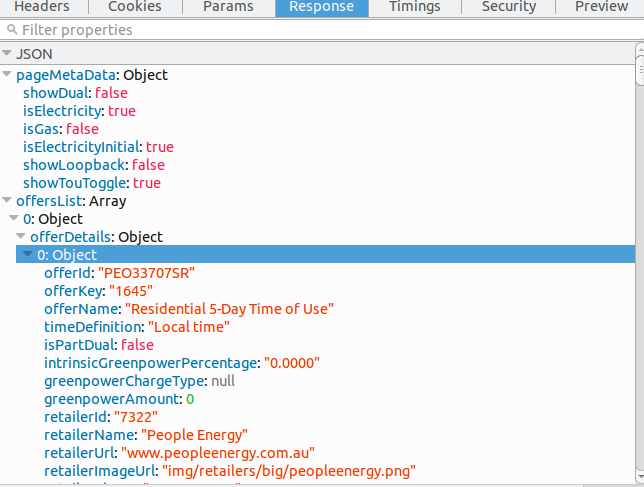
You can see all the json returned in firebug console if you click the https://compare.switchon.vic.gov.au/service/offers get entry then hit response:

enter image description here

You should be able to pull each field that you want from that.

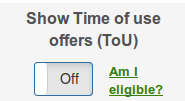
The output actually has a few extras results which you don't see on the page unless you toggle the tou button below:

enter image description here

You can filter those from the results so you exactly match the default output or give an option to include with a helper function:

def order_by(l, k, is_tou=False):     if not is_tou:         filt = filter(lambda x: not x["offerDetails"][0]["isTouOffer"], l)         return sorted(filt, key=lambda d: d["offerDetails"][0][k])     return sorted(l, key=lambda d: d["offerDetails"][0][k])  import json with requests.Session() as s:     s.post(sub_url, data=form1)     r = (s.get("https://compare.switchon.vic.gov.au/energy_questionnaire"))     s.post("https://compare.switchon.vic.gov.au/energy_questionnaire/submit",            data=form2)     js = s.get("https://compare.switchon.vic.gov.au/service/offers").json()["offersList"]     by_price = by_discount(js, "conditionalPrice", False)  print(by_price[:3) 

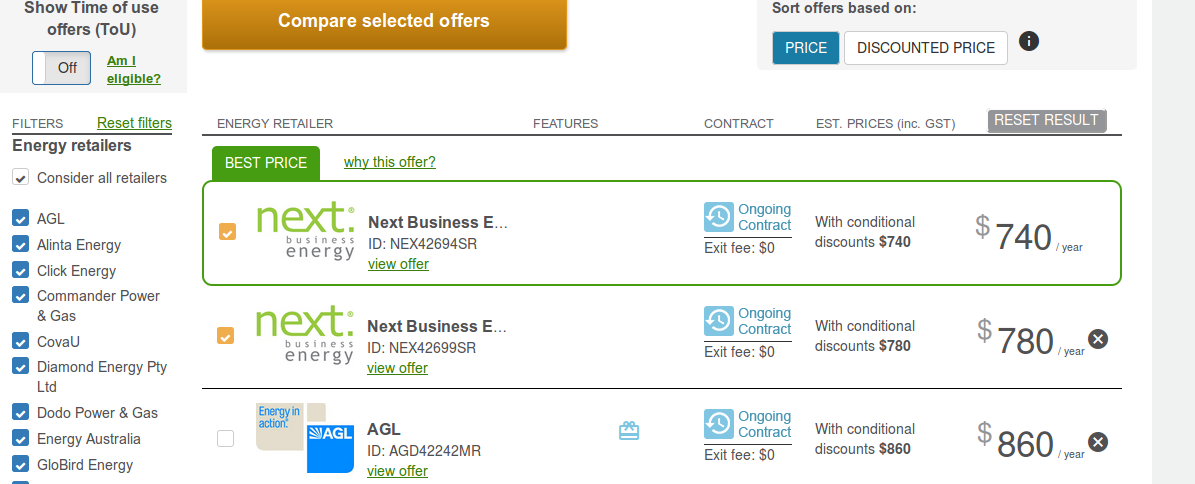
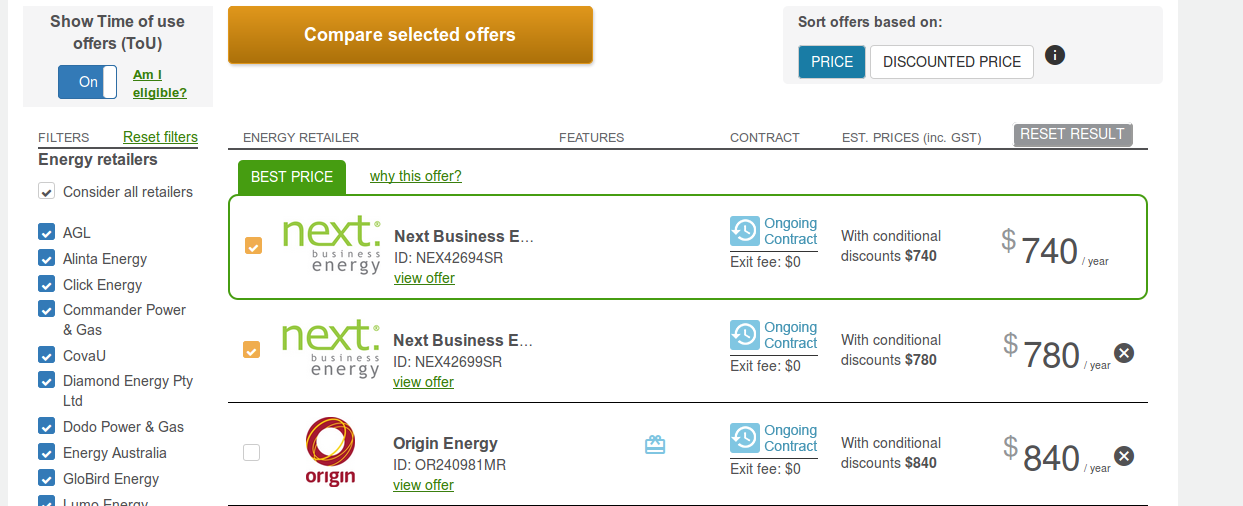
If you check the output you will see origin energy third with a price of 840 in the results with the switch on or 860 for AGL when it is off, you can apply the same to the discount output:

enter image description here

enter image description here

The regular output also seems to be ordered by conditionalPrice if you check the source the two js functions that get called for ordering are:

 ng-click="changeSortingField('conditionalPrice')"  ng-click="changeSortingField('fullDiscountedPrice')" 

So that should now definitely completely match the site output.

Read More