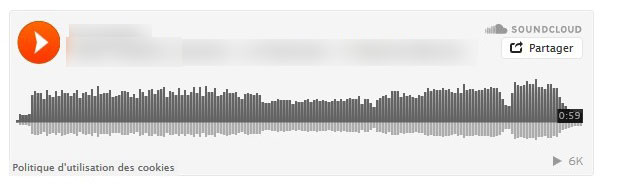
Here is how a SoundCloud embedded player on a HTML page looks like on mobile device:

It's rather annoying, because the user has to click "Listen in browser", and then, often, it doesn't start like it should, and so the user has to click "Pause" button and "Play" again.
How to have the normal look, even on mobile devices? :

Here is example of embedding code:
<iframe width="100%" height="166" scrolling="no" frameborder="no" src="https://w.soundcloud.com/player/?url=https%3A//api.soundcloud.com/tracks/271188615&color=ff5500&auto_play=false&hide_related=false&show_comments=true&show_user=true&show_reposts=false"></iframe>
I am going to suggest not using an embedded iframe for the player and instead use SoundCloud's HTTP API
My answer does not focus on any methods to trick the embedded iframe code into not thinking it is mobile. Instead I am showing an alternative path to how to do your own native SoundCloud player.
Doing this guarantees:
- You have full control over your UI
- You have full control over playback
I've gone ahead and built a sample application in Android. Assuming you are looking for Android here because of the status bar in the posted question's image.
Also as requested there is a web project, that will work on mobile. The web project is using the SoundCloud api JavaScript wrapper. Oddly there appears to be a bug I am seeing on mobile. I tested on nexus 6P and iPhone 6. Their player they provide doesn't start playing on page load, appears to be some sort of buffering issue. I will update when I know more. The Web player is working but requires pressing play button twice similar to how you described the issue with the embedded player. I will look into the buffering issue when I have more time.
You can find my example project here:
Web Project: https://github.com/davethomas11/stackoverlow_Q_39625513/tree/master/WebPlayer hosted here -> https://www.daveanthonythomas.com/remote/so39625513/
Android: https://github.com/davethomas11/stackoverlow_Q_39625513/SoundCloudPlayer
Check it out, and ask me any questions regarding implementation if anything is not clear. That goes for anyone reading this answer.
The solution is done natively in Java. But it could also be done in HTML and Javascript if that is what you prefer, because we are using their HTTP Rest API the platform does not matter.
Going completely custom, this way gives us full control over the UI. My UI isn't the most beautiful, but it can be as ugly or as beautiful as you want with this level of control ;) ->

I will break down the basic steps of using sound cloud's api to accomplish this.
Luckily for us playback is very straight forward. You can skip all of the authentication requirements. As any endpoints you will be using do not require authentication.
All you need is a client id to make your requests. I recommend registering an app with sound cloud, but you can use the embedded player's client id like I did.
Note: the embedded player uses the client id -> cUa40O3Jg3Emvp6Tv4U6ymYYO50NUGpJ
The basis of this implementation is the tracks endpoint: https://developers.soundcloud.com/docs/api/reference#tracks
This endpoint gives us almost everything we need:
- streaming url
- title, artist name
- artwork
But there is one thing missing and that is the waveform data points to display SoundCloud's brand identifying wave form.
The basics of getting this data requires a little bit of hacking. But the data is there in a pure enough form to use.
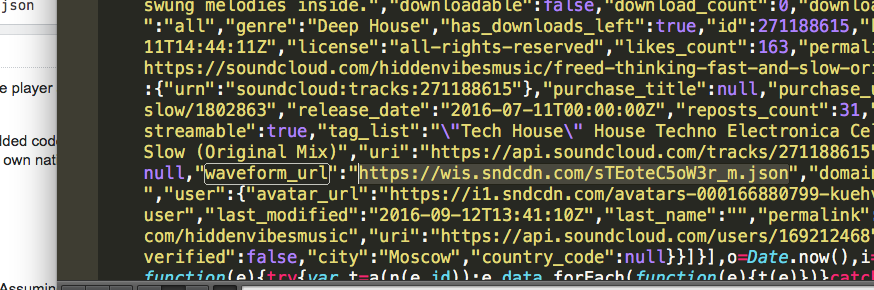
If you inspect the response of a call to get the embedded player, you'll notice a resource being loaded in the source code by the name of waveform_url. This url returns a nice json document with all the wave point information: https://wis.sndcdn.com/sTEoteC5oW3r_m.json
I've adapted my solution to parse the wave form data from the embedded player, by retrieving it from that url.
You'll notice I've made a very crude version. With a little elbow grease this can be turned into something nice, and even unique. But the basics are there for acquiring it.

Another endpoint I have implemented in my solution is the comments endpoint: https://developers.soundcloud.com/docs/api/reference#comments
I have not yet added it to the UI. But the API code should shed some light onto it's use.
The Android project uses the following libraries:
And for those not familiar, since it is semi new: - Android DataBinding https://developer.android.com/topic/libraries/data-binding/index.html
Please feel free to use my solution as a base, as I've released it under the GNU license. That goes to anyone reading this.
I'd like to consider adding a similar iOS solution to the git-hub repository too as well.
Here is the web project as a snippet:
/*! * jQuery UI Touch Punch 0.2.3 * * Copyright 2011–2014, Dave Furfero * Dual licensed under the MIT or GPL Version 2 licenses. * * Depends: * jquery.ui.widget.js * jquery.ui.mouse.js */ !function(a){function f(a,b){if(!(a.originalEvent.touches.length>1)){a.preventDefault();var c=a.originalEvent.changedTouches[0],d=document.createEvent("MouseEvents");d.initMouseEvent(b,!0,!0,window,1,c.screenX,c.screenY,c.clientX,c.clientY,!1,!1,!1,!1,0,null),a.target.dispatchEvent(d)}}if(a.support.touch="ontouchend"in document,a.support.touch){var e,b=a.ui.mouse.prototype,c=b._mouseInit,d=b._mouseDestroy;b._touchStart=function(a){var b=this;!e&&b._mouseCapture(a.originalEvent.changedTouches[0])&&(e=!0,b._touchMoved=!1,f(a,"mouseover"),f(a,"mousemove"),f(a,"mousedown"))},b._touchMove=function(a){e&&(this._touchMoved=!0,f(a,"mousemove"))},b._touchEnd=function(a){e&&(f(a,"mouseup"),f(a,"mouseout"),this._touchMoved||f(a,"click"),e=!1)},b._mouseInit=function(){var b=this;b.element.bind({touchstart:a.proxy(b,"_touchStart"),touchmove:a.proxy(b,"_touchMove"),touchend:a.proxy(b,"_touchEnd")}),c.call(b)},b._mouseDestroy=function(){var b=this;b.element.unbind({touchstart:a.proxy(b,"_touchStart"),touchmove:a.proxy(b,"_touchMove"),touchend:a.proxy(b,"_touchEnd")}),d.call(b)}}}(jQuery); /** * Created by dave on 16-09-26. */ function WaveForm(waveformPngUrl) { var self = this; var heightRatio; var waveformUrl = waveformPngUrl.replace(/png$/, "json"); waveformUrl = waveformUrl.replace(/:\/\/w1/,"://wis"); var canvas = $('#SoundCloudPlayer .track_waveform'); var heightPX = canvas.get(0).height; var data; var progress = 0; this.load = function () { $.get(waveformUrl, function (response) { heightRatio = heightPX / response.height; data = response; canvas.css({ height: "" + heightPX + "px" }); self.draw(); }); }; this.draw = function () { var ctx = canvas.get(0).getContext("2d"); ctx.clearRect(0, 0, canvas.get(0).width, canvas.get(0).height); var x = 0; var lineWidth = data.samples.length / canvas.width(); var progressPoint = canvas.get(0).width - ((1 - progress) * canvas.get(0).width); ctx.beginPath(); ctx.lineWidth = lineWidth / 2; ctx.strokeStyle = "#ff8000"; var progressFound = false; for (var i = 0; i < data.samples.length; i++) { if (x > progressPoint && !progressFound) { ctx.stroke(); ctx.closePath(); ctx.beginPath(); ctx.strokeStyle = "#000"; progressFound = true; } var ratio = (data.samples[i] * heightRatio) / heightPX; var drawTo = heightPX - ratio * heightPX; ctx.moveTo(x, heightPX); ctx.lineTo(x, drawTo); x += lineWidth; } ctx.stroke(); ctx.closePath(); }; this.setProgress = function (newProgress) { progress = newProgress; self.draw(); } } var player, mTrack, media, seekBarInterval, waveForm; var updatingSeekBar = false; $(function () { SC.initialize({ client_id: 'cUa40O3Jg3Emvp6Tv4U6ymYYO50NUGpJ' }); player = document.getElementById("SoundCloudPlayer"); checkQueryURLForTrackId(); loadTrackEnteredInInput(); $("form button").button(); }); function loadTrackEnteredInInput() { loadTrack(getTrackId()); } function loadTrack(trackId) { SC.get('/tracks/' + trackId).then(function (track) { // Inspect for info on track you want: console.log(track); mTrack = track; renderTrack(track); streamTrack(track); waveForm = new WaveForm(track.waveform_url); waveForm.load(); }, function () { alert("Sorry no track found for track id: "+ trackId) }); } function renderTrack(track) { $(player).find(".track_artist").text(track.user.permalink); $(player).find(".track_title").text(track.title); $(player).find(".track_artwork").attr('src', track.artwork_url); $(player).find(".track_seek_bar").slider( { orientation: "horizontal", range: "min", max: track.duration, value: 0, change: seek }); } function streamTrack(track) { SC.stream('/tracks/' + track.id).then(function (mediaPlayer) { media = mediaPlayer; console.log(media); play(); }); } function play() { if (!media) { return; } $(player).find(".track_play").hide(); $(player).find(".track_pause").fadeIn(); media.play(); seekBarInterval = setInterval(updateSeekBar, 500); } function pause() { if (!media) { return; } $(player).find(".track_pause").hide(); $(player).find(".track_play").fadeIn(); media.pause(); clearInterval(seekBarInterval); } function seek() { if (!media) { return; } if (!updatingSeekBar) { media.seek($(player).find(".track_seek_bar").slider("value")); } } function updateSeekBar() { if (!media) { return; } waveForm.setProgress(media.currentTime() / mTrack.duration); updatingSeekBar = true; $(player).find(".track_seek_bar").slider("value", media.currentTime()); updatingSeekBar = false; } /** * Loads a different track id based on * url query */ function checkQueryURLForTrackId() { var query = getUrlVars(); if (query.trackId) { $('[name=trackId]').val(query.trackId); } } //http://stackoverflow.com/questions/4656843/jquery-get-querystring-from-url // Read a page's GET URL variables and return them as an associative array. function getUrlVars() { var vars = {}, hash; var hashes = window.location.href.slice(window.location.href.indexOf('?') + 1).split('&'); for(var i = 0; i < hashes.length; i++) { hash = hashes[i].split('='); vars[hash[0]] = hash[1]; } return vars; } function getTrackId() { return trackId = $('[name=trackId]').val(); }
body { font-family: 'Raleway', sans-serif; } #SoundCloudPlayer .track_artwork { float:left; margin-right: 6px; } #SoundCloudPlayer .track_artist { font-size: small; margin-bottom: 4px; } #SoundCloudPlayer .track_title { margin-top: 0px; font-weight: bold; } #SoundCloudPlayer .track_control { cursor: pointer; display: none; } #SoundCloudPlayer .track_seek_bar .ui-slider-range { background: orange; } #SoundCloudPlayer .track_seek_bar .ui-slider-handle { border-color: orange; } #SoundCloudPlayer .track_waveform { width: 100%; }
<html> <head> <meta name="viewport" content="initial-scale=1, maximum-scale=1"> <title>SoundCloud API Web Player Demo</title> <script src="https://ajax.googleapis.com/ajax/libs/jquery/3.1.0/jquery.min.js"></script> <link rel="stylesheet" href="https://ajax.googleapis.com/ajax/libs/jqueryui/1.12.0/themes/smoothness/jquery-ui.css" /> <script src="jquery.ui.touch-punch.min.js"></script> <script src="https://ajax.googleapis.com/ajax/libs/jqueryui/1.12.0/jquery-ui.min.js"></script> <script src="https://connect.soundcloud.com/sdk/sdk-3.1.2.js"></script> <link href="https://fonts.googleapis.com/css?family=Raleway" rel="stylesheet" /> <link href="https://fonts.googleapis.com/icon?family=Material+Icons" rel="stylesheet" /> </head> <body> <form method="get"> <label for="trackId">Load Track:</label> <input name="trackId" type="text" value="271188615" /> <button>GO</button> </form> <section id="SoundCloudPlayer"> <img class="track_artwork" /> <p class="track_artist"></p> <p class="track_title"></p> <i class="material-icons track_play track_control" onClick="play()">play_circle_filled</i> <i class="material-icons track_pause track_control" onClick="pause()">pause_circle_filled</i> <canvas class="track_waveform"></canvas> <div class="track_seek_bar" ></div> </section> </body> </html>
Mini Player (height=20) has similar look & feel for desktops and mobiles.
<iframe width="100%" height="20" scrolling="no" frameborder="no" src="https://w.soundcloud.com/player/?url=https%3A//api.soundcloud.com/tracks/271188615&color=ff5500&auto_play=false&hide_related=false&show_comments=true&show_user=true&show_reposts=false"></iframe>