Showing posts with label webpack-dev-server. Show all posts

Wednesday, July 4, 2018

react-hot-loader and webpack-dev-server don't reload changes

Leave a Comment

I tried to follow react-hot-loader/getstarted to get up and running react-hot-loader in my webpack config. When I make some changes in my components, react-hot-loader doesn't reload changes. I updated npm script, added react-hot-loader into babel and webpack config and added module.hot.accept into index.jsx.

package.json

"scripts": {     "dev": "webpack-dev-server -d --progress --colors --port 8090 --hot --inline",   },     "dependencies": {         "aphrodite": "^2.2.1",         "bootstrap": "^4.1.1",         "bootstrap-select": "^1.13.1",         "classnames": "^2.2.5",         "d3": "^3.5.17",         "fixed-data-table-2": "^0.8.13",         "font-awesome": "^4.7.0",         "jquery": "^3.3.1",         "js-cookie": "^2.2.0",         "lodash": "^4.17.10",         "moment": "^2.22.1",         "popper.js": "^1.14.3",         "react": "^16.3.2",         "react-bootstrap-typeahead": "^3.1.3",         "react-datetime": "^2.14.0",         "react-dom": "^16.3.2",         "react-hot-loader": "^4.3.3",         "react-loadable": "^5.4.0",         "react-modal": "^3.4.4",         "react-redux": "^5.0.7",         "react-router": "^4.2.0",         "react-router-dom": "^4.2.2",         "react-router-redux": "^5.0.0-alpha.9",         "react-slidedown": "^1.3.0",         "react-tippy": "^1.2.2",         "react-toastify": "^4.0.1",         "react-transition-group": "^2.3.1",         "redux": "^4.0.0",         "redux-saga": "^0.16.0"       },       "devDependencies": {         "autoprefixer": "^8.4.1",         "babel": "^6.23.0",         "babel-core": "^6.26.3",         "babel-eslint": "^8.2.3",         "babel-loader": "^7.1.4",         "babel-plugin-syntax-dynamic-import": "^6.18.0",         "babel-plugin-transform-async-to-generator": "^6.24.1",         "babel-plugin-transform-class-properties": "^6.24.1",         "babel-plugin-transform-object-rest-spread": "^6.26.0",         "babel-polyfill": "^6.26.0",         "babel-preset-env": "^1.6.1",         "babel-preset-latest": "^6.24.1",         "babel-preset-react": "^6.24.1",         "css-loader": "^0.28.11",         "eslint": "^4.19.1",         "eslint-config-airbnb": "^16.1.0",         "eslint-plugin-import": "^2.11.0",         "eslint-plugin-jsx-a11y": "^6.0.3",         "eslint-plugin-react": "^7.7.0",         "file-loader": "^1.1.11",         "http-server": "^0.11.1",         "less": "^3.0.2",         "less-loader": "^4.1.0",         "node-sass": "^4.9.0",         "npm-install-webpack-plugin": "^4.0.5",         "postcss": "^6.0.22",         "postcss-loader": "^2.1.4",         "redux-devtools-extension": "^2.13.2",         "sass-loader": "^7.0.1",         "sass-resources-loader": "^1.3.3",         "style-loader": "^0.21.0",         "url-loader": "^1.0.1",         "webpack": "^4.6.0",         "webpack-cli": "^2.1.2",         "webpack-dev-server": "^3.1.4",         "webpack-merge": "^4.1.2",         "webpack-notifier": "^1.6.0"       } 

.babelrc

{   "presets": [     [       "latest", {         "es2015": {           "modules": false         }       }     ],     "react"   ],   "plugins": [     "transform-object-rest-spread",     "transform-class-properties",     "syntax-dynamic-import",     "transform-async-to-generator",     "react-hot-loader/babel"   ] } 

webpack.config.js

const webpack = require('webpack'); const webpackMerge = require('webpack-merge'); const path = require('path'); const WebpackNotifierPlugin = require('webpack-notifier');  const TARGET = process.env.npm_lifecycle_event; console.log(`target event is ${TARGET}`);  let outputFileName = 'app'; outputFileName += TARGET === 'prod' ? '.min.js' : '.js';  const common = {   entry: ['babel-polyfill', 'react-hot-loader/patch', './index.jsx'],   output: {     publicPath: '/',   },   module: {     rules: [       {         test: /\.js[x]?$/,         exclude: /(node_modules)/,         use: {           loader: 'babel-loader',         },       },     ],   },   plugins: [     new webpack.ProvidePlugin({       jQuery: 'jquery',       $: 'jquery',       jquery: 'jquery',       'window.jQuery': 'jquery',     }),     new WebpackNotifierPlugin(),   ],   resolve: {     modules: [       path.resolve('.'),       path.resolve('script'),       path.resolve('script', 'views'),       'node_modules',     ],     extensions: ['.js', '.jsx', '.json'],   }, };  if (TARGET === 'dev' || !TARGET) {   module.exports = webpackMerge(common, {     devtool: 'eval-source-map',     output: {       filename: 'bundle.js',       sourceMapFilename: '[file].map',     },     module: {       rules: [         {           test: /\.scss$/,           loaders: [             'style-loader',             'css-loader',             {               loader: 'postcss-loader',               options: {                 config: {                   path: 'postcss.config.js',                 },               },             },             'sass-loader',           ],         },         {           test: /\.less$/,           loaders: ['style-loader', 'css-loader', 'less-loader'],         },         {           test: /\.css$/,           use: ['style-loader', 'css-loader'],         },         {           test: /\.(eot|ttf|svg|gif|png|jpg|otf|woff|woff2)$/,           loader: 'url-loader',         },       ],     },     devServer: {       contentBase: path.resolve(__dirname), // New       historyApiFallback: true,     },     plugins: [       new webpack.DefinePlugin({         'process.env.NODE_ENV': JSON.stringify('development'),       }),       new webpack.HotModuleReplacementPlugin(),     ],   }); } 

index.jsx

import React from 'react'; import ReactDOM from 'react-dom'; import createHistory from 'history/createBrowserHistory'; import { createStore, combineReducers, applyMiddleware } from 'redux'; import { ConnectedRouter, routerReducer, routerMiddleware } from 'react-router-redux'; import { Provider } from 'react-redux'; import { AppContainer } from 'react-hot-loader'; import createSagaMiddleware from 'redux-saga'; import { composeWithDevTools } from 'redux-devtools-extension/developmentOnly';  import 'bootstrap'; import 'styles/custom.scss';  import App from 'App'; import reducers from 'state'; import sagas from 'sagas';  const history = createHistory(); const sagaMiddleware = createSagaMiddleware();  const store = createStore(   combineReducers({     ...reducers,     router: routerReducer,   }),   composeWithDevTools(applyMiddleware(routerMiddleware(history), sagaMiddleware)), );  if (module.hot) {   module.hot.accept('state', () => {     store.replaceReducer(require('state').default);   }); }  sagaMiddleware.run(sagas);  const render = (Component) => {   ReactDOM.render(     <AppContainer>       <Provider store={store}>         <ConnectedRouter history={history}>           <Component />         </ConnectedRouter>       </Provider>     </AppContainer>,     document.getElementById('app'),   ); };  render(App);  if (module.hot) {   module.hot.accept('App', () => { render(App); }); } 

index.html

<!DOCTYPE html>  <html lang="en"> <head>     <meta charset="utf-8">      <title>Test</title>      <meta name="description" content="">      <meta name="viewport" content="width=device-width, initial-scale=1, shrink-to-fit=no">  </head> <body>      <div id="app">      </div>    <script type="text/javascript" src="/bundle.js"></script>  </body> </html> 

2 Answers

Answers 1

  1. You can use react-script and react-app-rewire-hot-loader
  2. You maybe don't use react-hot-loader/babel

    { test: /\.(js|jsx)$/, include: paths.appSrc, loader: require.resolve("babel-loader"), options: {   // This is a feature of babel-loader for webpack (not Babel itself).   // It enables caching results in ./node_modules/.cache/babel-loader/   // directory for faster rebuilds.   cacheDirectory: true,   plugins: ["react-hot-loader/babel"]   }, } 

Answers 2

Have you tried exporting your root component as a hot:

import { hot } from "react-hot-loader" const App = () => <h3>Hello World</h3> export default hot(module)(App) 
Read More

Wednesday, October 18, 2017

WebPack sourcemaps confusing (duplicated files)

Leave a Comment

I decided to try out WebPack on a new project I'm spinning up today and I'm getting really strange behavior from the sourcemaps. I can't find anything about it in the documentation, nor can I find anyone else having this issue when skimming StackOverflow.

I'm currently looking at the HelloWorld app produced by Vue-CLI's WebPack template -- no changes have been made to the code, the build environment, or anything.

I installed everything and ran it like so:

vue init webpack test && cd test && npm install && npm run dev 

Looking at my sourcemaps, I see the following:

enter image description here

This is a hot mess. Why are there three version of HelloWorld.vue and App.vue? Worse yet, each version has a slightly different version of the code and none of them match the original source. The HellowWorld.vue sitting in the root directory does match the original source, but what's it doing down there instead of in the ./src/components folder? Finally, why isn't there a fourth App.vue that has the original source for it?

As far as I can tell this may have something to do with the WebPack loaders. I've never gotten these kinds of issues with any other bundler, though. Below is an example of the exact same steps using the Browserify Vue-CLI template:

enter image description here

No webpack:// schema, only one copy of every file, the files actually contain the original source code (kind of important for source maps), no unexpected (webpack)/buildin or (webpack)-hot-middleware, no . subdirectory,.... just the source code.

2 Answers

Answers 1

I haven't worked with Vue so can't really describe how exactly this is happening but it seems to be related to Vue Loader. Looking at the documentation I did not really find anything that clarifies why it would create three different files for one component. But it does seem logical considering that a .vue file might contain three types of top-level language blocks: <template>, <script>, and <style>.

Also, looking at two of those files you do see a comment at end of each file that suggests it was modified in some way by a Vue loader. Either this

////////////////// // WEBPACK FOOTER // ./node_modules/vue-loader/lib/template-compiler 

or

////////////////// // WEBPACK FOOTER // ./node_modules/vue-style-loader!./node_modules/css-loader 

The third file is different but it still does have code that identifies it as being modified by Vue loader. Here is some of that code

function injectStyle (ssrContext) {   if (disposed) return   require("!!vue-style-loader...") } /* script */ import __vue_script__ from "!!babel-loader!../../node_modules/vue-loader/..." /* template */ import __vue_template__ from "!!../../node_modules/vue-loader/..." /* styles */ var __vue_styles__ = injectStyle 

The document also says this:

vue-loader is a loader for Webpack that can transform Vue components written in the following format into a plain JavaScript module:

Which explains why you might not see the same type of behaviour with other bundlers.

Now, This might not be the answer you were looking for but just wanted to share what I had found.

Answers 2

This is actually a feature of webpack.

webpack has HMR (Hot Module Reloading). If you look in your network tab, go ahead and make an update to your HelloWorld.vue file. You'll see a js chunk come thru as well as an updated JSON manifest. Both of these will have a unique hash at the end for each time you make a change to the application. It does this so the browser does not have to do a full reload.

For a better explanation of this I would highly recommend reading through https://webpack.js.org/concepts/hot-module-replacement/

Read More

Tuesday, June 13, 2017

webpack-dev-server with hot reload reloading entire page with css changes

Leave a Comment

[Edit] Github Test Repo Created for you to test!!


I have hot reloading without any problems, but it reloads the entire page whenever I make a single css change. I would like it to inject any css changes and ideally do similarly with react components unless a full reload is truly needed.

** I get the following console logs **

[WDS] App updated. Recompiling... client?cd17:41 [WDS] App updated. Recompiling... client?8505:41 [WDS] App updated. Recompiling... client?cd17:41 [WDS] App updated. Recompiling... client?8505:41 [WDS] App hot update... dev-server.js:45 [HMR] Checking for updates on the server... client?cd17:41 [WDS] App hot update... dev-server.js:33 [HMR] Cannot apply update. Need to do a full reload! (anonymous) @ dev-server.js:33 dev-server.js:34 [HMR] Error: Aborted because ./node_modules/css-loader/index.js?{"modules":true,"sourceMap":true,"importLoaders":2,"localIdentName":"[path]___[name]__[local]___[hash:base64:5]"}!./node_modules/postcss-loader/index.js?sourceMap&parser=postcss-scss!./src/components/shared/userPages/userPages.css is not accepted Update propagation: ./node_modules/css-loader/index.js?{"modules":true,"sourceMap":true,"importLoaders":2,"localIdentName":"[path]___[name]__[local]___[hash:base64:5]"}!./node_modules/postcss-loader/index.js?sourceMap&parser=postcss-scss!./src/components/shared/userPages/userPages.css -> ./src/components/shared/userPages/userPages.css -> ./src/components/Signin/index.js -> ./src/routes.js -> ./src/index.js -> 0     at hotApply (http://localhost:8080/dist/main.js:430:30)     at hotUpdateDownloaded (http://localhost:8080/dist/main.js:283:13)     at hotAddUpdateChunk (http://localhost:8080/dist/main.js:263:13)     at webpackHotUpdateCallback (http://localhost:8080/dist/main.js:8:12)     at http://localhost:8080/dist/0.75f9c418ba8b1fdc9ad0.hot-update.js:1:1 

webpack config

/* eslint-disable */ const Config = require('webpack-config').default; const webpack = require('webpack'); const DashboardPlugin = require('webpack-dashboard/plugin'); const {environment} = require('webpack-config'); const path = require('path');  environment.set('cssIdent', '[path]___[name]__[local]___[hash:base64:5]');  module.exports = new Config().extend('./webpack.base.config.js').merge({   entry: [     'react-hot-loader/patch',     'webpack-dev-server/client?http://localhost:8080',     'webpack/hot/only-dev-server',     './src/index.js'   ],   devServer: {     contentBase: [       'demo/'     ],     hot: true,     historyApiFallback: true,     host: '0.0.0.0',     publicPath: '/dist/'   },   output: {     filename: 'main.js',     path: path.join(__dirname, 'dist'),     publicPath: '/dist/'   },   devtool: 'inline-source-map',   plugins: [     new webpack.DefinePlugin({       'process.env': {         BABEL_ENV: JSON.stringify('development')       }     }),     new webpack.HotModuleReplacementPlugin(),     new webpack.NamedModulesPlugin(),     new webpack.NoEmitOnErrorsPlugin(),     new DashboardPlugin()   ],   cache: true }); 

index.js

import React from 'react'; import ReactDOM from 'react-dom'; import {Provider} from 'react-redux'; import { AppContainer } from 'react-hot-loader'; import { ConnectedRouter } from 'react-router-redux' import injectTapEventPlugin from 'react-tap-event-plugin'; import nprogress from 'nprogress'; import store from './configureStore'; import Routes from './routes'; import './components/shared/main.css'; import createHashHistory from 'history/createHashHistory' const history = createHashHistory({   hashType: 'slash' });  //Remove on screen tap delay injectTapEventPlugin();  //Add progress bar nprogress.configure({ minimum: 0.15, showSpinner: false, speed: 500 });  // Now you can dispatch navigation actions from anywhere! // store.dispatch(push('/foo'))  ReactDOM.render(   <AppContainer>     <Provider store={store}>       <ConnectedRouter history={history}>         <Routes/>       </ConnectedRouter>     </Provider>   </AppContainer>,   document.getElementById('app') ); 

Store.js

import { createStore, applyMiddleware, compose } from 'redux' import { createLogger } from 'redux-logger' import { routerMiddleware } from 'react-router-redux' import reducers from './reducers';  const configureStore = function (history, preloadedState = {}) {   // Build the middleware for intercepting and dispatching navigation actions   const middlewareHistory = routerMiddleware(history);    const store = createStore(     reducers,     preloadedState,     compose(       applyMiddleware(createLogger(), middlewareHistory)     )   );    if (module.hot) {     // Enable Webpack hot module replacement for reducers     module.hot.accept('./reducers', () => {       const nextReducer = require('./reducers').default;        store.replaceReducer(nextReducer);     });   }    return store; };  export default configureStore(history); 

A random component

import React from 'react'; import { NavLink } from 'react-router-dom' import store from '../../configureStore';  import userStyles from '../shared/userPages/userPages.css';  class SignIn extends React.Component {   render(){     return (       <div className={userStyles.home}>       </div>     );   } }  export default SignIn; 

.babelrc

{   "presets": [     ["es2015", {"modules": false}],     "stage-0",     "react"   ],   "plugins": [     "react-hot-loader/babel"   ],   "env": {     "development/client": {       "plugins": [         ["transform-runtime", {           "helpers": false,           "polyfill": false,           "regenerator": true         }]       ]     },     "test": {       "presets": ["es2015"],       "plugins": [         ["transform-runtime", {           "helpers": false,           "polyfill": false,           "regenerator": true         }]       ]     }   } } 

1 Answers

Answers 1

you can use extract text webpack plugin for css hot reloading instead of whole page/module reloading. below is the guideline to know how to use https://github.com/webpack-contrib/extract-text-webpack-plugin https://www.npmjs.com/package/extract-text-webpack-plugin

Read More

Wednesday, February 15, 2017

Running Webpack-dev-server on run in visual studios - .net core project

Leave a Comment

I'm trying to set up my environment so when I click run in Visual Studio 2015 it will install my node modules, and then run the front-end webpack-dev-server.

I added

"precompile": [ "yarn install", "yarn run start" ]

to my scripts in my project.json

If you want to see the Start Script that I'm running: https://github.com/facebookincubator/create-react-app/blob/master/packages/react-scripts/scripts/start.js

It works, kinda. It will start the server, but doesn't open it in the browser, and it kinda breaks VS to the point where I can't stop debugging, and can't close VS because it's debugging.

enter image description here

So is there anyway I can make this work the way I want it to, or should I just resort to using cmd to start the webpack-dev-server?


I just tried:

"precompile": [ "yarn install", "start cmd /k yarn run start" ]

hoping I could get VS to open a command prompt and run the start script, but that didn't work.


I found an answer. Going to keep this open to see if anyone has a better solution.

In my Startup.cs I added:

Process.Start("CMD.exe", "/K yarn run start"); Process.Start("cmd", "/C start http://localhost:3000"); 

The first line running my command in cmd, and the second opening my default browser at the port of my webpack-dev-server.


A second solution that may work depending on the use case.

Download the node tools for VS and create a new empty Node project in your solution. You can go to the project's properties and there's an input called Script (startup file). You can point that to your start up script, in my case it was scripts/start.js

1 Answers

Answers 1

Here's the solutions that I came up with:

In my Startup.cs I added:

Process.Start("CMD.exe", "/K yarn run start"); Process.Start("cmd", "/C start http://localhost:3000"); 

The first line running my command in cmd, and the second opening my default browser at the port of my webpack-dev-server.


A second solution that may work depending on the use case.

Download the node tools for VS and create a new empty Node project in your solution. You can go to the project's properties and there's an input called Script (startup file). You can point that to your start up script, in my case it was scripts/start.js

Read More

Saturday, February 4, 2017

Angular under Webpack can't find an existing file app.module.ts

Leave a Comment

I have my webpack.config.js like this.

var HtmlWebpackPlugin = require("html-webpack-plugin"); module.exports = {   entry: "./source/application/main.ts",   output: {     path: "./distribution",     filename: "app.bundle.js"   },   module: { loaders: [{ test: /\.ts$/, loader: "ts-loader" }] },   plugins: [new HtmlWebpackPlugin({ template: "./source/index.html" })],   resolve: ["", ".js", ".ts"] } 

It finds and interprets the file main.ts properly, except when bootstraping the module (third line below), it says that the file can't be resolved. This is my main.ts file.

import { platformBrowserDynamic } from "@angular/platform-browser-dynamic"; import { AppModule } from "./app.module"; platformBrowserDynamic().bootstrapModule(AppModule); 

The file that it can't resolve is there. If I change its name or remove it, my IDE tells that it's missing. However, for some reason, when bootstraping the process, the computer can't find it.

ERROR in ./application/main.ts
Module not found: Error: Cannot resolve 'file' or 'directory' ./app.module in C:...\main
@ ./application/main.ts 3:19-42 webpack: bundle is now VALID.

The contents of the app.module.ts and main.ts were brought from Angular.IO page.

I've seen some posts saying that it's because config.json not being valid and/or possibly some confusion on paths in Windows. However, I've verified that the file is valid and I've tried adding context:require("path").resolve(__dirname, "app"), to my Webpack config. It only resulted in not finding even the former file app.ts, so I disregarded that approach.

I've spend a number of days trying to make it work and I'm out of ammo. How can I even troubleshoot it?

1 Answers

Answers 1

You have invalid file extension configuration in your webpack.config.js - instead of

resolve: ["", ".js", ".ts"] 

you should have

resolve: {     extensions: ["", ".js", ".ts"] } 

Edit:

If you need to target webpack2,in your case the migration would be pretty painless - its only needed to remove "" from extensions:

resolve: {     extensions: [".js", ".ts"] } 
Read More

Thursday, April 14, 2016

Webpack-dev-server not sending requests to external domain via proxy

Leave a Comment

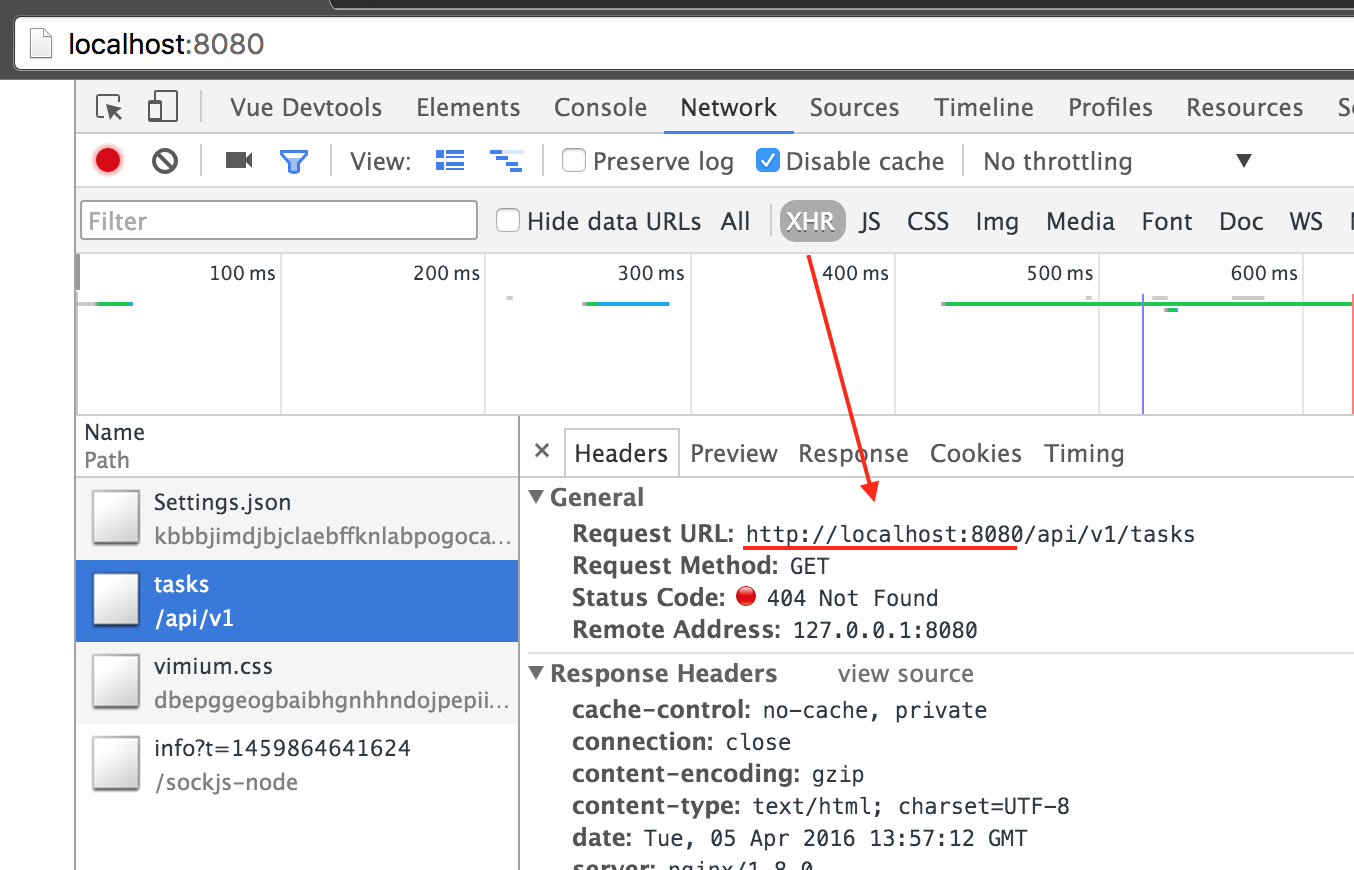
I'm trying to use the webpack-dev-server proxy configuration to send api requests to an external domain and I can't seem to get it working.

Here's my config:

var path = require('path')  module.exports = {     entry: './client/index.js',     output: {         filename: 'bundle.js',         path: path.resolve(__dirname, 'public/assets'),         publicPath: 'assets'     },     devServer: {         contentBase: 'public',         proxy:{             '/api/v1*': {                 target: 'http://laravelandwebpack.demo/',                 secure: false             }         }     } } 

So, anytime my app makes a request with the uri /api/v1... it should send that request to http://laravelandwebpack.demo.

In my Vue app, I'm using the vue-resource to make the requests and I'm defaulting all requests with the needed uri prefix:

var Vue = require('vue') Vue.use(require('vue-resource'))  new Vue({     el: 'body',     http: {         root: '/api/v1', // prefix all requests with this         headers:{             test: 'testheader'         }     },     ready: function (){         this.$http({             url: 'tasks',             method: 'GET'         }).then(function (response){             console.log(response);         }, function (response){             console.error(response);         })     } }) 

The URL's are being constructed correctly, but they're still pointing to localhost:8080 which is the webpack-dev-server:

Errant http request

I read and re-read the docs for webpack-dev-server and I can't figure out where I have it set up wrong. Any ideas?

0 Answers

Read More

Monday, April 4, 2016

Webpack Dev Server (webpack-dev-server) Hot Module Replacement (HMR) Not Working

Leave a Comment

I have gone through many answers on StackOverflow & on GitHub issues as well but, I am still stuck in Hot Module Replacement in Webpack. I am using npm start to run my server with webpack-dev-server --hot --inline. I am trying to change code in my React component, but nothing happens in the browser.

I am using Google Chrome Version 49.0.2623.87 (64-bit) on Ubuntu 14.04LTS.

In my browser console, I am getting log messages as

[HMR] Waiting for update signal from WDS...

[WDS] Hot Module Replacement enabled.

But, no hot/live reload is happening. Nothing gets displayed when I change code in my React component file. I was following first video of this tutorial, Egghead.io/ReactFundamentals where everything worked fine.

Following are my package.json & webpack.config.js files.

package.json

{   "name": "react-fundamentals",   "version": "1.0.0",   "description": "Fundamentals of ReactJS",   "main": "index.js",   "scripts": {     "start": "webpack-dev-server --hot --inline"   },   "author": "",   "license": "ISC",   "dependencies": {     "react": "^15.0.0-rc.2",     "react-dom": "^15.0.0-rc.2"   },   "devDependencies": {     "babel": "^6.5.2",     "babel-core": "^6.7.2",     "babel-loader": "^6.2.4",     "babel-preset-es2015": "^6.6.0",     "babel-preset-react": "^6.5.0",     "react-hot-loader": "^1.3.0",     "webpack": "^1.12.14",     "webpack-dev-server": "^1.14.1"   } } 

webpack.config.js

module.exports = {   context: __dirname,   entry: "./main.js",   output: {     path: __dirname,     filename: "bundle.js"   },   devServer: {     port: 7777   },   module: {     loaders: [       {         test: /\.js$/,         exclude: /node_modules/,         loader: "babel",         query: {           presets: ["es2015", "react"]         }       }     ]   } } 

It will be great if someone can guide me through this issue as I am not able to proceed further efficiently with the tutorial.

Thanks!

EDIT

I don't know how but, I started the server again with npm start after few days today & it automatically started loading files on the browser after the change in the code. I am still thinking what was the issue. Strange!

For the time being, it is working. Thanks everyone for your time!

3 Answers

Answers 1

Your webpack config is off. Take a look at react-transform-boilerplate for a correct setup.

webpack.config.js

var path = require('path'); var webpack = require('webpack');  module.exports = {   // or devtool: 'eval' to debug issues with compiled output:   devtool: 'cheap-module-eval-source-map',   entry: [     // necessary for hot reloading with IE:     'eventsource-polyfill',     // listen to code updates emitted by hot middleware:     'webpack-hot-middleware/client',     // your code:     './src/index'   ],   output: {     path: path.join(__dirname, 'dist'),     filename: 'bundle.js',     publicPath: '/dist/'   },   plugins: [     new webpack.HotModuleReplacementPlugin(),     new webpack.NoErrorsPlugin()   ],   module: {     loaders: [{       test: /\.js$/,       loaders: ['babel'],       include: path.join(__dirname, 'src')     }]   } }; 

.babelrc

{   "presets": ["react", "es2015"],   "env": {     "development": {       "presets": ["react-hmre"]     }   } } 

Answers 2

devServer: {  inline: true, // you missed this line which will reload the browser  port : 7777 } 

Answers 3

Try updating your module loader to this:

loaders: [       {         test: /\.jsx$/,         exclude: /node_modules/,         loaders: ["react-hot", "babel"],         query: {           presets: ["es2015", "react"]         }       }     ] 
Read More