I have a database in MySQL created by someone. I don't have any documentation of the database.
How can I know the relationship between the tables?
Is there any query or a procedure to generate a report so that it's easy to find the relations?
I can look into Schema information and manually figure it out, but it would be great if I could generate a relationship report.
7 Answers
Answers 1
You can get an overview in MySql Workbench by doing the steps below:
- Go to "Database" Menu option.
- Select the "Reverse Engineer" option.
- A wizard will be opened and will generate an EER Diagram which shows up
Answers 2
The better way as programmatically speaking is gathering data from INFORMATION_SCHEMA.KEY_COLUMN_USAGE table as follows:
SELECT `TABLE_SCHEMA`, -- Foreign key schema `TABLE_NAME`, -- Foreign key table `COLUMN_NAME`, -- Foreign key column `REFERENCED_TABLE_SCHEMA`, -- Origin key schema `REFERENCED_TABLE_NAME`, -- Origin key table `REFERENCED_COLUMN_NAME` -- Origin key column FROM `INFORMATION_SCHEMA`.`KEY_COLUMN_USAGE` -- Will fail if user don't have privilege WHERE `TABLE_SCHEMA` = SCHEMA() -- Detect current schema in USE AND `REFERENCED_TABLE_NAME` IS NOT NULL; -- Only tables with foreign keys and another one is
select * from INFORMATION_SCHEMA.TABLE_CONSTRAINTS; Answers 3
Try out SchemaSpy (http://schemaspy.sourceforge.net/):
SchemaSpy is a Java-based tool (requires Java 5 or higher) that analyzes the metadata of a schema in a database and generates a visual representation of it in a browser-displayable format.
Here is a screenshot of the HTML page of the sample output from http://schemaspy.sourceforge.net/sample/ :
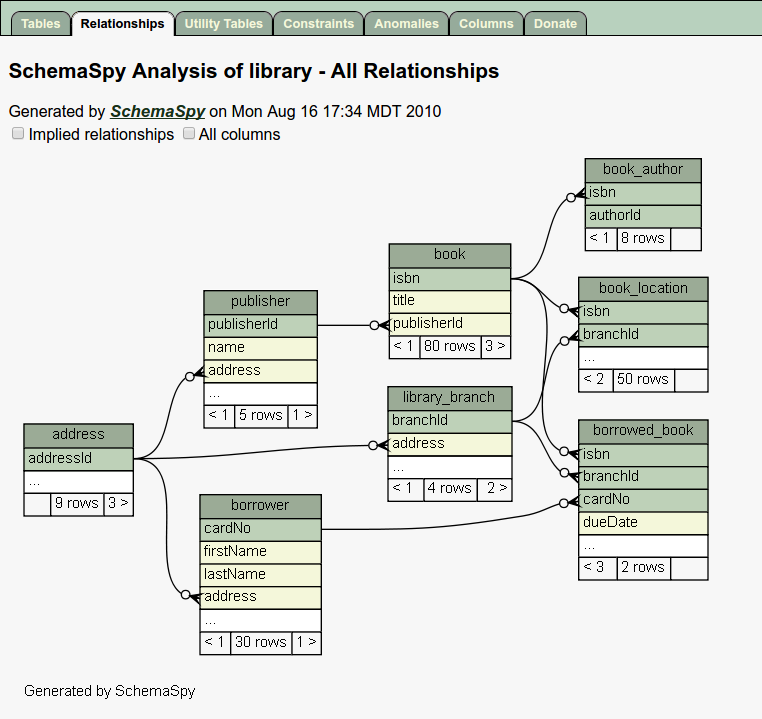
There is also a nice GUI if you do not want to use the command line: http://schemaspygui.sourceforge.net/
Both tools are open source and in my opinion very lightweight and easy to use. I used them several times when I was in situations that you described: To get an overview of the schema and even some details to dive deeper. (Take a look at the "Anomalies" report.)
Answers 4
You may take a look at information_scheme.KEY_COLUMN_USAGE table
As it is suggested there a quick way to list your FKs (Foreign Key references) using the KEY_COLUMN_USAGE view:
SELECT CONCAT( table_name, '.', column_name, ' -> ', referenced_table_name, '.', referenced_column_name ) AS list_of_fks FROM information_schema.KEY_COLUMN_USAGE WHERE REFERENCED_TABLE_SCHEMA = (your schema name here) AND REFERENCED_TABLE_NAME is not null ORDER BY TABLE_NAME, COLUMN_NAME; Answers 5
Do you have the SELECTs that use the database? That may be the best source of the relationships.
Answers 6
If you are using phpmyadmin then:
- Goto the database.
- Select the table and goto its structure.
- You'll find relation view at the bottom of your table structure.
Answers 7
One more valuable option may be if you just install mysql workbench.( refers to) And try "Create EER models from database" .You will surely able to see relations among tables.

0 comments:
Post a Comment