I am using jQuery UI datepicker and I want to display additional text inside date cells next to the date. This is the desired behavior:
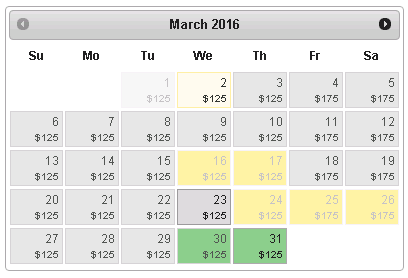
Unfortunately, manipulating date cells using .text() and .html() functions breaks the datepicker functionality. See following demo and try to use the datepicker. Notice that when you select a date (i) the custom text is gone (ii) changing months destroys the calendar and lands you on "undefined NaN" month:
https://jsfiddle.net/salman/aLdx4L0y/
Is there a solution?
3 Answers
Answers 1
Well, you can monkey-patch jQuery UI and risk breaking the code with newer versions or you can use documented callbacks to add custom data-* attributes to datepicker and display them using CSS pseudo elements:
$(function() { $("#datepicker").datepicker({ beforeShow: addCustomInformation, //---^----------- if closed by default (when you're using <input>) beforeShowDay: function(date) { return [true, date.getDay() === 5 || date.getDay() === 6 ? "weekend" : "weekday"]; }, onChangeMonthYear: addCustomInformation, onSelect: addCustomInformation }); addCustomInformation(); // if open by default (when you're using <div>) }); function addCustomInformation() { setTimeout(function() { $(".ui-datepicker-calendar td").filter(function() { var date = $(this).text(); return /\d/.test(date); }).find("a").attr('data-custom', 110); // Add custom data here }, 0) }.ui-datepicker .weekend .ui-state-default { background: #FEA; } .ui-datepicker-calendar td a[data-custom] { position: relative; padding-bottom: 10px; } .ui-datepicker-calendar td a[data-custom]::after { /*STYLE THE CUSTOME DATA HERE*/ content: '$' attr(data-custom); display: block; font-size: small; }<script src="//code.jquery.com/jquery-1.9.1.min.js"></script> <link href="//code.jquery.com/ui/1.9.2/themes/smoothness/jquery-ui.css" rel="stylesheet" /> <script src="//code.jquery.com/ui/1.9.2/jquery-ui.min.js"></script> <input id="datepicker">Here's an updated JSFiddle
Side note: I'm not sure which functionality is broke in your demo, but since this solution is using documented callbacks and CSS, I believe it's less likely to break anything in future than monkey patching
Answers 2
Since the jQuery UI datapicker is pretty monolithic it is difficult to enhance cleanly.
I would go with monkey-patching one of its internal functions, namely _generateHTML.
$.datepicker._generateHTML = (function () { var realGenerateHtml = $.datepicker._generateHTML; return function (instance) { var html = realGenerateHtml.apply(this, arguments), $temp; if ( instance.input.is(".datepicker-price") ) { $temp = $("<table></table>").append(html); $temp.find(".ui-datepicker-calendar td a").each(function () { var yy = $(this).parent().data("year"), mm = $(this).parent().data("month"), dd = +$(this).text(); $(this).append("<br><small class='price'>$100</small>"); }); html = $temp[0].innerHTML; } return html; }; })(); $(function() { $("#datepicker").datepicker(); });.ui-datepicker .weekend .ui-state-default { background: #FEA; } .price { color: blue; }<link href="https://code.jquery.com/ui/1.9.2/themes/smoothness/jquery-ui.css" rel="stylesheet"/> <script src="https://ajax.googleapis.com/ajax/libs/jquery/1.9.1/jquery.min.js"></script> <script src="https://code.jquery.com/ui/1.9.2/jquery-ui.min.js"></script> <div id="datepicker" class="datepicker-price"></div>Answers 3
Add this code into your JS...
$('#DatePicker').datepicker({ changeMonth: true, changeYear: true, minDate: 0, onSelect: function (date, dp) { updateDatePickerCells(); }, onChangeMonthYear: function(month, year, dp) { updateDatePickerCells(); }, beforeShow: function(elem, dp) { updateDatePickerCells(); }}); updateDatePickerCells(); function updateDatePickerCells(dp) { setTimeout(function () { var cellContents = {1: '20', 15: '60', 28: '$99.99'}; $('.ui-datepicker td > *').each(function (idx, elem) { var value = '$125';//cellContents[idx + 1] || 0; var className = 'datepicker-content-' + CryptoJS.MD5(value).toString(); if(value == 0) addCSSRule('.ui-datepicker td a.' + className + ':after {content: "\\a0";}'); // else addCSSRule('.ui-datepicker td a.' + className + ':after {content: "' + value + '";}'); $(this).addClass(className); }); }, 0); } var dynamicCSSRules = []; function addCSSRule(rule) { if ($.inArray(rule, dynamicCSSRules) == -1) { $('head').append('<style>' + rule + '</style>'); dynamicCSSRules.push(rule); } } Demo link... http://jsfiddle.net/pratikgavas/e3uu9/131/

0 comments:
Post a Comment