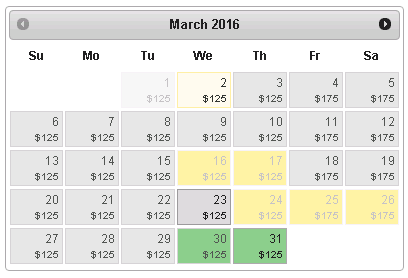
My requirement is to allow user to select multiple date ranges in a single calendar, also previous date selections should not be allowed to change. How is this possible? Below is the code and link to fiddle
HTML
<p>from</p> <input type="text" class="spromotion-input-inbody spromotion-input-datepick" id="sproid-bookingcondition-datefrom"> <p>to</p> <input type="text" class="spromotion-input-inbody spromotion-input-datepick" id="sproid-bookingcondition-dateto"> SCRIPT
$( function() { var dateFormat = "mm/dd/yy", from = $( "#sproid-bookingcondition-datefrom" ) .datepicker({ defaultDate: "+1w", changeMonth: true, numberOfMonths: 1 }) .on( "change", function() { to.datepicker( "option", "minDate", getDate( this ) ); }), to = $( "#sproid-bookingcondition-dateto" ).datepicker({ defaultDate: "+1w", changeMonth: true, numberOfMonths: 1 }) .on( "change", function() { from.datepicker( "option", "maxDate", getDate( this ) ); }); function getDate( element ) { var date; try { date = $.datepicker.parseDate( dateFormat, element.value ); } catch( error ) { date = null; } return date; } } ); 5 Answers
Answers 1
Please check this might solve your issue.
$(function() { $('input[name="daterange"]').daterangepicker(); $('input[name="daterange"]').change(function(){ $(this).val(); console.log($(this).val()); }); });<html> <head> <!-- Include Required Prerequisites --> <script type="text/javascript" src="//cdn.jsdelivr.net/jquery/1/jquery.min.js"></script> <script type="text/javascript" src="//cdn.jsdelivr.net/momentjs/latest/moment.min.js"></script> <link rel="stylesheet" type="text/css" href="//cdn.jsdelivr.net/bootstrap/3/css/bootstrap.css" /> <!-- Include Date Range Picker --> <script type="text/javascript" src="//cdn.jsdelivr.net/bootstrap.daterangepicker/2/daterangepicker.js"></script> <link rel="stylesheet" type="text/css" href="//cdn.jsdelivr.net/bootstrap.daterangepicker/2/daterangepicker.css" /> </head> <body> <input class="pull-right" type="text" name="daterange" value="01/15/2020 - 02/15/2010"> </body> </html>Answers 2
I think this Multi datepicker will help you to solve your problem.
$('#mdp-demo').multiDatesPicker();<script src="https://ajax.googleapis.com/ajax/libs/jquery/2.1.1/jquery.min.js"></script> <link href="https://cdn.rawgit.com/dubrox/Multiple-Dates-Picker-for-jQuery-UI/master/jquery-ui.multidatespicker.css" rel="stylesheet"/> <link href="https://code.jquery.com/ui/1.12.1/themes/pepper-grinder/jquery-ui.css" rel="stylesheet"/> <script src="https://code.jquery.com/ui/1.12.1/jquery-ui.min.js"></script> <script src="https://cdn.rawgit.com/dubrox/Multiple-Dates-Picker-for-jQuery-UI/master/jquery-ui.multidatespicker.js"></script> <div id="mdp-demo"></div>Answers 3
Unfortunately this is not something the datepicker plugin is able to do out of the box. You will need some custom JavaScript to enable this.
I found a way which gets close to what you want using the onSelect and beforeShowDay events. It maintains its own array of selected dates, so unfortunately doesn't integrate with a textbox showing the current date, etc. I'm just using it as an inline control, and I can then query the array for the currently selected dates.
The only thing you would need to alter about this code is grouping every two dates into ranges, but there are multiple ways to do that depending on your desired UX. Personally, I would just group every two dates as a range in the order the user selects. Then if they remove a date from any range, the entire range is removed (that is not coded here, you will need to add that).
Here is my code:
<script> // Maintain array of dates var dates = new Array(); function addDate(date) { if (jQuery.inArray(date, dates) < 0) dates.push(date); } function removeDate(index) { dates.splice(index, 1); } // Adds a date if we don't have it yet, else remove it function addOrRemoveDate(date) { var index = jQuery.inArray(date, dates); if (index >= 0) removeDate(index); else addDate(date); } // Takes a 1-digit number and inserts a zero before it function padNumber(number) { var ret = new String(number); if (ret.length == 1) ret = "0" + ret; return ret; } jQuery(function () { jQuery("#datepicker").datepicker({ onSelect: function (dateText, inst) { addOrRemoveDate(dateText); }, beforeShowDay: function (date) { var year = date.getFullYear(); // months and days are inserted into the array in the form, e.g "01/01/2009", but here the format is "1/1/2009" var month = padNumber(date.getMonth() + 1); var day = padNumber(date.getDate()); // This depends on the datepicker's date format var dateString = month + "/" + day + "/" + year; var gotDate = jQuery.inArray(dateString, dates); if (gotDate >= 0) { // Enable date so it can be deselected. Set style to be highlighted return [true, "ui-state-highlight"]; } // Dates not in the array are left enabled, but with no extra style return [true, ""]; } }); }); </script> And here is a fiddle: http://jsfiddle.net/gydL0epa/
Answers 4
As others already suggested, MultiDatesPicker comes close to what your need. It already allows single range selection, so you could fork that plugin and edit/improve it to allow multiple ranges selection.
A quick and dirty solution would be to comment out the line where the array of selected dates gets reset.
Answers 5
try this
<!DOCTYPE html> <html> <head> <title></title> <meta charset="utf-8" /> <script src="Scripts/jquery-1.11.1.js"></script> <script src="Scripts/jquery-ui-1.11.1.js"></script> <script src="Scripts/jquery-ui.multidatespicker.js"></script> <link href="css/jquery-ui.css" rel="stylesheet" /> <link href="css/jquery-ui.structure.css" rel="stylesheet" /> <link href="css/jquery-ui.theme.css" rel="stylesheet" /> <link href="css/pepper-ginder-custom.css" rel="stylesheet" /> <link href="css/prettify.css" rel="stylesheet" /> </head> <body> <input type="text" id="fromDate" /> <script> $(function () { $('#fromDate').multiDatesPicker(); }); </script> </body> </html> you can download the js file from the link https://sourceforge.net/projects/multidatespickr/