Showing posts with label ckeditor. Show all posts

Monday, August 6, 2018

Editing the ckeditor config.js has no impact

Leave a Comment

I changed my CKeditor config.js file to include all the buttons possible to this:

CKEDITOR.editorConfig = function( config ) {     config.toolbarGroups = [         { name: 'document', groups: [ 'mode', 'document', 'doctools' ] },         { name: 'clipboard', groups: [ 'clipboard', 'undo' ] },         { name: 'editing', groups: [ 'find', 'selection', 'spellchecker', 'editing' ] },         { name: 'forms', groups: [ 'forms' ] },         '/',         { name: 'basicstyles', groups: [ 'basicstyles', 'cleanup' ] },         { name: 'paragraph', groups: [ 'list', 'indent', 'blocks', 'align', 'bidi', 'paragraph' ] },         { name: 'links', groups: [ 'links' ] },         { name: 'insert', groups: [ 'insert' ] },         '/',         { name: 'styles', groups: [ 'styles' ] },         { name: 'colors', groups: [ 'colors' ] },         { name: 'tools', groups: [ 'tools' ] },         { name: 'others', groups: [ 'others' ] },         { name: 'about', groups: [ 'about' ] }     ]; }; 

This config was generated using the CKeditor config generator tool.

After the change was deployed to my server and the page was refreshed using incognito mode in chrome none of the buttons changed.

If I add this code directly in my admin.master then the new button does show.

<script>     jQuery(function() {         CKEDITOR.config.extraPlugins = 'justify';     }); </script> 

Is it possible that I am not using the config.js at all?

2 Answers

Answers 1

There's a Github issue that was posted for this https://github.com/galetahub/ckeditor/pull/433 (a long time ago). Also, a discussion post about unreflected changes when using CKEDITOR.editorConfig here: https://ckeditor.com/old/forums/CKEditor-3.x/config.js-changes-not-reflected

My suggestion:

Try to clear the cache after you change the config. Check the "console" tab in your developpers inspector inside the browser to verify if there's is any errors.

As an alternative you could use the replace() method after destroying the loaded instance inside the instanceReady event callback like :

CKEDITOR.instances.editor1.on("instanceReady", function(event) {   CKEDITOR.instances.editor1.destroy();    CKEDITOR.replace('editor1', {     toolbarGroups   }); }); 

Working demo fiddle.

Answers 2

I had this same problem and I had to delete the browser data. In Chrome you can select a time range. At first, I selected the last hour and this didn't work. Then I selected all times and it did.
Read More

Saturday, June 16, 2018

Laravel 5.5 and CKEditor Options

Leave a Comment

I want to use some of the optional extras, specifically video embedding, in CKEditor.

I have downloaded the entire thing to ckeditor in the public area, and in the plugins directory there is the video.

I start with the CDN of CKeditor:

<script src="//cdn.ckeditor.com/4.7.3/full-all/ckeditor.js"></script> 

and then I add the option for the video plugin:

<script>  CKEDITOR.plugins.addExternal( 'video', '{{ public_path('\ckeditor\plugins\video\ ') }}', 'video.js' ); </script> 

(The video.js actually is in a subdirectory dialogs which I have tried as well).

I can see the CKEditor which appears on my page but no video button.

Anyone any ideas please?

1 Answers

Answers 1

First of all, you need to upload the contents of the plugin archive to any folder on your website. Although, it is a good idea to name the folder so that you knew it holds CKEditor plugins. Let’s name it as ckeditor/plugins for the sake of our example. You should end up with the following path then:

ckeditor/plugins/jsplus_image_editor 

Now, we need to tell CKEditor to load the plugin from the above folder. Add the following code to your HTML code above the line where CKEditor replaces the standard control:

<textarea name="editor1"></textarea> ... <script> CKEDITOR.plugins.addExternal( 'yourpluginname',  '/ckeditor/plugins/yourpluginname', 'plugin.js' ); CKEDITOR.replace('editor1'); ... </script> 

Normally you install plugins trough the config.js but since you are using a cdn we need to replace the config. Update the above replace with the following code:

CKEDITOR.replace('editor1', { customConfig: '/ckeditor/custom_config.js'}); 

make the above mentioned custom_config.js and place the following code CKEDITOR.editorConfig = function( config ) {

CKEDITOR.editorConfig = function( config ) {  config.language = 'en';  config.extraPlugins = 'PLUGINNAME';  config.toolbar = 'custom'; config.toolbar_custom = [     { name: 'clipboard', groups: [ 'clipboard', 'undo' ], items: [ 'Cut', 'Copy', 'Paste', 'PasteText', 'PasteFromWord', '-', 'Undo', 'Redo' ] },     { name: 'editing', groups: [ 'find', 'selection', 'spellchecker' ], items: [ 'Scayt' ] },     { name: 'links', items: [ 'Link', 'Unlink', 'Anchor' ] },     { name: 'insert', items: [ 'Image', 'Table', 'HorizontalRule', 'SpecialChar' ] },     { name: 'tools', items: [ 'Maximize' ] },     { name: 'document', groups: [ 'mode', 'document', 'doctools' ], items: [ 'Source' ] },     { name: 'others', items: [ '-' ] },     '/',     { name: 'basicstyles', groups: [ 'basicstyles', 'cleanup' ], items: [ 'Bold', 'Italic', 'Strike', '-', 'RemoveFormat' ] },     { name: 'paragraph', groups: [ 'list', 'indent', 'blocks', 'align', 'bidi' ], items: [ 'NumberedList', 'BulletedList', '-', 'Outdent', 'Indent', '-', 'Blockquote' ] },     { name: 'styles', items: [ 'Styles', 'Format' ] },     { name: 'about', items: [ 'About' ] },     { name : 'new_group', items: ['PLUGINNAME'] } ];} 

hope this helps!

Read More

Saturday, October 21, 2017

How to enable CORS for angularjs project running using gulp serve

Leave a Comment

I have an Angularjs project. I build it using gulp serve. I,m using ckeditor to uploade a file on remote server and i get this error:

Permission denied to access property "CKEDITOR" on cross-origin object 

my gulp server.js file is as below

'use strict';   var path = require('path');  var gulp = require('gulp');  var conf = require('./conf');  var browserSync = require('browser-sync');  var browserSyncSpa = require('browser-sync-spa');  var util = require('util');  var proxyMiddleware = require('http-proxy-middleware');   function  browserSyncInit(baseDir, browser) {  browser = browser === undefined ? 'default' : browser;  var routes = null;  if(baseDir === conf.paths.src || (util.isArray(baseDir) &&   baseDir.indexOf(conf.paths.src) !== -1)) {     routes = {       '/bower_components': 'bower_components'     };  }  var server = {    baseDir: baseDir,    middleware: function (req, res, next) {    res.setHeader('Access-Control-Allow-Origin', '*');    res.setHeader('Access-Control-Allow-Headers', '*');    res.setHeader('Access-Control-Allow-Methods', 'GET,OPTIONS, POST, PUT');    res.setHeader('Access-Control-Allow-Credentials', 'GET,OPTIONS, POST, PUT');   next(); }, routes: routes };   browserSync.instance = browserSync.init({    startPath: '/',    server: server,    browser: browser,    ghostMode: false  }); }   browserSync.use(browserSyncSpa({     selector: '[ng-app]'// Only needed for angular apps   }));   gulp.task('serve', ['watch'], function () {     browserSyncInit([path.join(conf.paths.tmp, '/serve'), conf.paths.src]);     connect.server(server);  }); gulp.task('serve:dist', ['build'], function () {     browserSyncInit(conf.paths.dist);     connect.server(server);  });  gulp.task('serve:e2e', ['inject'], function () {  browserSyncInit([conf.paths.tmp + '/serve', conf.paths.src], []);  connect.server(server);  });  gulp.task('serve:e2e-dist', ['build'], function () {    browserSyncInit(conf.paths.dist, []);    connect.server(server);   }); 

but "Access-Control-Allow-Origin', '*'" did not set in header and i still get that error!

when page load Http response and request headers are as below:

response headers:

Access-Control-Allow-Origin * Access-Control-Allow-Headers    * Access-Control-Allow-Methods    GET,OPTIONS, POST, PUT Access-Control-Allow-Credentials    true Accept-Ranges   bytes Cache-Control   public, max-age=0 Last-Modified   Wed, 11 Oct 2017 05:56:16 GMT ETag    W/"91a-15f0a01475b" Date    Sat, 14 Oct 2017 05:03:02 GMT Connection  keep-alive 

request headers :

Host    localhost:3000 User-Agent  Mozilla/5.0 (X11; Ubuntu; Linu…) Gecko/20100101 Firefox/56.0 Accept  application/json, text/plain, */* Accept-Language en-US,en;q=0.5 Accept-Encoding gzip, deflate Referer http://localhost:3000/ Cookie  language=fa; io=qkk4hCbXxaQ78a…FxfKICyH9dwHZOr5m2aJJ89Z0DS2H Connection  keep-alive If-Modified-Since   Wed, 11 Oct 2017 05:56:16 GMT If-None-Match   W/"91a-15f0a01475b" 

Thanks :)

I also used CORS Everywhere Firefox add-on. but it did not work

0 Answers

Read More

Wednesday, June 21, 2017

How to force CKEditor to preserve <br> tags

Leave a Comment

I am using the latest version of CKEditor (4.7 to date) with the standard package, and I want to be able to force it to preserve line break elements (<br>).

I have attempted to use the following config, without success:

CKEDITOR.replace('ck', {     allowedContent: true,     enterMode: CKEDITOR.ENTER_BR }); 

As you can see in this jsfiddle, when you open Source mode, <br> tags have been replaced with a &nbsp;.

How do you achieve that?

2 Answers

Answers 1

A workaround (or at least partial workaround) was given on this CKEditor ticket, which forces the CKEditor to preserve <br> tags:

editor.on( 'pluginsLoaded', function( evt ){     evt.editor.dataProcessor.dataFilter.addRules({         elements :{             br : function( element ) {                           //if next element is BR or <!--cke_br_comment-->, ignore it.                 if( element && element.next && ( element.next.name == 'br' || element.next.value == 'cke_br_comment' ) ){                     return;                 }else {                     var comment = new CKEDITOR.htmlParser.comment( 'cke_br_comment' );                     comment.insertAfter( element );                  }             }         }     });  evt.editor.dataProcessor.htmlFilter.addRules({     comment : function( value, node ) {         if( value.indexOf('cke_br_comment') >= 0 ) {             return false;         }     } }); 

Updated fiddle here.

Answers 2

The developers of CKeditor have reportedly told that br to nbsp auto conversion is not an issue but CKeditors ways of normalizing things.

It wont create any problem for you. So, you need not worry about your br tags being converted to nbsp Go through the following link for more.

If you wish to remove the &nbsp from the source code, One way if to include the following :

 basicEntities: false,  entities_additional: 'lt,gt,amp,apos,quot' 
Read More

Monday, June 5, 2017

Ckeditor : stylesSet not working when i set a custom allowedContent

Leave a Comment

In my Ckeditor config i have a custom allowedContent. I don't use allowedContent:true because i don't want to allow the style attribute in the span tags

So this is my allowedContent

allowedContent : 'span[class]; a[!href](*);  caption; div; em; h1; h2; h3; h4; h5; h6; hr; i; img; li;  ol; p[*]{*}; pre; strong; sub; sup; table; thead; tbody; tfoot; td; th; tr; tt; u; ul; dl; dt; dd; iframe;' 

With this configuration, the style attributes are not allowed anymore on the span tags

The problem is with my stylesSets :

stylesSet:       - { name: "style 1", element: ['div', 'p', 'a', 'span'], attributes: { class:"display_only_in_popup" } }       - { name: "style 2", element: ['div', 'p', 'a', 'span'], attributes: { class:"blockquote" } }       - { name: "style 3", element: ['div', 'p', 'a', 'span'], attributes: { class:"note" } }       - { name: "style 4", element: ['p', 'span'], attributes: { class:"highlight" } }       - { name: "style 5", element: 'span', attributes: { class:"visuallyhidden" } } 

Before, when i had allowedContent:true, i was able to see and use all of my 5 stylesets, but now, for some reason, i only see the "style 5" in the Styles field

Is it possible to keep my 5 stylesets without using allowedContent:true?

Thanks a lot

1 Answers

Answers 1

It seems that your 5 stylesets all use the class attribute, but your allowedContent rule only allows the class attribute for the span elements.

I suggest changing the allowedContent rule to:

allowedContent : '*[class]; a[!href](*);  caption; div; em; h1; h2; h3; h4; h5; h6; hr; i; img; li;  ol; p[*]{*}; pre; strong; sub; sup; table; thead; tbody; tfoot; td; th; tr; tt; u; ul; dl; dt; dd; iframe;' 

or if you want to be more explicit:

allowedContent : 'div[class]; p[class]; a[class]; span[class]; a[!href](*);  caption; div; em; h1; h2; h3; h4; h5; h6; hr; i; img; li;  ol; p[*]{*}; pre; strong; sub; sup; table; thead; tbody; tfoot; td; th; tr; tt; u; ul; dl; dt; dd; iframe;' 

Please refer to the documentation here.

Note: I was not able to test this code, please let me know in the comments if it does the job.

Read More

Monday, January 16, 2017

CKEditor after copy+pasting URL, new text on next line is blue and underlined

Leave a Comment

We use CKEditor with auto-link-plugin to make URLs clickable.

After copy+pasting the URL, the link is blue and underlined: nice.

Unfortunately new text on the next lines is blue and underlined, too.

Is there a way to disable this?

1 Answers

Answers 1

It is common behavior with most of the editors. Before pasting any link give an extra space, and use left arrow to come back to right place and paste link and use right arrow to move extra space and continue. See if this helps.

Read More

Friday, July 22, 2016

Restore caret position after initializing Shared CKEditor?

Leave a Comment

When a user clicks on a contenteditable element inside my page-builder, I trigger a click-event that initialises a Shared CKEditor instance.

The problem is that I lose the caret-position and CKEditor places this cursor to the beginning of the text?

I would like to restore the caret position to the same position the user clicked before initialization. This is mostly in the middle of the text.

To achieve this I need two steps:

  1. Get the caret position before initializing the CKEditor
  2. Use the caret position in an CKEditor 'instanceReady' event and place the pointer back.

I have found this piece of code (from here):

editor.focus(); var selection = editor.getSelection(); var range = selection.getRanges()[0]; var pCon = range.startContainer.getAscendant({p:2},true); //getAscendant('p',true); var newRange = new CKEDITOR.dom.range(range.document); newRange.moveToPosition(pCon, CKEDITOR.POSITION_BEFORE_START); newRange.select(); 

But this only works when the editor is already instantiated. In my situation I start without an editor.

Any way to get this done?

2 Answers

Answers 1

Do you simply want to initialize the editor so the cursor position is where they clicked to start editing?

You can use the selection range and insert a placeholder into the original HTML, before starting the editor.

After starting the editor, find the placeholder in the editor content, remove it, and place the caret there. The placeholder could be as simple as <span class="caret-placeholder"></span>.

Answers 2

With jQuery, you can get the cursor position using:

$('#element').prop("selectionStart"); 

Native JS would be:

document.getElementById('#element').selectionStart; 

(You would need additional code if you have to support IE8 and below.)

On your click event, you need to get the CKEditor instance:

CKEDITOR.instances 

Then you should be able to use your code to set the cursor position.

Read More

Monday, April 11, 2016

Is there a way to add button to link plugin of CKEditor on the run?

Leave a Comment

There are ways to add function to the toolbar for CKEditor on the run. For example,

http://stackoverflow.com/a/25443349/1273587

How to add a custom button to the toolbar that calls a JavaScript function?

And there are ways to add new choice to existing link plugin of CKEditor

https://ssdtutorials.com/courses/ckeditor-internal-page-link

http://blog.xoundboy.com/?p=393

Is there a way to add button to existing link plugin on the run? I have a button to add to the link plugin that depends on user data and therefore the button must be added on the run.

1 Answers

Answers 1

I have used the internpage plugin and changed the source to support dynamically changing the list of links that appears. In the code at the link above you see they define a setup function, which is called every time the dialog is opened and the select shown:

setup : function (f) {     this.allowOnChange = false;     this.setValue(f.url ? f.url.url : '');     this.allowOnChange = true; } 

All you need to do is change or refresh the list of items in the select using the available methods:

  • this.clear() - removes all items in the select
  • this.remove(index) - removes an item in the select
  • this.add(text,url) - adds an item in the select
  • this.getElement() - gets the actual select element

Note that this.items remains unchanged when using these methods so you can use that property to automatically refresh the select.

Here is a working demo: https://jsfiddle.net/ud4csxyc/

Press the red button a few times and you will see the list of items is changed.

I hope it's what you wanted.

Read More

Sunday, March 6, 2016

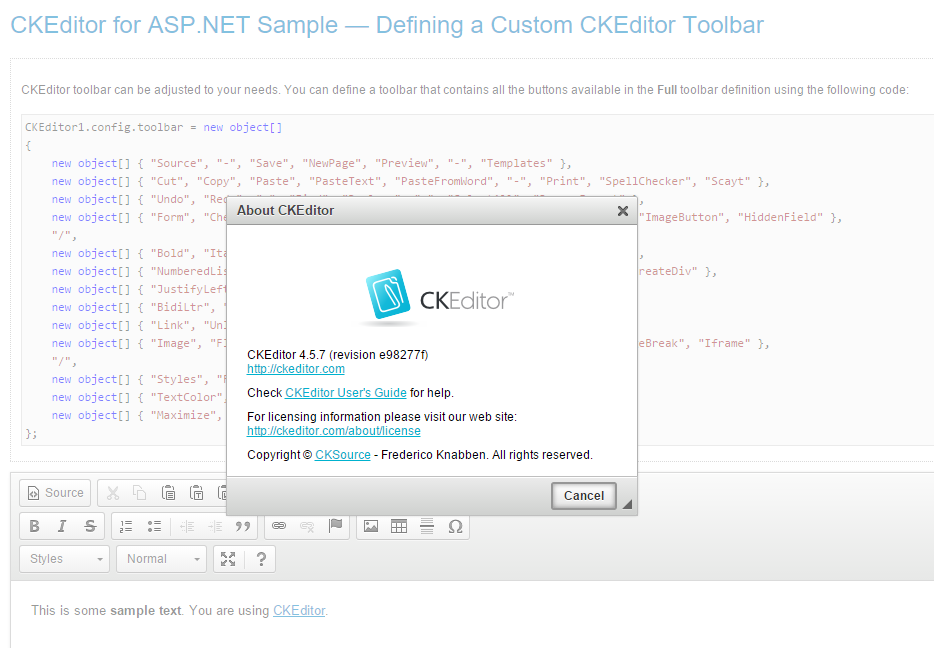
how to use CKEditor 4.5.7 in a ASP.net project

Leave a Comment

i am highly confused why i cannot intergrate the latest version of CKEditor in a ASP.net website. Which coding technologies is the 4.5.7 version comapible with (ie: php/jsp/ect)?

Isnt CKEditor for any HTML page?

Currently the latest ASP.net version is 3.6 which lacks support from many new plugins.

2 Answers

Answers 1

You add CKeditor.js javascript to your pages and call CKEDITOR.replace('id-of-textarea-here');

You don't need any ASP.NET specific packages.

Answers 2

I made a quick test:

  • download and decompress the .Net package from CKEdit site (3.6);
  • download the latest version of the javascript files (4.5.7);
  • check that the samples provided with the .Net package work fine;
  • rename the ckeditor folder in the solution and copy the new one downloaded from the site;
  • clean the solution and rebuild the projet, and check if it works fine;
  • replace the occurrences of the "kama" skin to the newer "moono" as the former one is replaced by the other in the 4.x version;
  • like this, it seems to be working just fine

Do you have specific issues I can look into?

HTH

enter image description here

Read More