Showing posts with label gulp. Show all posts

Tuesday, October 9, 2018

Gulp build task failing inside docker

Leave a Comment

I have a simple Hapi.js Node API. Since I have used TypeScript to write the API, I wrote Gulp task for transpiling the code. My API works fine if I run it directly in my main machine but I get the following error when I try to run it inside Docker:

Error: enter image description here

Docker compose command:

docker-compose -f docker-compose.dev.yml up -d --build 

Here is my code: ./gulpfile:

'use strict';  const gulp = require('gulp'); const rimraf = require('gulp-rimraf'); const tslint = require('gulp-tslint'); const mocha = require('gulp-mocha'); const shell = require('gulp-shell'); const env = require('gulp-env');  /**  * Remove build directory.  */ gulp.task('clean', function () {   return gulp.src(outDir, { read: false })     .pipe(rimraf()); });  /**  * Lint all custom TypeScript files.  */ gulp.task('tslint', () => {   return gulp.src('src/**/*.ts')     .pipe(tslint({       formatter: 'prose'     }))     .pipe(tslint.report()); });  /**  * Compile TypeScript.  */  function compileTS(args, cb) {   return exec(tscCmd + args, (err, stdout, stderr) => {     console.log(stdout);      if (stderr) {       console.log(stderr);     }     cb(err);   }); }  gulp.task('compile', shell.task([   'npm run tsc', ]))  /**  * Watch for changes in TypeScript  */ gulp.task('watch', shell.task([   'npm run tsc-watch', ])) /**  * Copy config files  */ gulp.task('configs', (cb) => {   return gulp.src("src/configurations/*.json")     .pipe(gulp.dest('./build/src/configurations')); });  /**  * Build the project.  */ gulp.task('build', ['tslint', 'compile', 'configs'], () => {   console.log('Building the project ...'); });  /**  * Run tests.  */ gulp.task('test', ['build'], (cb) => {   const envs = env.set({     NODE_ENV: 'test'   });    gulp.src(['build/test/**/*.js'])     .pipe(envs)     .pipe(mocha({ exit: true }))     .once('error', (error) => {       console.log(error);       process.exit(1);     }); });  gulp.task('default', ['build']); 

./.docker/dev.dockerfile:

FROM node:latest  LABEL author="Saurabh Palatkar"  # create a specific user to run this container # RUN adduser -S -D user-app  # add files to container ADD . /app  # specify the working directory WORKDIR app RUN chmod -R 777 . RUN npm i gulp --g # build process RUN npm install # RUN ln -s /usr/bin/nodejs /usr/bin/node RUN npm run build # RUN npm prune --production EXPOSE 8080 # run application CMD ["npm", "start"] 

./docker-compose.dev.yml:

version: "3.4"  services:   api:     image: node-api     build:       context: .       dockerfile: .docker/dev.dockerfile     environment:       PORT: 8080       MONGO_URL: mongodb:27017       NODE_ENV: development     ports:       - "8080:8080"     links:       - database    database:     image: mongo:latest     ports:       - "27017:27017" 

What I am missing here?

1 Answers

Answers 1

Each Dockerfile's command is executed in a separated subcontainer, so RUN npm run build can't find the gulp executable. Try to edit you Dockerfile to execute npm-related commands in the same subcontainer:

RUN npm i gulp --g && npm install && ln -s /usr/bin/nodejs /usr/bin/node && npm prune --production 

Maybe you also need to copy app files into the container.

Try adding:

COPY . . 

just before CMD ["npm", "start"] in your Dockerfile

Read More

Thursday, August 23, 2018

How to test my jQuery plugin with Gulp, Jasmine and NodeJS?

Leave a Comment

I created a simple jQuery plugin, which modifies the HTML according to some simple rules, using jQuery. Now I need to test that it works. I use Gulp for build automation. I decided to use Jasmine for unit testing. My question is how do I run my plugin from the test.js and validate the result? I have node.js installed at the build server.

3 Answers

Answers 1

Your best bet is to use the gulp-jasmine-browser npm plugin. This will allow you to run your tests in a normal browser, or headless browser. The gulp task you need to create is something like this:

let gulp = require('gulp'); let jasmineBrowser = require('gulp-jasmine-browser');  gulp.task('jasmine', () => {   return gulp.src(['src/**/*.js', 'spec/**/*_spec.js'])     .pipe(jasmineBrowser.specRunner())     .pipe(jasmineBrowser.server({port: 8888})); }); 

Or, if you want to run in a headless server, change the last line to this:

    .pipe(jasmineBrowser.headless({driver: 'chrome'})); 

Answers 2

Solution

Use jsdom to emulate a browser within your Jasmine unit tests.

Details

jsdom is "a pure-JavaScript implementation of many web standards...for use with Node.js...to emulate enough of a subset of a web browser to be useful for testing and scraping real-world web applications".

jsdom has become the de facto standard for emulating a browser within Node.js. It has over 2 million weekly npm downloads and, among other things, is included automatically as the default test environment in Jest.

jsdom provides the window needed to initialize jQuery, load a jQuery plugin, and unit test it using Jasmine from within Node.js as if it were running in a browser:


colorize-spec.js

const { JSDOM } = require('jsdom'); const { window } = new JSDOM(); global.$ = require('jquery')(window); require('../src/colorize');  describe('colorize', () => {    const div = $('<div/>');   const settings = { 30: 'highest', 20: 'middle', 10: 'lowest' };    it('should set the applicable class', () => {     div.text('35').colorize(settings);     expect(div.attr('class')).toBe('highest');      div.text('25').colorize(settings);     expect(div.attr('class')).toBe('middle');      div.text('15').colorize(settings);     expect(div.attr('class')).toBe('lowest');      div.text('5').colorize(settings);     expect(div.attr('class')).toBe('');   });  }); 

I created a pull request that includes jsdom as a dev dependency, bumps node to v8 in Travis CI, and includes this initial unit test. It passes the build checks (including this unit test) and is ready to merge.

Answers 3

Testing it with gulp and Karma.. Assuming you have install all the gulp files and their dependencies. Make your gulp task

Generate your karma conf file..

karma init karma.conf.js  gulp.task('tests', function (done) {    return karma.start({    configFile: __dirname + '/karma.conf.js',    singleRun: false   }, done); });  gulp.task('default', ['tests']); 

Edit conf file as per your file path

files: [    '<PATH-TO-TESTS>/*.js', '<PATH-TO-JQUERY>/jquery.js', '<PATH-TO-PLUGIN>/<PLUGIN-NAME>.js',  {    pattern:  '<PATH-TO-TESTS>/*.html',    watched:  true,    served:   true,    included: false  } ] 

Write your test js

describe('myPlugin Initialisation', function() {  var el, myPlugin;  beforeEach(function(){     jasmine.getFixtures().fixturesPath = 'base/Tests';     loadFixtures('Template.html');     el = $('#myPlugin-Test');     myPlugin = el.myPlugin().data('myPlugin'); }); }); 

The tests themselves are also a simple structure and jasmine users will be familiar once again:

 `it('Should add the class "myPlugin" to the element', function() {      expect(el.hasClass('myPlugin')).toBe(true);  });` 

All you need to do now is run:

 `gulp tests` 

you can refer this url https://earthware.co.uk/blog/using-gulp-and-karma-to-test-a-jquery-plugin/

Read More

Wednesday, June 20, 2018

E2E test orchestration with Gulp on Windows: Unable to kill process(es)

Leave a Comment

What I'm trying to achieve

This question is related to another one I recently closed with a horrible hack™.

I am trying to write a script that can be used a step in a context of a CI/build pipeline.

The script is supposed to run Protractor-based end-to-end tests for our Angular single-page application (SPA).

The script is required to do the following actions (in order):

  1. run a .NET Core microservice called "App"
  2. run a .NET Core microservice called "Web"
  3. run the SPA
  4. run a command that executes Protractor tests
  5. after steps 4 is complete (either successfully or with an error), terminate processes created on steps 1-3. This is absolutely necessary otherwise the build will never finish in CI and/or there will be zombie Web/App/SPA processes which will break future build pipeline execution.

The issue

I haven't started working on step 4 ("e2e test") because I really want to make sure that the step 5 ("cleanup") works as intended.

As you could guess (right), the cleanup step does not work. Specifically, the processes "App" and "Web" do not get killed for some reason and continue running.

BTW, I made sure that my gulp script is executed with elevated (admin) privileges.

Issue - UPDATE 1

I have just discovered the direct cause of the issue (I think), I don't know what's the root cause though. There are 5 processes launched instead of 1 as I was expecting. E.g., for App process the following processes are observed in Process manager:

{                             "id": 14840,                "binary": "cmd.exe",        "title": "Console"        },                          {                             "id": 12600,                "binary": "dotnet.exe",     "title": "Console"        },                          {                             "id": 12976,                "binary": "cmd.exe",        "title": "Console"        },                          {                             "id": 5492,                 "binary": "cmd.exe",        "title": "Console"        },                          {                             "id": 2636,                 "binary": "App.exe",   "title": "Console"        }                           

Similarly, five processes rather than one are created for Web service:

{                             "id": 13264,                "binary": "cmd.exe",        "title": "Console"        },                          {                             "id": 1900,                 "binary": "dotnet.exe",     "title": "Console"        },                          {                             "id": 4668,                 "binary": "cmd.exe",        "title": "Console"        },                          {                             "id": 15520,                "binary": "Web.exe",   "title": "Console"        },                          {                             "id": 7516,                 "binary": "cmd.exe",        "title": "Console"        }                           

How I am doing that

Basically, the work horse here is the runCmdAndListen() function that spins off the processes by running the cmd provided as an argument. When the function launches a process be the means of Node.js's exec(), it is then pushed to the createdProcesses array for tracking.

The Gulp step called CLEANUP = "cleanup" is responsible for iterating through the createdProcesses and invoking .kill('SIGTERM') on each of them, which is supposed to kill all the processes created earlier.

gulpfile.js (Gulp task script)

Imports and constants

const gulp = require('gulp'); const exec = require('child_process').exec; const path = require('path');  const RUN_APP = `run-app`; const RUN_WEB = `run-web`; const RUN_SPA = `run-spa`; const CLEANUP = `cleanup`;  const appDirectory = path.join(`..`, `App`); const webDirectory = path.join(`..`, `Web`); const spaDirectory = path.join(`.`);  const createdProcesses = []; 

runCmdAndListen()

/**  * Runs a command and taps on `stdout` waiting for a `resolvePhrase` if provided.  * @param {*} name Title of the process to use in console output.  * @param {*} command Command to execute.  * @param {*} cwd Command working directory.  * @param {*} env Command environment parameters.  * @param {*} resolvePhrase Phrase to wait for in `stdout` and resolve on.  * @param {*} rejectOnError Flag showing whether to reject on a message in `stderr` or not.  */ function runCmdAndListen(name, command, cwd, env, resolvePhrase, rejectOnError) {    const options = { cwd };   if (env) options.env = env;    return new Promise((resolve, reject) => {     const newProcess = exec(command, options);      console.info(`Adding a running process with id ${newProcess.pid}`);     createdProcesses.push({ childProcess: newProcess, isRunning: true });      newProcess.on('exit', () => {       createdProcesses         .find(({ childProcess, _ }) => childProcess.pid === newProcess.pid)         .isRunning = false;     });      newProcess.stdout       .on(`data`, chunk => {         if (resolvePhrase && chunk.toString().indexOf(resolvePhrase) >= 0) {           console.info(`RESOLVED ${name}/${resolvePhrase}`);           resolve();         }       });      newProcess.stderr       .on(`data`, chunk => {         if (rejectOnError) reject(chunk);       });      if (!resolvePhrase) {       console.info(`RESOLVED ${name}`);       resolve();     }   }); } 

Basic Gulp tasks

gulp.task(RUN_APP, () => runCmdAndListen(   `[App]`,   `dotnet run --no-build --no-dependencies`,   appDirectory,   { 'ASPNETCORE_ENVIRONMENT': `Development` },   `Now listening on:`,   true) );  gulp.task(RUN_WEB, () => runCmdAndListen(   `[Web]`,   `dotnet run --no-build --no-dependencies`,   webDirectory,   { 'ASPNETCORE_ENVIRONMENT': `Development` },   `Now listening on:`,   true) );  gulp.task(RUN_SPA, () => runCmdAndListen(   `[SPA]`,   `npm run start-prodish-for-e2e`,   spaDirectory,   null,   `webpack: Compiled successfully   `,   false) );  gulp.task(CLEANUP, () => {   createdProcesses     .forEach(({ childProcess, isRunning }) => {       console.warn(`Killing child process ${childProcess.pid}`);        // if (isRunning) {       childProcess.kill('SIGTERM');       // }     }); }); 

The orchestrating task

gulp.task(   'e2e',   gulp.series(     gulp.series(       RUN_APP,       RUN_WEB,     ),     RUN_SPA,     CLEANUP,   ),   () => console.info(`All tasks complete`), );  gulp.task('default', gulp.series('e2e')); 

0 Answers

Read More

Friday, February 2, 2018

Babel / Typescript aliases not working properly

Leave a Comment

I have a Typescript environment which i compile using Gulp, tsify, browserify and babelify. I have successfully configured aliases to navigate the project better.

I am trying to import a node module, lets say query-string, into component.ts by doing this:

import * as querystring from 'query-string';

The traceResolution option of tsconfig.json shows me this:

Module name 'query-string' was successfully resolved to '/node_modules/query-string/index.js'

But I'm still getting an error in the console saying:

Error: Cannot find module 'query-string' from '/components/example-component/'

Imagine the project structure like this:

/ |-- node_modules/ | |-- ts/ |    |-- app.ts //this is the main file, it imports component.ts | |-- components/ |    |-- example-component/ |        |-- component.html |        |-- component.ts //attempting to import a node module here | |-- gulpfile.js |-- tsconfig.json |-- .babelrc |-- package.json 

My tsconfig.json file looks like this:

{   "compilerOptions": {     "noImplicitAny": false,     "target": "es2015",     "sourceMap": true,     "baseUrl": "./ts",     "traceResolution": true,     "paths": {       "@components/*": ["../components/*"],       "*": ["../node_modules/*"]     }   } } 

My .babelrc looks like this:

{   "presets": ["es2015"],   "plugins": [     ["module-resolver", {       "cwd": "babelrc",       "root": ["./ts"],       "alias": {         "@components": "./components"       }     }]   ] } 

Here is what actually does work:

  1. importing .ts files using relative paths
  2. importing .ts files using aliases (eg. import '@component/example-component/component.ts')
  3. importing a node module into app.ts

2 Answers

Answers 1

Successfully locating a module's entry point, which is what is correctly happening based on the traceResolution message you provided, is a separate problem from understanding that module.

For TypeScript to understand the module it needs to find a typings file (.d.ts) that describes the module's types.

Looking at the query-string repo, it does not ship with a .d.ts file included, so you will need to pull it in from elsewhere.

It does, however, appear that the typings for query-string are available in the Definitely Typed repo, meaning that you should be able to run npm install --save-dev @types/query-string and the typings will be added to your project.

Answers 2

its not hard use this (I copied it from somewhere else):

Successfully locating a module's entry point, which is what is correctly happening based on the traceResolution message you provided, is a separate problem from understanding that module.

For TypeScript to understand the module it needs to find a typings file (.d.ts) that describes the module's types.

Looking at the query-string repo, it does not ship with a .d.ts file included, so you will need to pull it in from elsewhere.

It does, however, appear that the typings for query-string are available in the Definitely Typed repo, meaning that you should be able to run npm install --save-dev @types/query-string and the typings will be added to your project.

Read More

Monday, January 15, 2018

How to add a custom Gulp Task and a Directive in Ionic Framework

Leave a Comment

I've been asked to work on a fix for our Ionic Project. I have to replace all pixel units with Rem units but I didn't want to go file by file to replace them, instead I found this wich looks like quite a solution but I have almost no idea where I should write this task and Directive

Gulp Task:

gulp.task('build:rem', ['build:sass'], function() {     function replaceWith(match, p1, offset, string) {         return p1 / 16 + 'rem';     }      return gulp.src('./www/index.html')         .pipe(assets({js: false, css: true}))         .pipe(tap(function(file) {             file.contents = new Buffer(file.contents.toString().replace(/([\d.]+)\s*px/g, replaceWith));         }))         .pipe(gulp.dest('./www')); }); 

Directive and its extension:

(function() {     'use strict';     angular.module('App.core')     .directive('style', StyleDirective);      StyleDirective.$inject = ['$timeout'];      function StyleDirective($timeout) {     function pxToRem(el, at) {         if (el.attr('style')) {         at.$set('style', el.attr('style').replace(/([\d.]+)\s*px/g, function(match, p1, offset, value) {             return p1 / 16 + 'rem';         }));         }     }      return {         restrict: 'A',         compile: function(element, attr) {             pxToRem(element, attr);         }     };     } })();  (function() {     'use strict';     angular.module('App.core')     .directive('collectionRepeat', CollectionRepeatDirective);      CollectionRepeatDirective.$inject = ['$timeout'];      function CollectionRepeatDirective($timeout) {     function pxToRem(el, at) {         if (el.attr('style')) {             $timeout(function() {                 at.$set('style', el.attr('style').replace(/([\d.]+)\s*px/g, function(match, p1, offset, value) {                     return p1 / 16 + 'rem';                 }));             });         }     }      return {         restrict: 'A',         multielement: true,         link: {             post: function(scope, element, attr) {                 pxToRem(element, attr);             }         }     };     } })(); 

So that's my question: How do you add a custom Gulp task to your Ionic Enviroment and how to add a directive and its extension.

I'm sorry if my question sounds too lame but I really haven't found an actual way how to do it

Many thanks for your time in advance

1 Answers

Answers 1

I am addressing the root issue of your problem i.e. you need to change the PX to rem so this can be done using the gulp-pxtorem , and at the time of building the application you can add this task and as these changes will be in css only so no need to be using of the Directive.

Sample Task

var pxtorem = require('gulp-pxtorem');  gulp.task('css', function() {     gulp.src('css/**/*.css')         .pipe(pxtorem())         .pipe(gulp.dest('css')); }); 
Read More

Wednesday, January 10, 2018

The following gulp task is not working on windows but working on ubuntu

Leave a Comment

The gulp task

/* Run the npm script npm run buildLsdk using gulp */ gulp.task('sdk', function() {   if (process.cwd() != basePath) {     process.chdir('..');     // console.log(process.cwd());   }   spawn('./node_modules/.bin/lb-sdk', ['server/server.js', './client/src/app/shared/sdk', '-q'], {stdio: 'inherit'}); }); 

I am getting the following stack trace but i cannot debug

Error: spawn ./node_modules/.bin/lb-sdk ENOENT     at exports._errnoException (util.js:1022:11)     at Process.ChildProcess._handle.onexit (internal/child_process.js:193:32)     at onErrorNT (internal/child_process.js:359:16)     at _combinedTickCallback (internal/process/next_tick.js:74:11)     at process._tickCallback (internal/process/next_tick.js:98:9)     at Module.runMain (module.js:607:11)     at run (bootstrap_node.js:420:7)     at startup (bootstrap_node.js:139:9)     at bootstrap_node.js:535:3 

I have all the necessary files in node modules too any help is really appreciated.

More reference on the File use above - https://github.com/rahulrsingh09/loopback-Angular-Starter/blob/master/gulpfile.js

2 Answers

Answers 1

I think it's because lb-sdk.cmd is the file you're supposed to run on windows. when I changed the command to the below the error goes away. Please note the windows style directory slashes are different from linux.

gulp.task('sdk', function() { spawn(   '.\\node_modules\\.bin\\lb-sdk.cmd',   [     '.\\server\\server.js',     '.\\client\\src\\app\\shared\\sdk',     '-q'   ], {stdio: 'inherit'} ); }); 

Answers 2

Can you try using basePath when passing server/server.js and ./client/src/app/shared/sdk. Like for example:

spawn(   './node_modules/.bin/lb-sdk',   [     basePath + '/server/server.js',     basePath + '/client/src/app/shared/sdk',     '-q'   ], {stdio: 'inherit'} ); 
Read More

Saturday, October 21, 2017

How to enable CORS for angularjs project running using gulp serve

Leave a Comment

I have an Angularjs project. I build it using gulp serve. I,m using ckeditor to uploade a file on remote server and i get this error:

Permission denied to access property "CKEDITOR" on cross-origin object 

my gulp server.js file is as below

'use strict';   var path = require('path');  var gulp = require('gulp');  var conf = require('./conf');  var browserSync = require('browser-sync');  var browserSyncSpa = require('browser-sync-spa');  var util = require('util');  var proxyMiddleware = require('http-proxy-middleware');   function  browserSyncInit(baseDir, browser) {  browser = browser === undefined ? 'default' : browser;  var routes = null;  if(baseDir === conf.paths.src || (util.isArray(baseDir) &&   baseDir.indexOf(conf.paths.src) !== -1)) {     routes = {       '/bower_components': 'bower_components'     };  }  var server = {    baseDir: baseDir,    middleware: function (req, res, next) {    res.setHeader('Access-Control-Allow-Origin', '*');    res.setHeader('Access-Control-Allow-Headers', '*');    res.setHeader('Access-Control-Allow-Methods', 'GET,OPTIONS, POST, PUT');    res.setHeader('Access-Control-Allow-Credentials', 'GET,OPTIONS, POST, PUT');   next(); }, routes: routes };   browserSync.instance = browserSync.init({    startPath: '/',    server: server,    browser: browser,    ghostMode: false  }); }   browserSync.use(browserSyncSpa({     selector: '[ng-app]'// Only needed for angular apps   }));   gulp.task('serve', ['watch'], function () {     browserSyncInit([path.join(conf.paths.tmp, '/serve'), conf.paths.src]);     connect.server(server);  }); gulp.task('serve:dist', ['build'], function () {     browserSyncInit(conf.paths.dist);     connect.server(server);  });  gulp.task('serve:e2e', ['inject'], function () {  browserSyncInit([conf.paths.tmp + '/serve', conf.paths.src], []);  connect.server(server);  });  gulp.task('serve:e2e-dist', ['build'], function () {    browserSyncInit(conf.paths.dist, []);    connect.server(server);   }); 

but "Access-Control-Allow-Origin', '*'" did not set in header and i still get that error!

when page load Http response and request headers are as below:

response headers:

Access-Control-Allow-Origin * Access-Control-Allow-Headers    * Access-Control-Allow-Methods    GET,OPTIONS, POST, PUT Access-Control-Allow-Credentials    true Accept-Ranges   bytes Cache-Control   public, max-age=0 Last-Modified   Wed, 11 Oct 2017 05:56:16 GMT ETag    W/"91a-15f0a01475b" Date    Sat, 14 Oct 2017 05:03:02 GMT Connection  keep-alive 

request headers :

Host    localhost:3000 User-Agent  Mozilla/5.0 (X11; Ubuntu; Linu…) Gecko/20100101 Firefox/56.0 Accept  application/json, text/plain, */* Accept-Language en-US,en;q=0.5 Accept-Encoding gzip, deflate Referer http://localhost:3000/ Cookie  language=fa; io=qkk4hCbXxaQ78a…FxfKICyH9dwHZOr5m2aJJ89Z0DS2H Connection  keep-alive If-Modified-Since   Wed, 11 Oct 2017 05:56:16 GMT If-None-Match   W/"91a-15f0a01475b" 

Thanks :)

I also used CORS Everywhere Firefox add-on. but it did not work

0 Answers

Read More

Monday, October 16, 2017

Rollup: (define|require|module) is not defined

Leave a Comment

I'm trying to use Rollup with Gulp

The following is my Gulpfile:

const gulp = require("gulp"); const rollup = require("rollup-stream"); const vue = require("rollup-plugin-vue"); const resolve = require("rollup-plugin-node-resolve"); const commonjs = require("rollup-plugin-commonjs"); const json = require("rollup-plugin-json"); const babel = require("rollup-plugin-babel"); const globals = require("rollup-plugin-node-globals"); const source = require("vinyl-source-stream"); const buffer = require("vinyl-buffer"); const uglify = require("gulp-uglify");  // ... CSS tasks and the like  gulp.task("js", function scriptTask() {     rollup({         input: "js/app.js",         plugins: [             vue(),             resolve({                 jsnext: true,                 browser: true             }),             json(),             commonjs(),             babel({                 exclude: ["node_modules/**"],                 presets: [["env", {modules: false}]],                 plugins: ["external-helpers"]             }),             globals()         ],         format: "iife",     })         .pipe(source("bundle.js"))         .pipe(buffer())         .pipe(uglify())         .pipe(gulp.dest("../dist")); });  // ... default tasks and the like 

This seems to successfully pull all dependencies and performs tree shaking, but then the output file doesn't run. Depending on the value of the "format" option passed to Rollup, I get one of the following errors when trying:

Uncaught ReferenceError: require is not defined     at bundle.js:1     at bundle.js:1     at bundle.js:1  Uncaught ReferenceError: define is not defined     at bundle.js:1     at bundle.js:1     at bundle.js:1  Uncaught ReferenceError: module is not defined     at bundle.js:1     at bundle.js:1     at bundle.js:1 

Nothing works!

1 Answers

Answers 1

hi dear . you shuold be attached this to down your script .

gulp.task('default', ['js']); gulp.task('build', ['js']);

Read More

Monday, August 21, 2017

How to expose callback function for Google Maps when using Browserify?

Leave a Comment

I'm using Gulp and Browserify to bundle my JavaScripts. I need to expose a callback function that should be executed after the Google Maps API loads.

How can this be done without using something like window.initMap? The problem with this is that I need to fire a large number of other methods inside initMap, so there has to be a better way of doing it besides using window.functionName and polluting the global namespace.

On the other hand, is it alright to just exclude the callback parameter and do something like this instead?

$.getScript('https://maps.googleapis.com/maps/api/js').done(function() {   initMap(); }); 

Any help would be greatly appreciated. I have spent more time that I would ever admit in getting this to work.

gulpfile.js:

gulp.task('browserify', ['eslint'], function() {   return browserify('/src/js/main.js')     .bundle()     .pipe(source('main.js'))     .pipe(buffer())     .pipe(gulp.dest('/dist/js'))     .pipe(reload({ stream: true })); }); 

main.js:

require('jquery'); require('./map'); 

map.js:

var map = (function() {   'use strict';    var mapElement = $('#map');    function googleMapsAPI() {     $.getScript('https://maps.googleapis.com/maps/api/js?callback=initMap');   }    function initMap() {     var theMap = new google.maps.Map(mapElement);     // functions...   }    function init() {     googleMapsAPI();   } });  map.init(); 

4 Answers

Answers 1

No, it's not okay to not include the callback parameter.

The google maps API library calls a bunch of other scripts to be loaded on the page and then, when they have all been loaded, the callback parameter is called on the window object.

Just declare it on the window object:

var MyApp = {     init: function() {          //all your stuff     } }  window.initMap = function() {    window.initMap = null; //set this to null this so that it can't get called anymore....if you want    MyApp.init(); }; 

and then just include the script tag on your page:

<script src="https://maps.googleapis.com/maps/api/js?callback=initMap"></script> 

Answers 2

I honestly think here it is a better solution to simply define a global initMap function to keep things simple while taking advantage of Google Maps asynchronous initialization. It might sound like a hack, but you can define a random name for the function and then simply remove it from the global scope once Google Maps SDK has called it. This mechanism is similar to the one used in JSONP.

var functionName = getRandomName(); window[functionName] = function() {     window[functionName] = undefined;     // call to your initialization functions }; 

In this answer you can check out that the way to prevent polluting the global scope is to make the google maps script load synchronously, what could harm user experience, specially on smartphones.

Answers 3

If you want to load the script and then do something when the script has been loaded, you can set the attributes async and onload when injecting the script. By wrapping all the code into an IIFE we will keep private all objects defined inside the IIFE, avoiding populate the global namespace window. See the following example:

// IIFE (Immediately-Invoked Function Expression) // Keeps all private !function() { /**  * Injects the script asynchronously.  *  * @param {String} url: the URL from where the script will be loaded  * @param {Function} callback: function executed after the script is loaded  */ function inject(url, callback) {   var tag = 'script',     script = document.createElement(tag),     first = document.getElementsByTagName(tag)[0];   script.defer = script.async = 1; // true   script.type = 'text/javascript';   script.src = url;   script.onload = callback;   first.parentNode.insertBefore(script, first); }  /**  * Injects and initializes the google maps api script.  */ function injectMapsApi() {   var key = 'your-api-key';   var query = '?key=' + key;   var url = 'https://maps.googleapis.com/maps/api/js' + query;   inject(url, initMapsApi); }  /**  * Callback that initializes the google maps api script.  */ function initMapsApi() {   var maps = window.google.maps;   // ... code initializations   console.log(maps); }  injectMapsApi();  }(); // end IIFE 

You need to register and claim you API key in order to use the google maps API. More information here:

Answers 4

I've had issues with this approach Google has taken also. I don't like it very much myself.

My way to deal with this as of late has been creating the global function, with a twist of firing an event to trigger my actual application javascript. This way I have my application JS clean of dealing the maps API handling, and it's one small global function call outside of my main object.

function initMap(){   $(document).ready(function(){     $(window).on('GoogleMapsLoaded', myObj.init());     $(window).trigger('GoogleMapsLoaded');   }); }; 

With that I just include the callback=initMap in the script url.

UPDATE: Another option is to just include your callback as a function inside your object. Ex: your object could be something like

var app = app || {};  (function($){     $(function(){       $.extend(app, {         initMap:function(yourMainWrapDiv){            //Do whatever you need to do after the map has loaded         },         mapLoadFunction(){            //Map API has loaded, run the init for my whole object            this.initMap($('#mainWrapper'))         },         mainInit: function(){            ///do all your JS that can or needs              // to be done before the map API loads            this.maybeSetSomeBindings();         },         maybeSetSomeBindings: function(){              //do things         }       });       //On document ready trigger your mainInit       //To do other things while maps API loads       app.mainInit()    }); })(jQuery); 

Then you can just use the callback to jump inside your one global object and run what you need to run just for the map handling. Your API url could be with callback=app.initMap

That could keep it cleaner also

UPDATE 2: Yet another option (I minimally tested) would be to NOT use the callback parameter in the Google API url, and link it with whatever else, library wise, you needed. (places, search, etc). https://maps.googleapis.com/maps/api/js?key=YOUR-KEY-HERE&libraries=places for example.

Then in your object init function just set a timer with to see if the google object is available! Maybe something like this:

var app = app || {};    (function($){       $(function(){        $.extend(app, {          init:function(){            var self = this;            var timer = setInterval(function(){                if ($('.ex').length){ //but really check for google object                console.log('things exist google, elements, etc..');                    self.next();                    clearInterval(timer);                }            });          },          next:function(){            console.log('google object exists')          }        });        app.init()     });  })(jQuery);
<script src="https://ajax.googleapis.com/ajax/libs/jquery/2.1.1/jquery.min.js"></script>    <div class='ex'>as an example for something to trigger a flag (true/false) to clear the interval</div>

in any case where you try to access the global object, in this case app, as a callback in the URL you would set callback=app.yourFunctionToCall NOT callback=app.funtionToCall() you script tag should also have the async and defer attributes attributed to it to promote further html parsing (your app's js should be directly after the maps script)

Read More

Thursday, July 20, 2017

Page-specific JavaScript together with third-party scripts and application-wide scripts in Webpack

Leave a Comment

TL;DR at the bottom.

I'm looking for a way to use Webpack like the way I'm using a Gulpfile right now.

My Gulpfile does the following:

  1. It Uglifies bower components (like jQuery, Air datepicker, MomentJS) into a single file (vendors.min.js)
  2. It concats every file in a specific folder, Uglifies the contents and processes it into another single file. (lib.min.js)
  3. It watches a folder for new/changed files, takes only the changed file, Uglifies it and saves it into a folder (these are my app files, they are page specific and can be loaded on demand).

So now I have 3 types of files:

  1. vendors.min.js

    • Loaded on every page in my application.
    • These make sure all the required third-party scripts are always available when you need them.
  2. lib.min.js

    • Loaded on every page as well.
    • This is my application's 'framework' 'Library', it mostly looks for data-attributes on elements and binds datepickers, tooltips but also provides some utility functions like cleaning Strings, formatting Strings as money etc.
  3. app/*.min.js

    • These give our developers a place to write page specific JavaScript.
    • They are loaded ONLY on that page.

I'm new to Webpack

I've watched a couple of video tutorials about it, I can see it is powerful and can help me to get further into JavaScript (read: use a more advanced structure and ES2015). I've also read through the Webpack tutorial but can't find how to make it work for my structure.

So the question is:

TL;DR

How can I use Webpack to have global (application wide) AND page-specific JavaScript in my applications and have them use third-party vendors (like jQuery, MomentJS, either through bower or npm or something).

1 Answers

Answers 1

You should have a entry config for each page like this:

entry: {     page1: ['./src/page1.js'],     page2: ['./src/page2.js'], } 

And output like:

output: {     path: `${__dirname}/app/`,     filename: '[name].min.js', }, 

And then use the CommonsChunkPlugin plugin to build a global file with things like jQuery, MomentJS

plugins: [     new webpack.optimize.CommonsChunkPlugin('vendors.and.lib.min.js'), ] 

(This is for webpack version 1)

Read More

Sunday, February 5, 2017

Can not run protractor with gulp (ECONNREFUSED connect ECONNREFUSED)

Leave a Comment

I could run it before. But now i cant. It is in a project. My friend who has this project from git latst repository (that is also how i imported) can run protractor under gateway with gulp protractor qa. But for me it gives errors

vegan@vegan:~/xxx-yyyy/gateway$ gulp protractor qa [16:04:08] Using gulpfile ~/xxx-yyyy/gateway/gulpfile.js [16:04:08] Starting 'protractor'... [16:04:08] Starting 'qa'... [16:04:08] Finished 'qa' after 67 μs Using ChromeDriver directly... [launcher] Running 1 instances of WebDriver  /home/vegan/xxx-yyyy/gateway/node_modules/selenium-webdriver/http/index.js:174       callback(new Error(message));                ^ Error: ECONNREFUSED connect ECONNREFUSED 127.0.0.1:40886     at ClientRequest.<anonymous> (/home/vegan/xxx-yyyy/gateway/node_modules/selenium-webdriver/http/index.js:174:16)     at emitOne (events.js:90:13)     at ClientRequest.emit (events.js:182:7)     at Socket.socketErrorListener (_http_client.js:306:9)     at emitOne (events.js:90:13)     at Socket.emit (events.js:182:7)     at emitErrorNT (net.js:1265:8)     at _combinedTickCallback (internal/process/next_tick.js:74:11)     at process._tickCallback (internal/process/next_tick.js:98:9) From: Task: WebDriver.createSession()     at Function.webdriver.WebDriver.acquireSession_ (/home/vegan/xxx-yyyy/gateway/node_modules/selenium-webdriver/lib/webdriver/webdriver.js:157:22)     at Function.webdriver.WebDriver.createSession (/home/vegan/xxx-yyyy/gateway/node_modules/selenium-webdriver/lib/webdriver/webdriver.js:131:30)     at new Driver (/home/vegan/xxx-yyyy/gateway/node_modules/selenium-webdriver/chrome.js:810:36)     at [object Object].DirectDriverProvider.getNewDriver (/home/vegan/xxx-yyyy/gateway/node_modules/gulp-protractor/node_modules/protractor/lib/driverProviders/direct.js:68:16)     at [object Object].Runner.createBrowser (/home/vegan/xxx-yyyy/gateway/node_modules/gulp-protractor/node_modules/protractor/lib/runner.js:186:37)     at /home/vegan/xxx-yyyy/gateway/node_modules/gulp-protractor/node_modules/protractor/lib/runner.js:276:21     at _fulfilled (/home/vegan/xxx-yyyy/gateway/node_modules/gulp-protractor/node_modules/q/q.js:797:54)     at self.promiseDispatch.done (/home/vegan/xxx-yyyy/gateway/node_modules/gulp-protractor/node_modules/q/q.js:826:30)     at Promise.promise.promiseDispatch (/home/vegan/xxx-yyyy/gateway/node_modules/gulp-protractor/node_modules/q/q.js:759:13)     at /home/vegan/xxx-yyyy/gateway/node_modules/gulp-protractor/node_modules/q/q.js:525:49 [launcher] Process exited with error code 1 [16:04:10] gulp-notify: [JHipster Gulp Build] Error: protractor exited with code 1 [16:04:10] Finished 'protractor' after 2.41 s [16:04:10] E2E Tests failed 

I did not touch any of conf files of protractor. They are default.

that is in package json

 },   "engines": {     "node": "^4.3"   }, 

this is the error line for 174

  request.on('error', function(e) {     if (e.code === 'ECONNRESET') {       setTimeout(function() {         sendRequest(options, callback, opt_data, opt_proxy);       }, 15);     } else {       var message = e.message;       if (e.code) {         message = e.code + ' ' + message;       }       callback(new Error(message));     }   }); 

this is in packagejson in selenumwebdriver

{   "_args": [     [       "selenium-webdriver@https://registry.npmjs.org/selenium-webdriver/-/selenium-webdriver-2.48.2.tgz",       "/home/vegan/xxx-yyyy/gateway"     ]   ],   "_from": "selenium-webdriver@2.48.2",   "_id": "selenium-webdriver@2.48.2",   "_inCache": true,   "_location": "/selenium-webdriver",   "_phantomChildren": {     "bufferutil": "1.2.1",     "options": "0.0.6",     "ultron": "1.0.2",     "utf-8-validate": "1.2.2",     "xmlbuilder": "4.2.1"   },   "_requested": {     "name": "selenium-webdriver",     "raw": "selenium-webdriver@https://registry.npmjs.org/selenium-webdriver/-/selenium-webdriver-2.48.2.tgz",     "rawSpec": "https://registry.npmjs.org/selenium-webdriver/-/selenium-webdriver-2.48.2.tgz",     "scope": null,     "spec": "https://registry.npmjs.org/selenium-webdriver/-/selenium-webdriver-2.48.2.tgz",     "type": "remote"   },   "_requiredBy": [     "/gulp-protractor/protractor",     "/protractor"   ],   "_resolved": "https://registry.npmjs.org/selenium-webdriver/-/selenium-webdriver-2.48.2.tgz",   "_shasum": "b26a4631430d0a9f36284ee0cfe09676e8f348ca",   "_shrinkwrap": null,   "_spec": "selenium-webdriver@https://registry.npmjs.org/selenium-webdriver/-/selenium-webdriver-2.48.2.tgz",   "_where": "/home/vegan/xx-yyyy/gateway",   "bugs": {     "url": "https://github.com/SeleniumHQ/selenium/issues"   },   "dependencies": {     "adm-zip": "0.4.4",     "rimraf": "^2.2.8",     "tmp": "0.0.24",     "ws": "^0.8.0",     "xml2js": "0.4.4"   },   "description": "The official WebDriver JavaScript bindings from the Selenium project",   "devDependencies": {     "express": "^4.11.2",     "mocha": ">= 1.21.x",     "multer": "^0.1.7",     "promises-aplus-tests": "^2.1.0",     "serve-index": "^1.6.1"   },   "engines": {     "node": ">= 0.12.x"   },   "homepage": "https://github.com/SeleniumHQ/selenium",   "keywords": [     "automation",     "selenium",     "testing",     "webdriver",     "webdriverjs"   ],   "license": "Apache-2.0",   "main": "./index",   "name": "selenium-webdriver",   "optionalDependencies": {},   "readme": "# selenium-webdriver\n\nSelenium is a browser automation library. Most often used for testing\nweb-applications, Selenium may be used for any task that requires automating\ninteraction with the browser.\n\n## Installation\n\nSelenium supports Node `0.12.x` and `4.x`. Users on Node `0.12.x` must run with\nthe --harmony flag. Selenium may be installed via npm with\n\n    npm install selenium-webdriver\n\nOut of the box, Selenium includes everything you need to work with Firefox. You\nwill need to download additional components to work with the other major\nbrowsers. The drivers for Chrome, IE, PhantomJS, and Opera are all standalone\nexecutables that should be placed on your\n[PATH](http://en.wikipedia.org/wiki/PATH_%28variable%29). The SafariDriver\nbrowser extension should be installed in your browser before using Selenium; we\nrecommend disabling the extension when using the browser without Selenium or\ninstalling the extension in a profile only used for testing.\n\n| Browser           | Component                          |\n| ----------------- | ---------------------------------- |\n| Chrome            | [chromedriver(.exe)][chrome]       |\n| Internet Explorer | [IEDriverServer.exe][release]      |\n| PhantomJS         | [phantomjs(.exe)][phantomjs]       |\n| Opera             | [operadriver(.exe)][opera]         |\n| Safari            | [SafariDriver.safariextz][release] |\n\n## Usage\n\nThe sample below and others are included in the `example` directory. You may\nalso find the tests for selenium-webdriver informative.\n\n    var webdriver = require('selenium-webdriver'),\n        By = require('selenium-webdriver').By,\n        until = require('selenium-webdriver').until;\n\n    var driver = new webdriver.Builder()\n        .forBrowser('firefox')\n        .build();\n\n    driver.get('http://www.google.com/ncr');\n    driver.findElement(By.name('q')).sendKeys('webdriver');\n    driver.findElement(By.name('btnG')).click();\n    driver.wait(until.titleIs('webdriver - Google Search'), 1000);\n    driver.quit();\n\n### Using the Builder API\n\nThe `Builder` class is your one-stop shop for configuring new WebDriver\ninstances. Rather than clutter your code with branches for the various browsers,\nthe builder lets you set all options in one flow. When you call\n`Builder#build()`, all options irrelevant to the selected browser are dropped:\n\n    var webdriver = require('selenium-webdriver'),\n        chrome = require('selenium-webdriver/chrome'),\n        firefox = require('selenium-webdriver/firefox');\n\n    var driver = new webdriver.Builder()\n        .forBrowser('firefox')\n        .setChromeOptions(/* ... */)\n        .setFirefoxOptions(/* ... */)\n        .build();\n\nWhy would you want to configure options irrelevant to the target browser? The\n`Builder`'s API defines your _default_ configuration. You can change the target\nbrowser at runtime through the `SELENIUM_BROWSER` environment variable. For\nexample, the `example/google_search.js` script is configured to run against\nFirefox. You can run the example against other browsers just by changing the\nruntime environment\n\n    # cd node_modules/selenium-webdriver\n    node example/google_search\n    SELENIUM_BROWSER=chrome node example/google_search\n    SELENIUM_BROWSER=safari node example/google_search\n\n### The Standalone Selenium Server\n\nThe standalone Selenium Server acts as a proxy between your script and the\nbrowser-specific drivers. The server may be used when running locally, but it's\nnot recommend as it introduces an extra hop for each request and will slow\nthings down. The server is required, however, to use a browser on a remote host\n(most browser drivers, like the IEDriverServer, do not accept remote\nconnections).\n\nTo use the Selenium Server, you will need to install the\n[JDK](http://www.oracle.com/technetwork/java/javase/downloads/index.html) and\ndownload the latest server from [Selenium][release]. Once downloaded, run the\nserver with\n\n    java -jar selenium-server-standalone-2.45.0.jar\n\nYou may configure your tests to run against a remote server through the Builder\nAPI:\n\n    var driver = new webdriver.Builder()\n        .forBrowser('firefox')\n        .usingServer('http://localhost:4444/wd/hub')\n        .build();\n\nOr change the Builder's configuration at runtime with the `SELENIUM_REMOTE_URL`\nenvironment variable:\n\n    SELENIUM_REMOTE_URL=\"http://localhost:4444/wd/hub\" node script.js\n\nYou can experiment with these options using the `example/google_search.js`\nscript provided with `selenium-webdriver`.\n\n## Documentation\n\nAPI documentation is included in the `docs` directory and is also available\nonline from the [Selenium project][api]. Addition resources include\n\n- the #selenium channel on freenode IRC\n- the [selenium-users@googlegroups.com][users] list\n- [SeleniumHQ](http://www.seleniumhq.org/docs/) documentation\n\n## Contributing\n\nContributions are accepted either through [GitHub][gh] pull requests or patches\nvia the [Selenium issue tracker][issues]. You must sign our\n[Contributor License Agreement][cla] before your changes will be accepted.\n\n## Issues\n\nPlease report any issues using the [Selenium issue tracker][issues]. When using\nthe issue tracker\n\n- __Do__ include a detailed description of the problem.\n- __Do__ include a link to a [gist](http://gist.github.com/) with any\n    interesting stack traces/logs (you may also attach these directly to the bug\n    report).\n- __Do__ include a [reduced test case][reduction]. Reporting \"unable to find\n    element on the page\" is _not_ a valid report - there's nothing for us to\n    look into. Expect your bug report to be closed if you do not provide enough\n    information for us to investigate.\n- __Do not__ use the issue tracker to submit basic help requests. All help\n    inquiries should be directed to the [user forum][users] or #selenium IRC\n    channel.\n- __Do not__ post empty \"I see this too\" or \"Any updates?\" comments. These\n    provide no additional information and clutter the log.\n- __Do not__ report regressions on closed bugs as they are not actively\n    monitored for upates (especially bugs that are >6 months old). Please open a\n    new issue and reference the original bug in your report.\n\n## License\n\nLicensed to the Software Freedom Conservancy (SFC) under one\nor more contributor license agreements.  See the NOTICE file\ndistributed with this work for additional information\nregarding copyright ownership.  The SFC licenses this file\nto you under the Apache License, Version 2.0 (the\n\"License\"); you may not use this file except in compliance\nwith the License.  You may obtain a copy of the License at\n\nhttp://www.apache.org/licenses/LICENSE-2.0\n\nUnless required by applicable law or agreed to in writing,\nsoftware distributed under the License is distributed on an\n\"AS IS\" BASIS, WITHOUT WARRANTIES OR CONDITIONS OF ANY\nKIND, either express or implied.  See the License for the\nspecific language governing permissions and limitations\nunder the License.\n\n[api]: http://seleniumhq.github.io/selenium/docs/api/javascript/\n[cla]: http :/ /go o.gl/qC50R\n[chrome]: http://chromedriver.storage.googleapis.com/index.html\n[gh]: https://github.com/SeleniumHQ/selenium/\n[issues]: https://github.com/SeleniumHQ/selenium/issues\n[opera]: https://github.com/operasoftware/operachromiumdriver/releases\n[phantomjs]: http://phantomjs.org/\n[reduction]: http://www.webkit.org/quality/reduction.html\n[release]: http://selenium-release.storage.googleapis.com/index.html\n[users]: https://groups.google.com/forum/#!forum/selenium-users\n",   "readmeFilename": "README.md",   "repository": {     "type": "git",     "url": "git+https://github.com/SeleniumHQ/selenium.git"   },   "scripts": {     "test": "mocha --harmony -t 600000 --recursive test"   },   "version": "2.48.2" } 

those are versions

vegan@vegan:~/xx-yyyy/gateway$ node -v v5.12.0 vegan@vegan:~/xx-yyyy/gateway$ npm -v 3.8.6 

my friend also has this versions but he can run Also i could until lasst week. I dont know what happened. I deleted node modules, resetted all but did not work.

i dont know what i can give information about.

i also tried this

http://stackoverflow.com/a/34758398/6804200

changed configjson to this

{   "webdriverVersions": {       "seleniumServerJar": './node_modules/protractor/selenium/selenium-server-standalone-2.51.0.jar',       "chromedriver": "2.21",     "iedriver": "2.51.0"   } } 

but nothng changed.

i did also npm update

gulp protractor is

gulp.task(     'protractor', function () {           configObj['args'] = [];//to be able to add multiple parameters          if (argv.suite) {             configObj['args'].push(                 '--suite',                 argv.suite             );         }          return gulp.src([])             .pipe(plumber({errorHandler: handleErrors}))             .pipe(protractor(configObj))             .on(                 'error', function () {                         gutil.log('E2E Tests failed');                         process.exit(1);                     }                 );         }     ); var configObj = {     configFile: config.test + 'protractor.conf.js' }; 

protractorconf is

var HtmlScreenshotReporter = require("protractor-jasmine2-screenshot-reporter"); var JasmineReporters = require('jasmine-reporters');  var prefix = 'src/test/javascript/'.replace(/[^/]+/g, '..');    exports.config = {      chromeDriver: prefix + 'node_modules/protractor/selenium/chromedriver',     allScriptsTimeout: 240000,      suites: {         register: './e2e/account/register/*.js',         login: './e2e/account/login/*.js'      },      capabilities: {         'browserName': 'chrome'     },      directConnect: true,      framework: 'jasmine2',      jasmineNodeOpts: {         showColors: true,         defaultTimeoutInterval: 240000     },     onPrepare: function () {          var disableNgAnimate = function () {             angular                 .module('disableNgAnimate', [])                 .run(                     [                         '$animate',                         function ($animate) {                             $animate.enabled(false);                         }                     ]                 );         };          var disableCssAnimate = function () {             angular                 .module('disableCssAnimate', [])                 .run(                     function () {                         var style = document.createElement('style');                         style.type = 'text/css';                         style.innerHTML = 'body * {' +                             '-webkit-transition: none !important;' +                             '-moz-transition: none !important;' +                             '-o-transition: none !important;' +                             '-ms-transition: none !important;' +                             'transition: none !important;' +                             '}';                         document.getElementsByTagName('head')[0].appendChild(style);                     }                 );         };          browser.addMockModule('disableNgAnimate', disableNgAnimate);         browser.addMockModule('disableCssAnimate', disableCssAnimate);          browser.driver.manage().window().maximize();       } }; 

gulp tasks of qa

gulp.task('qa', function () {      argv.baseUrl = qaurl;      configObj['args'].push(         '--baseUrl',         argv.baseUrl     ); }); 

i got this when i do npm install

npm WARN lifecycle gateway@0.0.0~postinstall: cannot run in wd %s %s (wd=%s) gateway@0.0.0 webdriver-manager update /home/vegan/xx-yyy/gateway npm WARN optional Skipping failed optional dependency /chokidar/fsevents: npm WARN notsup Not compatible with your operating system or architecture: fsevents@1.0.17

also i get this

vegan@vegan:~/xx-yyy/gateway$ sudo npm install -g protractor npm WARN deprecated minimatch@0.3.0: Please update to minimatch 3.0.2 or higher to avoid a RegExp DoS issue /usr/bin/protractor -> /usr/lib/node_modules/protractor/bin/protractor /usr/bin/webdriver-manager -> /usr/lib/node_modules/protractor/bin/webdriver-manager /usr/lib └─┬ protractor@5.0.0    └── source-map-support@0.4.11  

it is a spring boot project. it uses gulp. the project is not needed to be up to run the protractor.

2 Answers

Answers 1

Could you please update the gulp-protractor-qa plugin. Mean while i hope you are using gulp-protractor update that also. Update gulp-protractor to version 3.0.0 npm update gulp-protractor & give a try it should work.

Answers 2

Remove & reinstall npm, gulp, nodejs.

Read More

Friday, June 17, 2016

Incorrect source maps when using Gulp with source maps plugin

Leave a Comment

I have recently started using Gulp as I much prefer the syntax over Grunt and whilst I like it for the most part I have noticed when using Chrome or any browser for that matter it tells me the incorrect line mappings when looking in the inspector.

It always tells me the correct file, however it incorrectly tells me the line it is on.

What I have found is it seems to have problems with the Sass nesting; in that the line number it gives me is the line for where the first parent starts, so for example in the below code:

#foo {      .bar {      }  } 

If I am trying to inspect an element that has the bar class, it will tell me it's on line 1 rather than 3.

Here is my gulpfile.js file:

var gulp = require('gulp'); var concat = require('gulp-concat'); var plumber = require('gulp-plumber'); var sass = require('gulp-sass'); var sourcemaps = require('gulp-sourcemaps'); var autoprefixer = require('gulp-autoprefixer');  gulp.task('scripts', function() {     gulp.src([         'js_dev/jquery.js',         'js_dev/plugins/*.js',         // We have to set the bootstrap lines separately as some need to go before others         'js_dev/bootstrap/alert.js',         'js_dev/bootstrap/collapse.js',         'js_dev/bootstrap/modal.js',         'js_dev/bootstrap/tooltip.js',         'js_dev/bootstrap/popover.js',         'js_dev/bootstrap/tab.js',         'js_dev/bootstrap/transition.js',         'js_dev/scripts.js'     ])         .pipe(plumber())         .pipe(sourcemaps.init())         .pipe(concat('scripts.js'))         .pipe(sourcemaps.write('../maps'))         .pipe(gulp.dest('./js')) });  gulp.task('styles', function() {     gulp.src('scss/**/*.scss')         .pipe(plumber())         .pipe(sourcemaps.init())         .pipe(sass())         .pipe(autoprefixer({             browsers: [                 'last 4 Chrome versions',                 'last 4 Firefox versions',                 'last 4 Edge versions',                 'last 2 Safari versions',                 'ie >= 10',                 '> 1.49%',                 'not ie <= 9'             ],             cascade: false         }))         .pipe(sourcemaps.write('../maps'))         .pipe(gulp.dest('./css')); });  gulp.task('watch', function() {     gulp.watch(['scss/**/*.scss', 'js_dev/**/*.js'], ['scripts', 'styles']); });  gulp.task('default', ['scripts', 'styles']); 

0 Answers

Read More

Friday, April 29, 2016

Include a twig template as an object to be passed into another template?

Leave a Comment

Im using gulp-twig: https://github.com/zimmen/gulp-twig

I have a twig file for my container component:

{# container.twig #} <div class="container">   {% for item in items %}     <div class="container__item">        {{ item }}      </div>   {% endfor %} </div> 

I also have a snippet file:

{# snippet.twig #} <div class="snippet">   <h2>{{ title }}</h2> </div> 

Im demoing these in page.twig. I need to render the snippet as the {{ item }} within the container. So when viewing page.twig this should be the output:

<div class="container">     <div class="container__item">        <div class="snippet">         <h2>title</h2>       </div>     </div>    <div class="container__item">       <div class="snippet">        <h2>title</h2>      </div>     </div>    <div class="container__item">       <div class="snippet">        <h2>title</h2>      </div>     </div> </div> 

Now here is where it gets tricky. container.twig and snippet.twig are being pulled into another application. As such {{ item }} within container.twig cant be changed to something like {{ itemRenderer(item) }}.

However page.twig is not being used anywhere else so I can edit it however I like. Is there a way in page.twig to render container.twig with snippet.twig as it's item, without modifying container.twig or snippet.twig?

This is my gulp task:

var gulp    = require('gulp'),   config    = require('../config'),   utilities     = require('../build-utilities'),   src       = config.path.src,   dest      = config.path.dest,   opts      = config.pluginOptions,   env       = utils.getEnv(),   plugins   = require('gulp-load-plugins')(opts.load);  var compile = function() {   var notProdOrTest = env.deploy && !env.prod && !env.test,     deployPath    = env.deployPath,     sources = (env.deploy) ? ((env.styleguide) ? src.twig.styleguide: src.twig.testing): src.twig.all;   return gulp.src(sources, {base: 'src/'})     .pipe(plugins.twig({       data: {         component: utils.getDirectories('src/component/'),         deploy    : env.deploy,         test      : env.test,         prod      : env.prod       }     }))     .pipe(plugins.htmlmin(opts.htmlmin))     .pipe(plugins.tap(function(file){       file.path = file.path.replace('testing/', '');     }))     .pipe((notProdOrTest) ? plugins.replace(/src="\//g, 'src="/' + deployPath.root + '/'): plugins.gutil.noop())     .pipe((notProdOrTest) ? plugins.replace(/href="\//g, 'href="/' + deployPath.root + '/'): plugins.gutil.noop())     .pipe((notProdOrTest) ? plugins.replace(/srcset="\//g, 'srcset="/' + deployPath.root + '/'): plugins.gutil.noop())     .pipe((notProdOrTest) ? plugins.replace(/url\('\//g, 'url(\'/' + deployPath.root + '/'): plugins.gutil.noop())     .pipe(gulp.dest((env.deploy) ? deployPath.markup: dest.markup)); },   watch = function() {     gulp.watch(src.twig.watch, ['twig:compile']);   };  module.exports = {   compile: compile,   watch  : watch }; 

2 Answers

Answers 1

This could be done with macros:

{# macros.html.twig #} {% macro thisItem(item) %}     <div class="this-snippet">         <h2>{{ item.title }}</h2>     </div> {% endmacro %}  {% macro thatItem(item) %}     <div class="other-snippet">         <h2>{{ item.title }}</h2>     </div> {% endmacro %}  {% macro container(itemRenderer, items) %}     <div class="container">         {% for item in items %}             <div class="container__item">                 {{ itemRenderer(item) }}             </div>         {% endfor %}     </div> {% endmacro %} 

And then in the template:

{# template.html.twig #} {% from "macros.html.twig" import thisItem as itemRenderer, container %}  {% container(itemRenderer, items) %} 

And in another template:

{# template2.html.twig #} {% from "macros.html.twig" import thatItem as itemRenderer, container %}  {% container(itemRenderer, items) %} 

The same thing can be achieved with regular includes, although both offer the same possibilities, I think the macro solution is cleaner.

{# snippet.html.twig #} <div class="this-snippet">     <h2>{{ item.title }}</h2> </div>  {# container.html.twig #} <div class="container">     {% for item in items %}         <div class="container__item">             {% include snippetTmpl with { 'item': item } only %}         </div>     {% endfor %} </div>  {# page.html.twig #} {% include "container.html.twig" with { 'snippetTmpl': 'snippet.html.twig', 'items': items } only %} 

Answers 2

I don't see how it could be possible without modifying container.html.twig, since you are trying to render {{ item }}, which is intended to be HTML, without the raw filter, which is mandatory to mark the content of {{ item }} as HTML-safe.

If you are the owner of the container.html.twig file origin (not sure what you meant by

container.twig and snippet.twig are being pulled into another application

), maybe you could change {{ item }} to {{ item|raw }}. Then you would just need to be sure the items parameter passed to container.html.twig contains HTML generated by a renderView of snippet.html.twig. Then just be careful container.html.twig is not used somewhere else with HTML-unsafe items.

If you really don't have your hands on it, you may also try to render your template with a Twig environment that has autoescape disabled.

Hope this helps!

EDIT: Since you must do this using gulp-twig, what about something like this:

var titles = ['First snippet', 'second snippet']; var i, items; for (i = 0; i < titles.length; i++) {     gulp.src('/path/to/snippet.html.twig')         .pipe(plugins.twig({             data: {                 title: titles[i]             }         }))         .pipe(plugins.intercept(function(file){               items[i] = file.contents.toString();               return file;         })); }  gulp.src('/path/to/container.html.twig')     .pipe(plugins.twig({             data: {                 items: items             }         }))      .dest('/path/to/dest.html'); 
Read More

Tuesday, April 12, 2016

Changing Laravel's Gulp/Elixir `watch` task

Leave a Comment

I want to use Laravel's Elixir along with Semantic UI in my new project.

In Semantic UI docs, they suggest how to include their gulp tasks to your current project's gulpfile. In Laravel, they suggest (briefly) how to extend Elixir. But how can I include another gulp task to the watch command?

Currently I'm running gulp watch watch-ui, but I wanted to include the watch-ui task inside watch. Is it possible?

This is my current gulpfile.js:

var gulp     = require('gulp'); var elixir   = require('laravel-elixir'); var semantic = {   watch: require('./resources/assets/semantic/tasks/watch'),   build: require('./resources/assets/semantic/tasks/build') };  gulp.task('watch-ui', semantic.watch); gulp.task('build-ui', semantic.build);  elixir(function(mix) {   mix.task('build-ui'); }); 

2 Answers

Answers 1

If I understand your question correctly, you want to add something to the Semantic UI task. However they never really define a task, but only a function that you can assign to a task.

You can't really include anything in the semantic watch task, unless you want to patch files, but you can add two watch tasks and make sure they both run.

The following code should enable you to do what you need:

var gulp     = require('gulp'); var elixir   = require('laravel-elixir'); var semantic = {   watch: require('./resources/assets/semantic/tasks/watch'),   build: require('./resources/assets/semantic/tasks/build') };  // Define a task for the semantic watch function. gulp.task('semantic-watch', semantic.watch);  // Define the main watch task, that is depended on the semantic-watch, this will run both watch tasks when you run this one. gulp.task('watch', ['semantic-watch'], function() {     // Do your own custom watch logic in here. });  gulp.task('build-ui', semantic.build);  elixir(function(mix) {   mix.task('build-ui'); }); 

You can see how Semantic UI actually defines that their watch tasks should use the watch function here: https://github.com/Semantic-Org/Semantic-UI/blob/master/gulpfile.js#L46

Answers 2

If you mean is it possible to add custom watcher logic through the Elixir API then the short answer is no.

In this case, you could simply rename the watch task that Elixir defines to something else, then create your own watch task that runs both Elixir's watch and the Semantic UI watch:

gulp.tasks['watch-elixir'] = gulp.tasks.watch;  gulp.task('watch', ['watch-elixir', 'watch-ui']); 


But in terms of Elixir extensions, the closest you get to custom watchers is a second argument to mix.task() that takes a set of file paths to watch and retriggers the task on change. So, although you could do something like...

mix.task('build-ui', './resources/assets/semantic/src/**/*') 

... that would trigger a full rebuild on every change, which isn't the same as the more granular watch task provided by semantic.

Read More

Saturday, March 19, 2016

Check for empty or blank links in all html files in root directory using gulp

Leave a Comment

I have a lot of HTML documents in the root of my projects. Let's take a simple skeleton HTML document like so:

<!doctype html> <html class="no-js" lang="">     <head>         <meta charset="utf-8">         <meta http-equiv="x-ua-compatible" content="ie=edge">         <title></title>         <meta name="description" content="">         <meta name="viewport" content="width=device-width, initial-scale=1">          <link rel="shortcut icon" type="image/x-icon" href="favicon.ico">         <!-- Place favicon.ico in the root directory -->          <link rel="stylesheet" href="css/style.css">     </head>     <body>         <!--[if lt IE 8]>             <p class="browserupgrade">You are using an <strong>outdated</strong> browser. Please <a href="http://browsehappy.com/">upgrade your browser</a> to improve your experience.</p>         <![endif]-->            <a href="#">hello</a>         <a href="">hello</a>         <a href="#">hello</a>         <a href="">hello</a>         <a href="#">hello</a>           <script src="http://code.jquery.com/jquery-1.11.3.min.js"></script>         <script src="js/scripts.js"></script>     </body> </html> 

Now before I send all these files to the development team, I am assigned with the task of checking that there are no links which have no href, and empty href, or have an empty fragment as an href. I.e.,

Basically, there cannot be likes like so:

<a href=""> 

or

<a href="#"> 

or

 <a> 

I found this gulp plugin and but I have a few issues with it. Let's have a look at the gulp file first:

gulp.task("checkDev", function(callback) {   var options = {     pageUrls: [       'http://localhost:8080/Gulp-Test/index.html'     ],     checkLinks: true,     summary: true   };   checkPages(console, options, callback); }); 

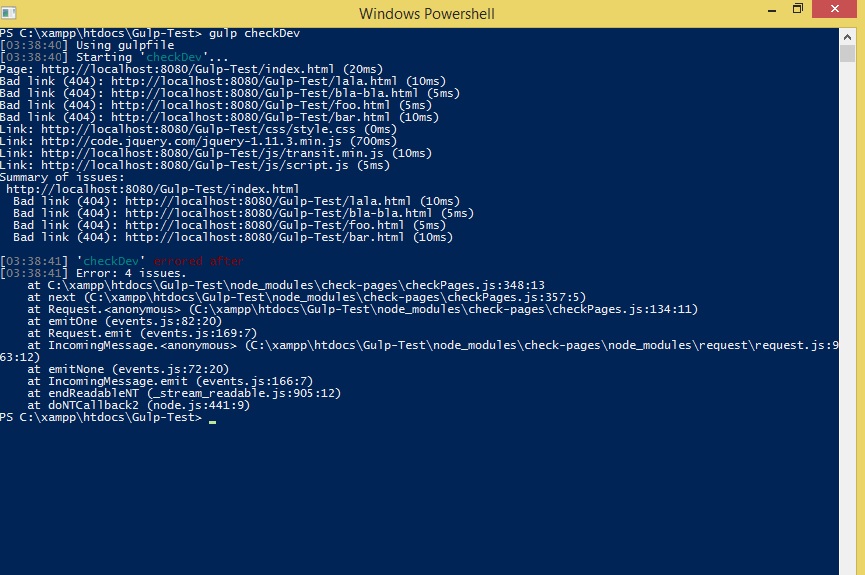
Note that when you pass the option checkLinks: true , it's not just for the a tags , it for all of the tags mentioned on this page. The plugin doesn't have a problem if the <a> tag is empty or just has a # or is not present at all.

See what happens when I run the gulp tasks:

The result of running the gulp plugin

So what I would like instead is, if only the a links could be checked and if the <a> tag doesn't have an href or a blank value or just a #, then it should throw an error or show it in the summary report.

Lastly, see in the sample of the gulp file how I am passing the pageUrl (i.e. the pages to be checked basically) like so:

 pageUrls: [           'http://localhost:8080/Gulp-Test/index.html'         ], 

How do I instead tell this plugin to check for all the .html files inside the Gulp-Test directory ?

So to summarize my question: how do I get this plugin to throw an error (i.e. show in the summary report) when it sees an <a> without a href or a href that is blank or has a value of # and also how do I tell this plugin to check for all .html files inside a directory.

2 Answers

Answers 1

I am assigned with the task of checking that there are no links which have no href, and empty href, or have an empty fragment as an href.

If that's all you require, you don't really need any gulp plugins. And it's doubtful that you will find something that fits your specific requirements anyway.

You can accomplish this yourself pretty easily however. All you really have to do is:

  1. Read in all the HTML files you want to validate using gulp.src().
  2. Pipe each file to a function of your own using through2.
  3. Parse each file using any HTML parser you like (e.g. cheerio).
  4. Find the bad links in the parsed HTML DOM.
  5. Log the bad links using gutil.log() so you will know what to fix.
  6. Maybe throw a gutil.PluginError so your build fails (this is optional).

Here's a Gulpfile that does exactly that (referencing the above points in comments):

var gulp = require('gulp'); var through = require('through2').obj; var cheerio = require('cheerio'); var gutil = require('gulp-util'); var path = require('path');  var checkLinks = function() {   return through(function(file, enc, cb) { // [2]     var badLinks = [];     var $ = cheerio.load(file.contents.toString()); // [3]     $('a').each(function() {       var $a = $(this);       if (!$a.attr('href') || $a.attr('href') == '#') { // [4]         badLinks.push($.html($a));       }     });     if (badLinks.length > 0) {       var filePath = path.relative(file.cwd, file.path);       badLinks.forEach(function(badLink) {         gutil.log(gutil.colors.red(filePath + ': ' + badLink)); // [5]       });       throw new gutil.PluginError( 'checkLinks',         badLinks.length + ' bad links in ' + filePath); // [6]     }     cb();   }); }  gulp.task('checkLinks', function() {   gulp.src('Gulp-Test/**/*.html') // [1]     .pipe(checkLinks()); }); 

Running gulp checkLinks with a Gulp-Test/index.html like so ...

<html> <head><title>Test</title></head> <body> <a>no href</a> <a href="">empty href</a> <a href="#">empty fragment</a> <a href="#hash">non-empty fragment</a> <a href="link.html">link</a> </body> </html> 

... results in the following output:

[20:01:08] Using gulpfile ~/example/gulpfile.js [20:01:08] Starting 'checkLinks'... [20:01:08] Finished 'checkLinks' after 21 ms [20:01:08] Gulp-Test/index.html: <a>no href</a> [20:01:08] Gulp-Test/index.html: <a href="">empty href</a> [20:01:08] Gulp-Test/index.html: <a href="#">empty fragment</a>  /home/sven/example/gulpfile.js:22       throw new gutil.PluginError( 'checkLinks',       ^ Error: 3 bad links in Gulp-Test/index.html 

Answers 2

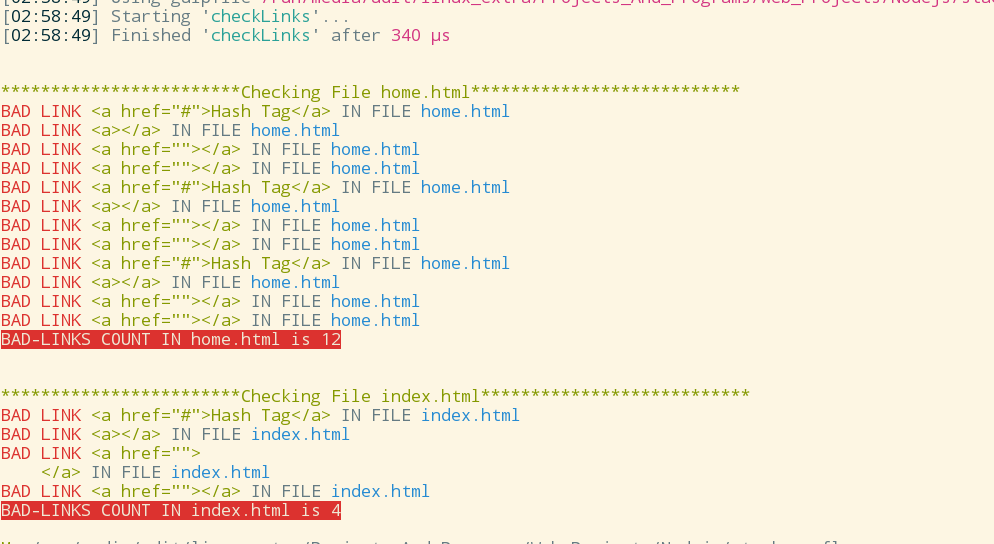
var gulp = require('gulp');  var jsdom= require('jsdom').jsdom;  var fs=require('fs');  var colors= require('colors');  colors.setTheme({    error:"red",    file:"blue",    info:"green",    warn:"yellow" });   gulp.task('checkLinks',function() {     fs.readdir('.',function(err, files){      if(err)       throw err;       var htmlFiles=files.filter(function(c,i,a){        return c.substring(c.lastIndexOf('.')+1)==="html";      });      htmlFiles.forEach(function(c,i,a){        fs.readFile(c,function(fileReadErr,data){          if(fileReadErr)           throw fileReadErr;          var doc= jsdom(data);          var window= doc.defaultView;          var $=require('jquery')(window);          var aTags=$('a').toArray();           var k=0;          console.log(("\n\n************************Checking File "+c+"***************************").info);          for(var i=0; i<aTags.length; i++){            if(!(aTags[i].hasAttribute("href")) || aTags[i].getAttribute("href")==="" || aTags[i].getAttribute("href")==="#" ) {               k++;               console.log("BAD LINK ".error+aTags[i].outerHTML.info+" IN FILE "+c.file);            }         }          console.log(("BAD-LINKS COUNT IN " +c+" is "+k).bgRed.white);          window.close();        });     });   });  }); 

output:

output of script above

Read More